
An LMS requirements checklist works when every line is marked must, should or could before a vendor sees it, and every line says how you’ll check the answer. A must is a line where a No ends the conversation. Anything a vendor can’t fail, like “tracks completions”, doesn’t belong on the list at all. The tables below give you 40 learning management system requirements in eight areas, each with why it matters, how to verify it in a demo or trial, and a default priority your team can change.
Key Takeaways
- A must is a line where a No ends the evaluation. A should gets scored. A could breaks ties.
- Write each line as a test you can run in a trial, not as a feature name.
- The lines that split vendors are plan gates, SCORM editions and contract clauses, not features.
- Docebo’s and Absorb’s terms both bar lowering your user count mid-term, so seat reduction is a must.
Test the authoring lines on your own material before any demo: an AI LMS that drafts a course from a policy document you already own gives you a baseline no vendor chose.
How to Use This Checklist
Paste the eight tables into a shared document. Then hold one meeting with your L&D colleague, a line manager and someone from IT. Go line by line, change the priority column, and delete any line no one would miss.
- Must: a No ends the evaluation, whatever else the vendor does well.
- Should: scored. A vendor can miss a few and still win.
- Could: a tie-breaker between two finalists.
The “how to verify” column keeps the list honest. Each line names a check you run yourself: a trial task, a document, or a clause number. Without one, the vendor’s “yes” is your only evidence.
Too many musts is the usual failure. With 30 of them, every vendor fails something, and the team starts downgrading lines after the demos. Settle the musts before the first call.
What Makes a Good Learning Management System Requirement
A good requirement passes three tests. Most items on a typical LMS features checklist fail at least one.
It can be failed. “Imports SCORM” is true of nearly every LMS, so it separates no one. “Plays our SCORM 2004 packages” does, because support differs by edition. Moodle’s SCORM FAQ says SCORM 2004 isn’t supported natively. Cornerstone’s Course Asset Connector takes SCORM 2004 in its 3rd edition only.
It’s specific enough to check. Name the user, the action and the result. “Reminders” is a category. “A learner gets an email two days before a due date” is a test.
It names the plan. SSO, integrations and API access often sit a tier above the quote. 360Learning’s pricing table lists “Single sign-on (SSO)*” with an asterisk the page doesn’t define. So add “on the plan in the quote” wherever the tier could change the answer.
That’s what to look for in a learning management system: these three tests, applied to your own list.
The LMS Requirements Checklist, Area by Area
The priorities are defaults for a company of a few hundred people training its own staff. Change them in your meeting, not after the demos.
Learner experience
If learners can’t reach a course in two taps, your completion rate suffers, not the vendor’s.
| Requirement | Why it matters | How to verify it | Priority |
|---|---|---|---|
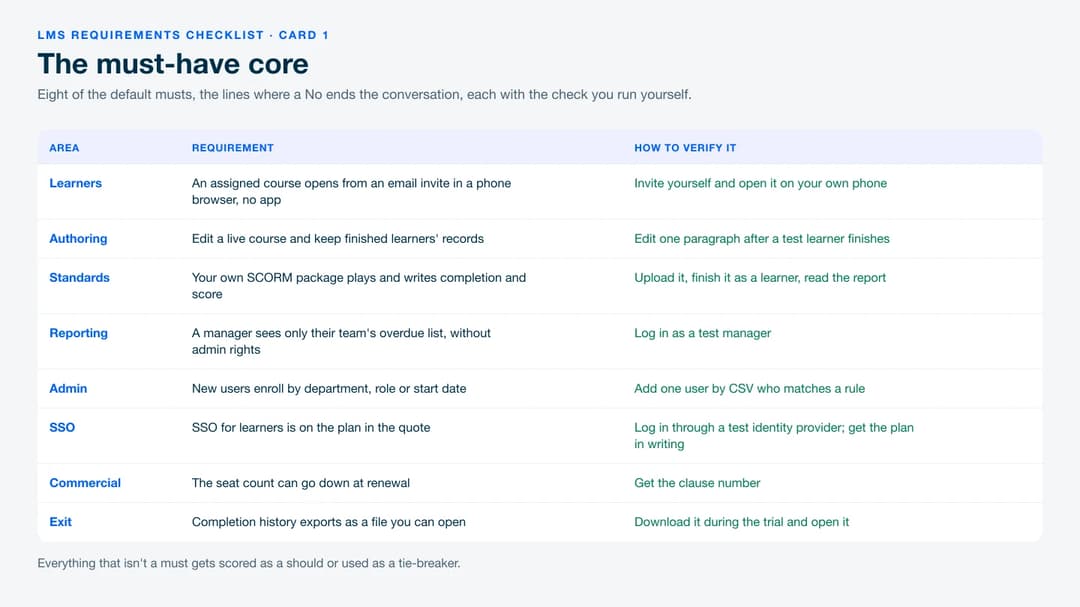
| An assigned course opens from an email invite in a phone browser, with no app install | Frontline and remote staff won’t install an app for a 20-minute course | Invite yourself in the trial and open it on your own phone | Must |
| Progress resumes at the same lesson on a second device | People start on a phone and finish on a laptop | Stop halfway, then reopen on another device | Should |
| Learners see due dates and get a reminder before one passes | Reminders do the chasing you’d otherwise do by email | Set a due date two days out on a test learner | Must |
| The learner interface runs in [your languages] | A course people can’t read won’t get finished | Switch the interface language in the trial | Could |
| An accessibility conformance report against WCAG 2.2 AA | Accessibility complaints arrive after launch, when fixes cost most | Ask the vendor to attach the report | Should |
Content and authoring
This is where your weeks go. If the platform can’t build or update a course, you’ll buy a second tool.
| Requirement | Why it matters | How to verify it | Priority |
|---|---|---|---|
| Build a course with a quiz inside the platform, no separate authoring tool | Otherwise you’re buying and learning two products | Build one from your own policy document in the trial | Must |
| Draft a course from a document you upload, with a person approving before learners see it | Saves days for a team of two, as long as someone reviews the draft | Upload a real PDF, fix one wrong line, publish | Should |
| Edit a live course and choose whether finished learners retake it, with their old records kept | Policies change, and the audit asks which version someone completed | Edit one paragraph after a test learner finishes | Must |
| Certificates with expiry dates that reassign the course when one lapses | Recertification is most of the compliance workload | Set a certificate to expire tomorrow and watch what happens | Should |
| Learning paths with prerequisites | Onboarding usually runs in a fixed order | Build a two-course path and try to open the second course first | Could |
Standards: SCORM and xAPI
Standards decide whether the courses you own will run, and whether the ones you build can leave with you. What a SCORM file is shows where a package’s version is written.
| Requirement | Why it matters | How to verify it | Priority |
|---|---|---|---|
| Plays your SCORM 1.2 packages and records completion and score | Most content bought or built in the last decade is SCORM | Upload one of your own packages, finish it, read the report | Must |
| Names the SCORM 2004 editions it plays, in writing | Support differs by edition, and a 2004 package can fail silently | Get the editions in writing, then upload a 2004 package | Must if you own 2004 content |
| States which event marks a course complete, and lets you set it per course | Two platforms can report different completion rates for the same people | Find the completion setting in the trial | Must |
| Exports your courses in a format another LMS can import | Export decides whether you can leave at renewal | Export one course and import it somewhere else | Should |
| Stores xAPI statements, built in or through an external learning record store | Only matters if you’ll track learning outside courses | Ask where statements are stored and how you get them out | Could |
SCORM 1.2 vs 2004 covers when the version changes the outcome. For the xAPI line, xAPI vs SCORM explains what each one records.
Reporting
Your director judges you on these, so name the reports they already expect. Each report measures something narrower than its name, as how LMS reporting works shows.
| Requirement | Why it matters | How to verify it | Priority |
|---|---|---|---|
| A manager sees only their team’s completions and overdue items, without admin rights | Managers chase their own people, so you don’t have to | Create a test manager and log in as them | Must |
| Reports filter by team, course and due date, and export as CSV | That’s the director’s monthly report | Build it in the trial | Must |
| A report runs on a schedule and arrives by email without vendor services | Otherwise every month’s report is a manual job | Schedule one and wait for it to arrive | Should |
| An audit trail shows who completed which version of a course, and when | Audits ask about versions, not just completions | Edit a course after a test learner finishes and check their record | Must if you’re regulated |
| A deactivated user’s history stays in reports and exports | A leaver’s records are still audit evidence | Deactivate a test learner and rerun the report | Must |
Admin and automation
Most admin hours after launch go on joiners, leavers and permissions.
| Requirement | Why it matters | How to verify it | Priority |
|---|---|---|---|
| New users are enrolled automatically by department, role or start date | Otherwise you assign every new hire by hand | Add one user by CSV who matches a rule | Must |
| Recurring due dates for annual courses | Annual refreshers shouldn’t need a calendar reminder | Set a course to recur yearly for a test group | Should |
| Admin permissions limited by department or group | A site admin shouldn’t see every employee’s records | Create a scoped admin and log in as them | Should |
| Bulk import and deactivation by CSV | Your fallback when an HR sync breaks | Import 20 test users, then deactivate 5 | Should |
| Reminders by email and [Slack or Teams] | People answer the channel they already watch | Let a test learner go overdue | Could |
Integrations and SSO
These are IT’s lines, and two are plan questions, not feature questions. Read what an LMS integration involves before the meeting. SSO for an LMS covers the protocols and plan gates in more detail.
| Requirement | Why it matters | How to verify it | Priority |
|---|---|---|---|
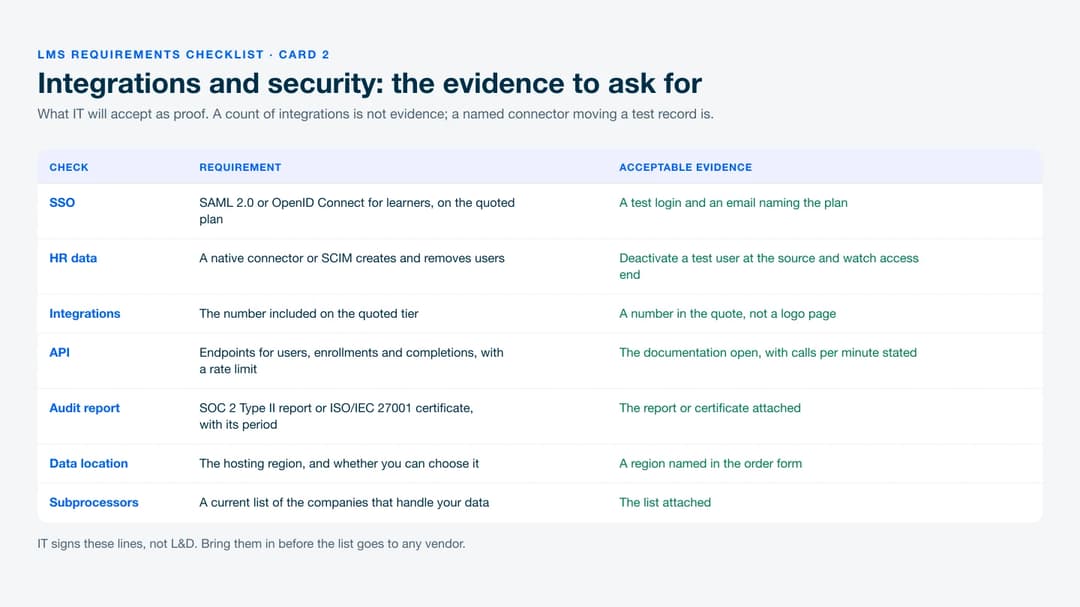
| SSO for learners through SAML 2.0 or OpenID Connect with your identity provider, on the quoted plan | SSO often sits a tier above the price you were shown | Log in through a test identity provider, and get the plan named in writing | Must |
| Accounts created and removed from your HR system through a native connector or SCIM | Without it, leavers keep access until someone notices | Get the connector’s name, then deactivate a test user at the source | Should |
| The number of integrations included on the quoted tier | “Included” has a ceiling | A number in the quote | Should |
| API endpoints for users, enrollments and completions, with a stated rate limit | Your developers need the limit before they build anything | Open the documentation and find the calls-per-minute figure | Could |
| Completion events sent by webhook | Lets other systems react when someone finishes | Point a webhook at a test tool and complete a course | Could |
Integration counts are marketing. 360Learning says “80+ more” on its homepage and “50+” on its features page. Named connectors are what you’re buying.
Ceilings exist even on top tiers. Docebo’s Enterprise tier includes up to six integrations, two sandboxes and 100 API calls a minute, and Elevate up to four integrations (September 2026). SCIM is defined in IETF RFC 7644.
Security and data
Security teams want documents, not answers, so ask for them up front. If IT wants to host the platform itself, settle SaaS versus self-hosted first. For the fuller list of questions security will ask, see LMS security.
| Requirement | Why it matters | How to verify it | Priority |
|---|---|---|---|
| A current SOC 2 Type II report or ISO/IEC 27001 certificate, with its audit period | It’s the first thing a security review asks for | The report or certificate attached | Must if IT requires one |
| The hosting region is stated, and you can choose it if you need to | Some contracts and policies fix where learner data sits | A region named in the order form | Should |
| A current list of subprocessors | Your privacy team needs to know who else handles the data | The list attached | Should |
| An uptime commitment with service credits | A promise without a credit is a hope | The clause, with the percentage and the credit | Could |
| Data deleted within a stated number of days after exit, with written confirmation | Your records shouldn’t outlive the contract | The clause number | Should |
Commercial terms and exit
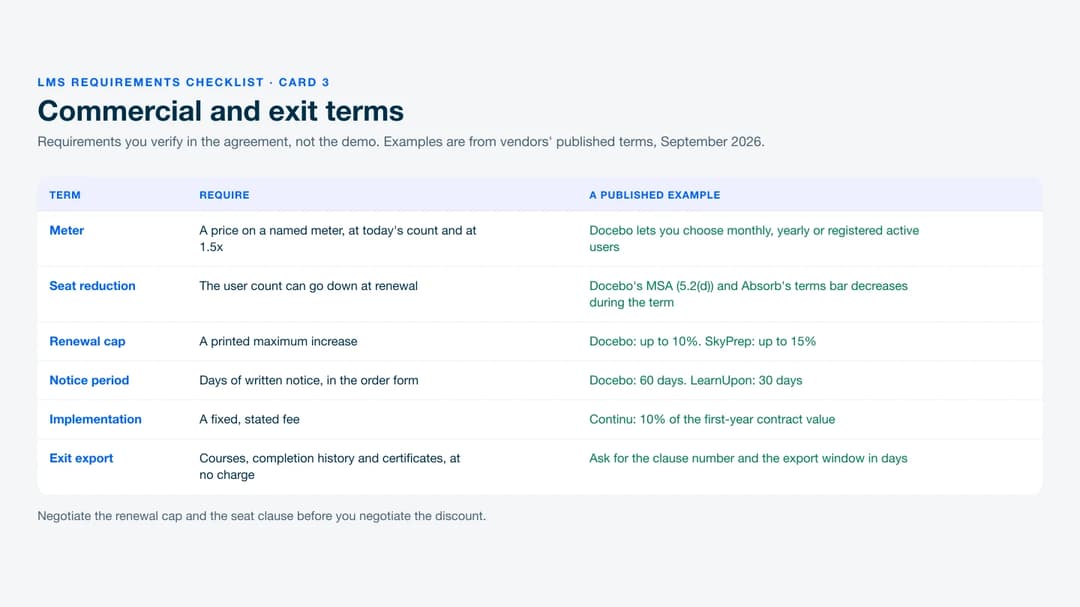
You verify these in the agreement, not the demo, and they decide what year three costs. Examples are from published terms as of September 2026.
| Requirement | Why it matters | How to verify it | Priority |
|---|---|---|---|
| A price at today’s learner count and at 1.5x, on a meter you name | The same headcount produces different bills on different meters | Every quote on the same meter and the same two counts | Must |
| The user count can go down at renewal | A forecast you miss is otherwise paid for until the term ends | The clause number | Must |
| A printed maximum price increase at renewal, and the notice period in days | Without a cap, the renewal price is whatever gets proposed in month eleven | Both clauses, quoted | Must |
| Courses, completion history and certificates exported at exit, at no extra charge | Completion history is what an auditor asks for after you’ve switched | Run the export in the trial, then get the clause | Must |
| The implementation fee as a fixed, stated number | Some fees grow with the contract rather than the work | A line in the quote | Should |
The meter comes first because vendors count users differently. Docebo lets you choose monthly, yearly or registered active users. iSpring LMS counts anyone who “logged in at least once during a month”. What an LMS costs shows the price spread once the meter is fixed.
Seat reduction is a must because some agreements refuse it. Docebo’s master agreement bars downgrading user thresholds during the term (section 5.2(d)). Absorb’s terms say user subscriptions can’t be decreased during the term.
Renewal terms vary just as much. Docebo renews for 12 months on 60 days’ written notice, with increases of up to 10% (section 12.2). LearnUpon’s terms need 30 days’ notice, and SkyPrep’s allow up to 15%. Continu prices implementation at 10% of first-year contract value.
Requirements Vendors Answer Vaguely, and the Wording That Forces a Yes or No
Some lines get a “yes” that means “partly” or “on another plan”. Close the question so the only honest answers are Yes or No, plus one checkable detail.
| The vague answer you’ll get | Rewrite the requirement as |
|---|---|
| “SSO is supported.” | Is SSO for learners through SAML 2.0 included in the plan you’re quoting? Yes or No, and name the plan. |
| “We integrate with [your HR system].” | Is there a native [HR system] connector that creates and deactivates users, included in this quote? If No, what runs the sync? |
| “We’re fully SCORM compliant.” | Does your player track SCORM 1.2 and SCORM 2004 4th edition? Answer for each version. |
| “Reporting is fully flexible.” | Can a manager without admin rights see their team’s overdue list? Can I schedule that report without your services team? Yes or No for each. |
| “Hundreds of integrations.” | How many integrations are included on the quoted tier, and what is the API rate limit in calls per minute? |
| “You own your data.” | At termination, do we receive completion history with dates and scores as a CSV within [30] days, at no charge? Give the clause number. |
| “Mobile-friendly.” | Can a learner complete an assigned course in a phone browser without installing an app? |
| “AI-powered authoring.” | Does the AI draft a course from a document we upload, and must a person approve it before learners see it? |
| “Enterprise-grade security.” | Attach your current SOC 2 Type II report or ISO/IEC 27001 certificate and state its audit period. |
Treat a reply to a different question as a No until it’s corrected in writing. “Supported” and “included in your price” are different claims.
A Worked Example: Sorting the List for a 320-Person Company
Here’s an example. A company has 320 staff across an office and two warehouses, an annual safety refresher, and about 40 SCORM 1.2 packages.
The default tables carry 15 musts, plus three that apply only in some situations. Six lines get decided in the meeting.
- Interface language goes from could to must. A third of the warehouse staff read Spanish first, so a course they can’t read fails the rollout.
- Certificates with expiry dates go from should to must. The safety refresher is annual, and the auditor asks who’s current.
- Building courses inside the platform drops from must to should. The team keeps the authoring tool its 40 packages were built in.
- The SCORM 2004 editions line gets deleted, and the audit trail line stays out. Every package they own is 1.2, and no regulator asks them which course version someone completed.
- The security report becomes a must. IT requires one for every system that holds employee data.
That leaves 17 musts, and IT signs its two: SSO and the security report.
In this example, the list drops two vendors before any demo. One puts SSO a tier above the quote. The other can’t say which event marks a course complete.
Where the Finished List Goes
One agreed list feeds three documents. The musts and shoulds become the knockouts and scored lines in an LMS RFP template. The verify column becomes your demo script, with LMS demo questions that make vendors show each line. After signature, the musts become go-live gates in the LMS implementation plan.
The list is step three of choosing an LMS. If your director still asks whether you need a platform, start with what an LMS does. For names to test it against, see the best LMS platforms.
Get IT’s Signature on the Musts This Week
Book one hour with your L&D colleague, a line manager and IT, and mark every line must, should or could. Rewrite any line that could draw a vague answer. Then send the musts as yes-or-no questions before you accept a demo.
Mini Course Generator is our product, so here are its written answers. Check them like any other vendor’s.
- Trial: every plan opens with 14 days of full access, with no credit card, so the verification column can be run on your own material.
- Standards and exit: courses export as PDF or SCORM packages at any time, whatever your subscription status. The SCORM Upload Block accepts packages you already have from another LMS or authoring tool and tracks how learners interact with them.
- Integrations and SSO: SSO for learners and the REST API are on the Custom plan. Webhooks, Zapier and Make connect other systems, and there’s no native HR system connector.
- Commercial: learners count as a yearly allowance, with no implementation fee and no minimum annual commitment. The plans are on the pricing page.
Frequently Asked Questions
What should be on an LMS requirements checklist?
Lines in eight areas: learners, authoring, standards, reporting, admin, integrations and SSO, security, and commercial terms. Each line needs a priority and a way to verify it.
How many must-have requirements should an LMS have?
Few enough that a vendor failing one would genuinely end the evaluation. In the worked example above, a 320-person company ends with 17. If your list has 30 musts, some of them are shoulds, and you’ll find out after the demos.
What are the functional requirements of an LMS?
Functional requirements are what the system does: assigning courses, playing SCORM, tracking completion, sending reminders and reporting. Non-functional ones cover SSO, security, hosting and uptime. Both belong on one list, because either can knock a vendor out.
What’s the difference between an LMS features checklist and a requirements checklist?
A features checklist lists what platforms can do. A requirements checklist lists what your team needs, with a priority and a check for each line.
Who should approve the LMS requirements list?
L&D owns the list, a line manager checks the learner and reporting lines, and IT signs the SSO and security lines. A must added after the demos means repeating them.
Sources
- Docebo Master Services Agreement, sections 5.2(d) and 12.2, and Docebo pricing page (user models, tier limits), September 2026
- 360Learning pricing page, homepage and LMS features page, September 2026
- Moodle SCORM FAQ (SCORM 2004 support)
- Cornerstone Course Asset Connector developer documentation (supported SCORM editions)
- iSpring LMS pricing FAQ (active user definition), September 2026
- Absorb terms and conditions (user subscriptions during the term), September 2026
- LearnUpon Terms of Service (notice period), September 2026
- SkyPrep Terms and Conditions (renewal increase), September 2026
- Continu pricing FAQ (implementation fee), September 2026
- W3C WCAG 2.2
- IETF RFC 7644 (SCIM)
- ADL xAPI
- Mini Course Generator pricing page FAQ (trial, learner allowance, export, fees), September 2026


