An LMS implementation plan is a list of gates, not a list of phases: the go-live date is the day the last gate passes, plus a pilot you don’t shorten. That matters to you because the two gates that set the date, sign-in and people data, sit in IT’s and the HRIS admin’s queues, not yours. If you’re still choosing a platform, start with how to choose an LMS and come back after signature. This template gives you a 90-day plan with a launch around day 57, six gates with a test each owner can run, a RACI table, a checklist, and the rule for what to cut when something slips.
Key Takeaways
- A phase is done when a named test passes, not when its week ends. Six gates carry this plan from signature to launch.
- The date is set by identity and HR data, the two workstreams L&D doesn’t own. Book IT and the HRIS admin in week one.
- Test that a leaver loses access, not only that a joiner appears. Removal is what an audit asks about.
- A course that plays can still record nothing. The content gate passes only when a test learner’s completion reaches the report.
- When the calendar tightens, shrink the content you migrate. Never cut the pilot.
While IT works on sign-in, build your launch courses from the policy documents you already have on an AI LMS – the content gate is the one you control.
The 90-Day LMS Implementation Plan
Here is the whole plan on one page. Week 1 starts the Monday after signature. Launch is day 57, the first day of week 9, and the 30-day review lands in week 13, so day 90 is a report, not a deadline.
Workstreams overlap on purpose. Identity and content both start in week 3, because each takes four weeks and neither waits for the other.
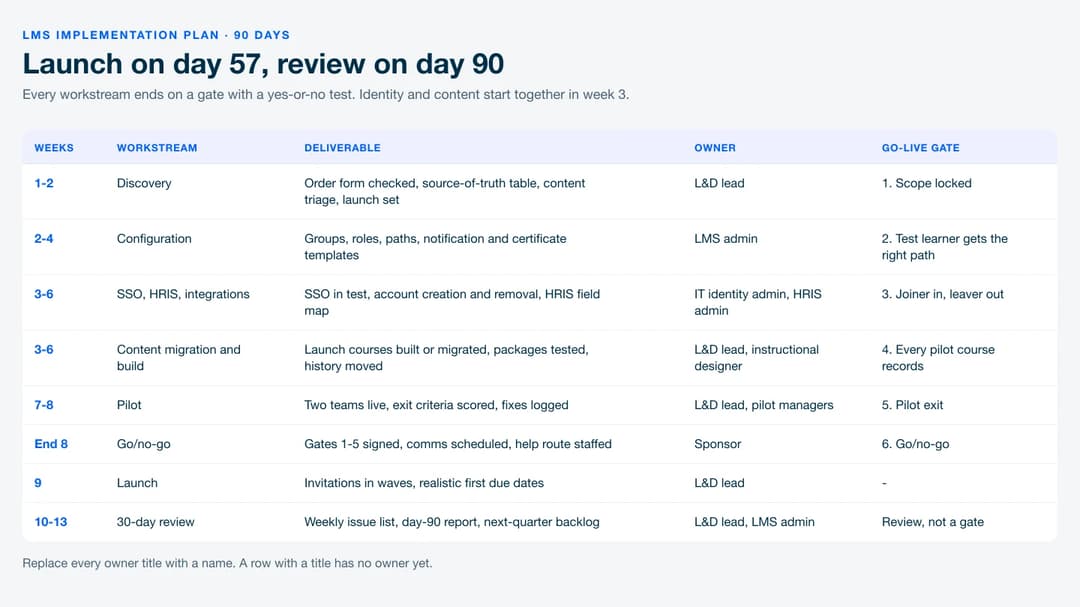
| Weeks | Workstream | Deliverable | Owner | Go-live gate |
|---|---|---|---|---|
| 1–2 | Discovery | Order form checked, source-of-truth table, content triage list, launch audience, success measures | L&D lead | Gate 1: Scope locked |
| 2–4 | Configuration | Org structure, groups and roles, learning paths, notification and certificate templates, admin accounts | LMS admin | Gate 2: A test learner gets the right path |
| 3–6 | SSO, HRIS and integrations | SSO in test, account provisioning and removal, HRIS field map, reporting export | IT identity admin, HRIS admin | Gate 3: Joiner in, leaver out |
| 3–6 | Content migration and build | Launch courses built or migrated, packages tested, completion history imported or archived | L&D lead, instructional designer | Gate 4: Every pilot course records |
| 7–8 | Pilot | Two teams live, exit criteria scored, fixes logged | L&D lead, pilot managers | Gate 5: Pilot exit |
| End of 8 | Go/no-go | Gates 1–5 signed off, comms scheduled, help route staffed | Sponsor | Gate 6: Go/no-go |
| 9 | Launch | Invitations in waves, first assignments with realistic due dates | L&D lead | — |
| 10–13 | Hypercare and 30-day review | Weekly issue list, day-90 report, next-quarter backlog | L&D lead, LMS admin | Review, not a gate |
Copy the table into your project document and replace the owner titles with names. A row with a title instead of a name has no owner yet. If “LMS admin” isn’t a role you have yet, see what an LMS administrator does before you hand it to someone as a fourth job.
The Six Go-Live Gates and How Each One Passes
A gate is a test with a yes or no answer, run by the person who owns the work. “Configuration is mostly done” is not a gate. “A test learner in each role received the right path, the right email and a due date 30 days out” is.
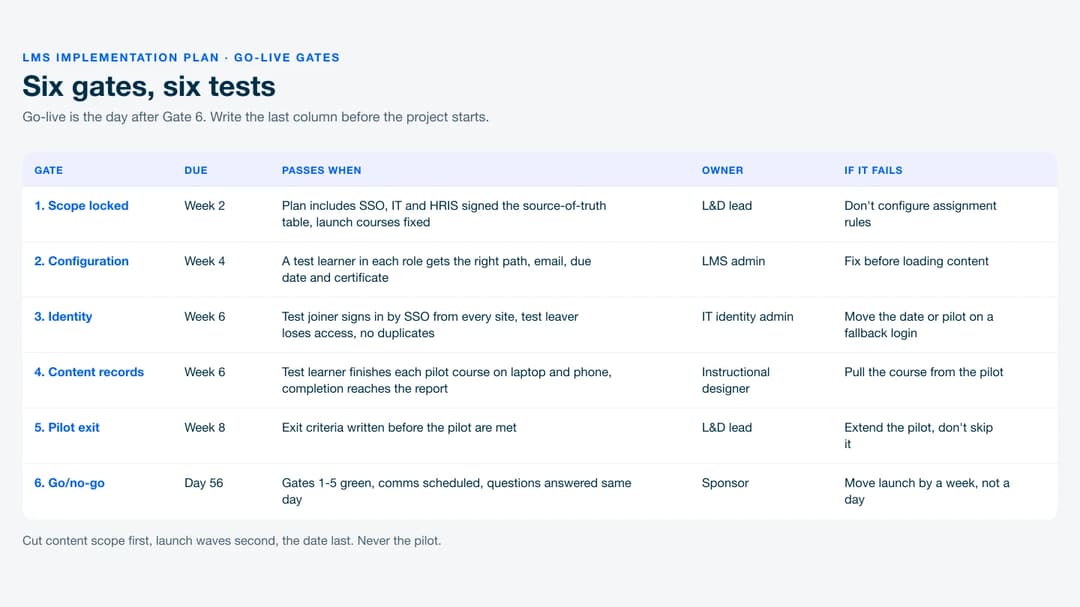
| Gate | Due | Passes when | Owner | If it fails |
|---|---|---|---|---|
| 1. Scope locked | End of week 2 | The signed plan includes SSO and provisioning, IT and HRIS have signed the source-of-truth table, and the launch course list is fixed | L&D lead | Don’t configure assignment rules yet |
| 2. Configuration | End of week 4 | A test learner in each role gets the right path, email, due date and certificate name | LMS admin | Fix before content is loaded into paths |
| 3. Identity | End of week 6 | A test joiner is created from the HRIS and signs in by SSO from every site, a test leaver loses access, no duplicate accounts exist | IT identity admin | Move the date, or pilot on a fallback login |
| 4. Content records | End of week 6 | A test learner finishes each pilot course on a laptop and a phone, and the completion, score and date appear in the report | Instructional designer | Pull the course from the pilot |
| 5. Pilot exit | End of week 8 | The exit criteria written before the pilot are met | L&D lead | Extend the pilot, don’t skip it |
| 6. Go/no-go | Day 56 | Gates 1–5 are green, comms are scheduled, someone answers questions the same day | Sponsor | Move launch by one week, not one day |
The “if it fails” column is the part most plans leave blank. Write it before the project starts, while nobody is under pressure, and the conversation in week 6 becomes a lookup instead of a negotiation.
How to Set the Go-Live Date
Work backward from the gates. Go-live is the day after Gate 6, Gate 6 follows a pilot of at least two weeks, and the pilot can’t start until identity and pilot content both pass. So the earliest honest date is the later of those two gates, plus two weeks, plus one day.
Two rules decide what happens when the calendar pushes back:
- If SSO isn’t working in the test environment by the end of week 4, move the date. Identity work that hasn’t reached test by then rarely finishes in two weeks, and every week it slips comes straight off the pilot.
- If a launch date is fixed from above, cut content scope, not the pilot. Launch with fewer courses. A missing course is a follow-up email. A broken sign-in on launch day is the only thing anyone remembers.
Keep the first assignment’s due date out of any week that already carries a compliance deadline, a peak season or quarter-end. Your support load peaks in the first ten days, and it shouldn’t land on top of another deadline.
A worked example, for illustration. A 450-person company with three sites and a BambooHR account signs its contract. Week 1 starts on day 1, and IT books SSO for week 3.
IT passes Gate 3 on day 40. The instructional designer passes Gate 4 for four pilot courses on day 42. The pilot runs days 43 to 56, Gate 6 is signed on day 56, and invitations go out on day 57. If Gate 3 had slipped to day 49, the same arithmetic puts launch on day 64, and the plan says so in advance.
Who Owns What
Most L&D teams are one or two people, and most of this plan is work they can’t do themselves, even though what an LMS does day to day is theirs to run. A RACI table (Responsible, Accountable, Consulted, Informed) turns “can you help with the LMS” into a named request with a due week.
| Task | L&D lead | LMS admin | IT identity admin | HRIS admin | Security or legal | Pilot managers | Sponsor |
|---|---|---|---|---|---|---|---|
| Confirm plan inclusions on the order form | R | C | C | I | C | — | A |
| Source-of-truth table | A | R | C | C | I | — | I |
| Security and data review | C | C | R | I | A | — | I |
| SSO and account removal | A | C | R | C | I | — | I |
| HRIS field map and data cleanup | A | C | I | R | — | — | I |
| Paths, groups, notifications | A | R | — | — | — | C | — |
| Content triage and build | R/A | C | — | — | C | C | I |
| Pilot and exit scoring | R/A | C | C | I | — | R | I |
| Go/no-go | R | C | C | C | C | C | A |
Send this table to IT, the HRIS admin and security in week one, with the weeks from the plan beside each of their rows. Their queues were full before your contract was signed.
Weeks 1–2: Discovery That Changes the Plan
Discovery earns its two weeks only if it can still change the plan. Three outputs do that.
The order form check. SSO, automatic account provisioning and API access are often priced into higher plans across software in general, and the community-run SSO Wall of Shame tracks how steep that markup gets. Read your signed order form line by line before you book IT’s time. If SSO isn’t on it, you have a commercial conversation to finish before Gate 1, not a technical one.
The source-of-truth table. Decide which system owns each kind of data before anything connects. The identity provider owns who can sign in, the HRIS owns names, roles, managers and start dates, and the LMS owns completions, scores and certificates.
Every field gets exactly one system that edits it, and our LMS integration guide covers the table and the join-key problem in detail.
The content triage list. Put every existing course in one of three columns. Migrate it (it works and people still need it), rebuild it (the policy changed or the file is broken), or retire it (nobody has taken it in a year). Then mark the launch set: the courses learners need in week 9, and nothing else.
Identity and HR Data: The Workstream You Don’t Control
This is where most implementation dates are really set, and the reason is structural. The work sits with people whose performance isn’t measured on your launch.
Test removal, not only creation. Everyone checks that a new hire appears in the LMS. The audit question is the opposite one: when someone leaves, do they lose access, and how fast?
SCIM, the IETF standard for creating and removing accounts across systems (RFC 7644), defines both directions. Your Gate 3 test needs a named leaver account that loses access within a window IT agrees to in writing.
Clean the HRIS fields before you build rules on them. Assignment rules (“everyone in the Denver warehouse gets forklift refresher”) are only as good as the location, department and manager fields behind them. An empty manager field means a manager dashboard with missing people, and three spellings of one job title mean three groups.
The fix is a data cleanup the HRIS admin runs, and it belongs in weeks 3 and 4, not the week before launch.
Pick one key for matching people. Work email is the usual choice and a messy one, since contractors can have two addresses and names change. Agree on the identifier with IT and the HRIS admin before the first sync, or you’ll spend the pilot merging duplicate learners.
If SSO can’t pass by week 6, a pilot on a fallback login (magic links or local passwords) can still test content, paths and reporting. Don’t launch company-wide on it if your security team treats SSO as a condition of access.
Content: Migrate Less, Test Every Package
Content is the workstream you control, so it’s the one to protect from scope creep. The launch set from discovery is the ceiling, not the floor.
“It plays” is not “it records”. A SCORM package can open, look right and still send nothing to the LMS. Gate 4 passes only when a test learner finishes the course inside your own LMS and the completion, score and date show up in the report. The two-stage test in what a SCORM file contains is the way to run it: a validator catches packaging faults in minutes, and a test learner inside your own LMS catches what the validator can’t.
Check the version the package claims. A migrated package can import without an error and still run under a different SCORM version than it was built for. Moodle, for example, gives any package whose version string it doesn’t recognize the SCORM 1.2 runtime, silently, as its own SCORM FAQ documents. If your old courses mix versions, the SCORM 1.2 vs 2004 guide shows the manifest line to read before you import.
Completion history is records, not content. Moving a course doesn’t move who finished it. Decide which history must come across as live records, usually anything with a recertification date or an audit behind it. The LMS migration guide covers moving both without losing either.
Everything else can be archived as a dated export from the old system. Spot-check ten imported people against the old reports before Gate 4 is signed.
Rebuild the short, stale courses instead of fixing them. A ten-minute policy module with a broken file and an outdated rule is faster to rebuild from the current policy document than to repair. Save migration effort for long courses that still work.
Pilot, Launch and the 30-Day Review
Pilot with two teams, not the keenest volunteers. Pick one team at your busiest site and one at your smallest or most remote, so the pilot meets the sign-in problems and the phone-only learners before launch does. Write the exit criteria before day 43:
- Every pilot learner signed in without a password reset
- Every completion appeared in the report within a day
- Each pilot manager can see their own team and nobody else’s
- One test leaver lost access inside the agreed window
- Every support question was answered the same working day
- No blocker is open on day 56
Launch in waves, not all at once. Invite by site or department over a week, so a problem found on Monday reaches one group, not the company. If the LMS is replacing onboarding tasks, line the first wave up with the start dates in your employee onboarding process so new hires meet the system on day one.
The 30-day review reports on what the gates promised. Pull four numbers from the LMS and the help inbox: on-time completion for the first assignment, failed or reset logins, accounts with no matching HRIS record, and the five most common support questions. Our LMS reporting guide covers which reports to build. The review’s real output is next quarter’s backlog, and the courses you cut from the launch set go at the top of it.
What Slips First, and Why
No survey is needed to predict where this plan breaks. The same three properties show up in every task that slips.
Work in another team’s queue slips first. SSO, HRIS cleanup and the security review are owned by people who have other deadlines and aren’t measured on yours. The fix is to book their time in week one, with dates, and escalate through the sponsor the week a date moves, not the week before launch.
Work the demo showed as done slips second. A sales demo shows a finished org structure, clean groups and populated manager dashboards. It never shows the HRIS data cleanup that made them possible, which is why the questions to ask in an LMS demo include asking to see it with your own data. Anything you saw working in the demo but haven’t seen working with your own data is unscoped work.
Work that can only be tested with real data slips third. Assignment rules, manager views and completion history all look fine with three test accounts and break on the first real import. Run a full import into the test environment by week 5, even if the data is messy, so the breakage happens while there’s still time.
When something slips, the order of what to give up is fixed in advance. Cut content scope first, then launch waves (start with fewer sites), and move the date last. The pilot never gets cut, because it’s the only test of everything at once.
The LMS Implementation Checklist
Copy this into your project tool. Each item is either done or not.
Discovery (weeks 1–2)
- [ ] Order form confirms SSO, provisioning and any API access you need
- [ ] Sponsor named, with authority to move the date
- [ ] RACI sent to IT, HRIS admin and security, with weeks
- [ ] Source-of-truth table signed by IT and the HRIS admin
- [ ] Content triage list: migrate, rebuild, retire
- [ ] Launch course set fixed
- [ ] Success measures for day 90 written down
Configuration (weeks 2–4)
- [ ] Org structure, groups and roles built
- [ ] Learning paths and due-date rules set
- [ ] Notification and reminder emails edited and tested
- [ ] Certificate template shows the right name and date
- [ ] Admin and manager permissions checked with a test manager
Identity and HR data (weeks 3–6)
- [ ] SSO working in test from every site and on a phone
- [ ] Test joiner created from the HRIS
- [ ] Test leaver loses access inside the agreed window
- [ ] HRIS manager, location and job-title fields cleaned
- [ ] One matching key agreed, no duplicate accounts
- [ ] Full test import run by week 5
Content (weeks 3–6)
- [ ] Every pilot course completed by a test learner inside the LMS
- [ ] Completion, score and date visible in the report
- [ ] SCORM version string checked on migrated packages
- [ ] Completion history imported or archived as a dated export
- [ ] Ten imported learners spot-checked against old reports
Pilot and launch (weeks 7–9)
- [ ] Pilot exit criteria written before day 43
- [ ] Two pilot teams live, one busy site and one small site
- [ ] Gate 6 signed by the sponsor
- [ ] Launch waves scheduled, first due date clear of other deadlines
- [ ] Help route staffed for the first ten days
30-day review (weeks 10–13)
- [ ] On-time completion for the first assignment
- [ ] Failed and reset logins counted
- [ ] Accounts with no HRIS match found and closed
- [ ] Top five support questions answered in the LMS itself
- [ ] Next-quarter backlog, cut courses first
Book the Two Queues You Don’t Own This Week
Before you configure anything, send the RACI table to IT and the HRIS admin with the weeks from the plan and ask for dates in return. Read the order form for SSO. Then set the go-live date from Gate 3 and Gate 4, add a two-week pilot, and write down what you’ll cut if either slips, starting with content.
Mini Course Generator is our product. If the system you’re rolling out is ours, Automations connects enrollment and completions to the rest of your stack through Zapier, Make and webhooks, and learner SSO sits on the Custom plan listed on the pricing page.
FAQ
How long does an LMS implementation take?
This plan launches on day 57 and reviews results on day 90, which fits a company of a few hundred people on a hosted LMS. The date depends less on the platform than on how fast SSO and HRIS cleanup get through IT’s and HR’s queues. A custom API build or a large migration adds weeks.
What should an LMS implementation plan include?
Workstreams with week ranges, a deliverable and a named owner for each, and a gate that says when each one is done. It also needs a RACI table for the teams outside L&D, a pilot with exit criteria written in advance, and a rule for what gets cut when a date slips.
Do we need SSO working before launch?
Only if your security team makes it a condition of access, which many do. You can pilot on magic links or local passwords to keep content and reporting on schedule. Launching company-wide without SSO usually means a second rollout of sign-in later.
Should we migrate all our old courses?
No. Migrate the courses people still need that work, rebuild the short ones that are out of date, and retire what nobody has taken in a year. Bring completion history across only where an audit or recertification date depends on it.
Who should own the LMS implementation?
The L&D lead is accountable for the plan and the date, and a sponsor with authority to move the date signs the go/no-go. IT owns sign-in and account removal, the HRIS admin owns people data, and security or legal owns the data review. L&D can’t do those three jobs, so the plan has to name the people who will.
Sources
- IETF RFC 7644 – System for Cross-domain Identity Management (SCIM)
- Moodle SCORM FAQ – Moodle documentation
- SSO Wall of Shame – community registry of SSO plan pricing