LMS integration is the practice of connecting your learning management system to the other software your company runs. People, content, and results then move between systems without manual work. Identity tools handle who signs in, HR systems decide who gets trained, and CRMs and dashboards receive the results.
The reason this topic matters is bigger than training. The average enterprise now manages 897 applications, and only 29% of them are integrated (MuleSoft Connectivity Benchmark Report, 2025). An LMS bought without an integration plan becomes application 898: another login, another roster to maintain, another report to export by hand.
Most guides answer this with a list of logos. This one answers the three questions the lists skip. What does each integration actually do? What order fits your team size and goal? And when is the honest answer to not integrate at all?
Key Takeaways
- LMS integration connects six jobs, not twenty tools: identity, people data, content, delivery surfaces, commerce, and reporting.
- There are four ways to connect: native connectors, automation platforms like Zapier or Make, a custom build on the LMS API, and interoperability standards such as SCORM, xAPI, and LTI.
- Order matters more than count. Internal training teams start with SSO and HR sync. Customer education teams start with learner access and CRM.
- An integration is earned, not default. Below a few hundred learners with a stable roster, a CSV upload and shared links often beat a connector you have to maintain.
- Almost every vendor gates SSO, SCIM, and API access behind top tiers, and few disclose it up front. Get tier-level answers in writing before the demo. Our own product’s gates are listed below.
What Is LMS Integration?
LMS integration means linking a learning management system to the rest of your software stack through connectors, APIs, or shared standards, so data moves on its own instead of being retyped. When someone joins the company, an integrated LMS signs them up. When they finish a course, the completion lands in the systems that need it. You’ll also see the long form, learning management system integration; same practice, longer name.
One clarification saves a lot of confused reading, because “integration” points in two directions:
- Business systems into your learning stack. A company connects its LMS to identity, HR, CRM, and communication tools. This is the corporate direction, and it’s what this guide covers.
- Learning tools into a school’s LMS. A school plugs outside tools into Canvas or Moodle using the LTI 1.3 standard. That’s the education direction, with its own vocabulary and its own buying process.
And if you arrived here researching “curriculum integration” or “ICT integration,” those are teaching methods from K-12 pedagogy, not software topics. Different field entirely.
One more distinction, because the question comes up constantly: an API is not a rival to integration, it’s one method of achieving it. The API is the interface a system exposes. The integration is the working connection you build across it, whether through a pre-built connector, an automation platform, or your own code.
The Six Jobs an LMS Integration Actually Does
A logo tells you a connection exists, not what it actually does. Every LMS integration you will ever evaluate does one of six jobs.
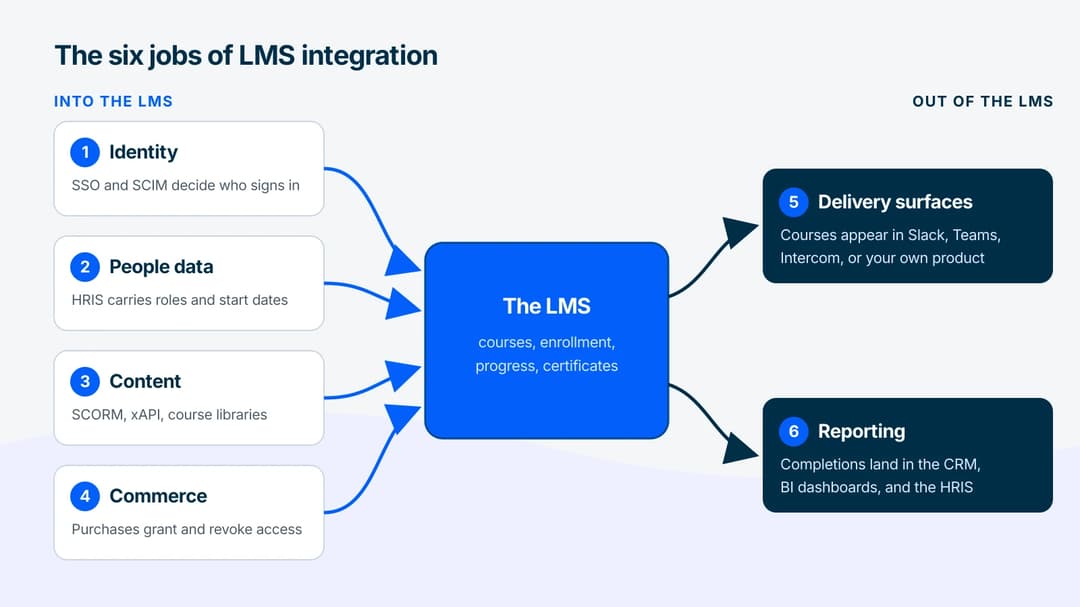
1. Identity: who can sign in. Single sign-on (SSO) through a provider like Okta or Microsoft Entra lets learners use the account they already have. Its quieter sibling, SCIM provisioning, creates and removes LMS accounts on its own as people join and leave. Together they answer login friction and offboarding risk in one move.
2. People data: who should be trained on what. A connection to an HRIS such as Workday or BambooHR carries roles, departments, start dates, and managers into the LMS, so sign-up rules can run on real data. “All new support hires get the onboarding path in week one” is an HRIS integration wearing a policy costume.
3. Content: what learners actually study. Content libraries and authoring tools connect through standards. A SCORM package produced in one tool plays in another; xAPI reports rich activity data back out. This is also the door between an LMS and a corporate ecosystem it doesn’t own: a course exported as SCORM runs inside a client’s LMS without any live connection at all.
4. Delivery surfaces: where learning appears. Connections to Slack, Microsoft Teams, Intercom, or your own product put the course where people already work instead of behind another portal login. This is the job the embedded LMS pattern is built around, and for products, it’s the difference between a training link and in-app training.
5. Commerce: who paid. Payment and checkout connections (Stripe, Shopify, or a built-in paywall) grant and revoke course access based on purchases, which matters the moment you sell training instead of assigning it.
6. Reporting: what the results were. Completions, scores, and certificates flow out to a CRM, a BI tool, or back into the HRIS. For customer education this is the commercial payoff: when training status sits on the account record, sales and success teams can actually act on it.
Notice the direction of each arrow. Identity, people data, content, and purchase signals flow into the LMS. Delivery and reporting flow out. That asymmetry is the foundation of the ownership question in a moment.
The Four Ways Systems Connect
Under every logo on an integrations page sits one of four mechanisms. They trade setup effort against control, and knowing which one you’re buying prevents most integration disappointments.
| Method | What it is | Best for | Watch for |
|---|---|---|---|
| Native connector | A pre-built link the vendor maintains | Speed; the big pairs (Okta, Workday, Salesforce) | Often gated to top plans; may sync fewer fields than you assume |
| Automation platform (iPaaS) | Zapier, Make, and similar tools relaying triggers between apps | Lean teams; the long tail of tools with no native connector | Task quotas, minutes of latency, no bulk backfill of history |
| Custom API build | Your code calling the LMS’s REST API | Exact control; embedding learning in your own product | Engineering time, rate limits, and permanent maintenance |
| Standards (SCORM, xAPI, LTI) | Portable content and data formats | Moving courses and records across systems you don’t control | Version mismatches: SCORM 1.2 vs 2004, LTI 1.1 vs 1.3 |
Two mechanics inside that table deserve a closer look.
APIs ask; webhooks announce. An API call is your system asking the LMS a question: “what’s the status of learner 4187?” A webhook is the LMS announcing an event the moment it happens. A learner finishes a course, and the LMS fires a course.completed message to a URL you chose. There it might update a CRM field or trigger a certificate email. Polling an API for changes wastes requests; webhooks push the change to you. Real integrations usually use both.
Standards are integration without a wire. xAPI statements (“this person completed this, with this score”) can travel to a learning record store even from content running outside any LMS. SCORM export means your course runs inside a system you’ll never get API access to, like a client’s locked-down enterprise LMS. When someone says a platform “integrates with everything,” check whether they mean live connections or these portable formats. The honest answer is usually a mix.
Who Owns Which Data
More integrations fail from ownership confusion than from broken code. Before connecting anything, decide which system is the source of truth for each kind of data. Two systems editing the same record will eventually disagree, and someone’s compliance audit will land on the wrong number.
| Data | Source of truth | Flow | What breaks when you invert it |
|---|---|---|---|
| Identity and access | Identity provider (Okta, Entra) | IdP → LMS | Departed employees keep working logins |
| People, roles, org structure | HRIS | HRIS → LMS | Enrollment rules run on stale titles and teams |
| Course content and versions | Authoring tool or LMS | Authoring → LMS | Two “current” versions of the same course |
| Completions, scores, certificates | LMS | LMS → CRM, BI, HRIS | Hand-edited records that contradict the audit trail |
| Customer and account records | CRM | CRM ↔ LMS | Sales works accounts with no training signal |
| Purchases and refunds | Billing or commerce tool | Commerce → LMS | Paid learners locked out; refunded ones still in |
The rule that falls out of the table: every field has exactly one editor. For example, the LMS should never be where a job title gets corrected, and the HRIS should never be where a completion gets recorded. Write the table down for your own stack before the kickoff call. It’s one page, and it’s the page the project will keep returning to.
What to Connect First
Integration order isn’t one ladder; it depends on whether you’re training your own people or your customers, and on how much team you have. The tracks differ because the first bottleneck differs.
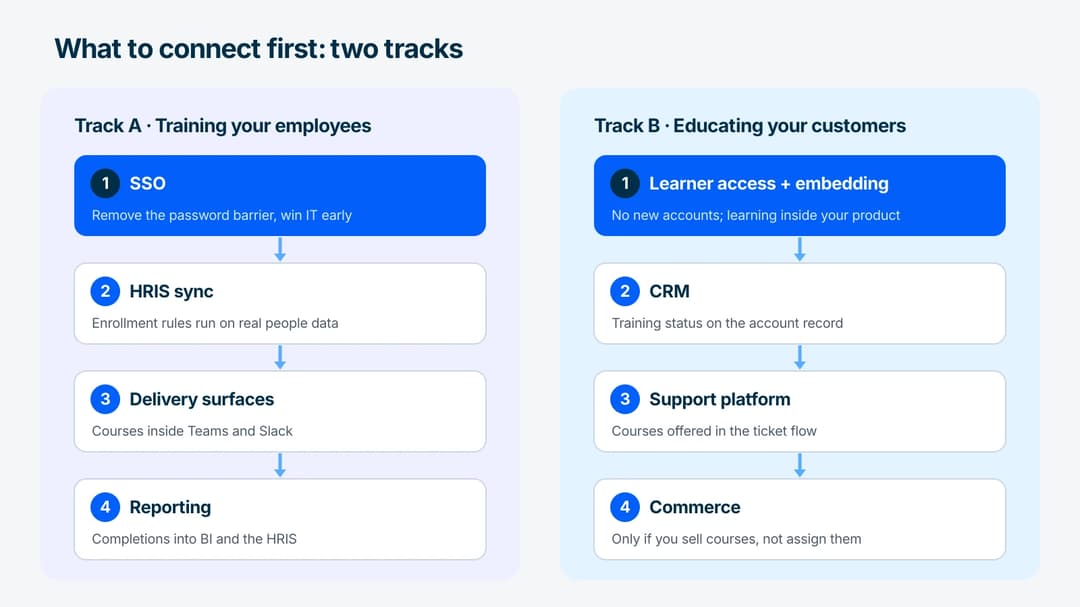
Track A: internal training (employees).
- SSO first. It removes the single biggest adoption barrier (another password) and puts access under IT’s control from day one. It’s also the integration IT will demand anyway, so leading with it wins an ally.
- HRIS sync second. Automatic enrollment by role and start date is where admin hours actually disappear. Until this exists, someone maintains the roster by hand.
- Delivery surfaces third. Course notifications and links inside Teams or Slack, where people already spend their day.
- Reporting last. Completions into your BI tool or back into the HRIS, once there’s enough activity for the reports to say something.
Track B: customer education.
- Learner access and embedding first. Customers won’t create another account to learn your product. Frictionless access (magic links, or SSO from your own app) and delivery inside your product come before everything else.
- CRM second. Training signals on the account record turn courses from a cost line into customer academy infrastructure. Success teams see who’s trained before renewal calls, and sales sees which trial users learned the product.
- Support platform third. Courses offered inside the support conversation deflect the tickets that training was supposed to prevent.
- Commerce fourth, and only if you sell courses rather than bundling them.
The earn-the-integration rule. A connection is justified when the manual version costs real hours every week, breaks compliance, or blocks learners; otherwise it can wait. If updating the roster takes ten minutes a month, a sync that takes days to set up and attention to maintain hasn’t earned its place yet. Lean teams should also default to the automation-platform tier before custom API work: a Zapier or Make scenario is built in an afternoon, and it’s reversible.
When Not to Integrate
Sometimes the right number of integrations is zero.
- Small, stable audiences. Below a few hundred learners whose roster rarely changes, a CSV import and shared course links cover onboarding fine. The integration can come when scale does.
- Tools you might replace. Every connection deepens lock-in. If the HRIS is under review or the CRM migration is next quarter, integrating with it now means doing the work twice.
- One-off training moments. A product launch course or an annual policy update doesn’t need live sync. Export, share, collect completions, done.
- The maintenance surface is real. IT teams already spend 36% of their time designing, building, and testing custom integrations. In the same survey, 26% of IT projects shipped late in the last year (MuleSoft Connectivity Benchmark Report, 2026). Each connection you add is a small standing claim on that same capacity: another credential to rotate, another sync-error inbox, another thing that breaks silently during a vendor’s API update.
The test is symmetry: every integration should have an owner who would notice within a week if it stopped working. If nobody would notice, you didn’t need it.
LMS and CRM: What Actually Moves Between Them
Of the six jobs, the CRM connection is the one buyers ask about most and scope worst. “Connect the LMS to the CRM” gets written into a requirements doc, and nobody says in which direction, or what happens to the record when it arrives.
There are only two useful flows, and they run opposite ways.
CRM to LMS: the account decides who gets enrolled. A deal closes, an onboarding stage flips, a support tier changes, and someone should be in a course because of it. Here the CRM is the trigger and the LMS is the thing being told what to do. This is the flow that carries customer and partner training, and it is the reason customer education teams want the connection at all.
LMS to CRM: the completion lands on the record. A learner finishes, and the account row now shows it. A customer-success manager opens the account before a renewal call and sees that four of the six admins are certified. That’s the flow that turns training from a cost line into something a revenue team can read.
| Direction | Trigger | What lands | Who asks for it |
|---|---|---|---|
| CRM → LMS | Deal closes, stage changes, support tier changes | An enrollment | Customer education, partner programs |
| LMS → CRM | Course completed, certificate issued, score recorded | A field on the account record | Customer success, renewals, sales |
Most projects need only the second row to start. The first is a nice automation. The second is the reason anyone paid.
What it costs to build depends on the mechanism, not on which CRM you run. A native Salesforce or HubSpot connector makes it a configuration job. No connector puts you on the automation tier instead.
The automation-tier build is three steps. A course.completed webhook fires. Zapier or Make catches it. It writes one field, say training_status, on the matching contact. Budget a morning for the first course and about an hour for each one after. That is how most lean teams actually do this, and it survives a CRM migration better than a connector does.
Two things break it, and neither is the connector.
- The join key. Both systems have to agree on who the person is. Email is the usual key and a bad one: work addresses change, contractors have two, and the same human appears as
jane@in the CRM andjane.smith@in the LMS. Decide the canonical identifier before the build, not after the first duplicate. - The field that has two editors. A completion written by the LMS and also editable by hand in the CRM will drift, and the hand-edited version is always the one someone screenshots. Make it read-only in the CRM.
When to skip it. Under a few hundred learners, with one product and one success manager, a quarterly CSV export beats a live sync. The integration earns its place the week someone starts asking for training status by email and getting it by hand.
Honest note on our own stack: Mini Course Generator has no native Salesforce or HubSpot connector. It connects to a CRM the way most lean teams actually do it, through Automations on Zapier or Make, through webhooks, or through the REST API on the Custom plan. If your requirement is a vendor-maintained Salesforce package, we are not that product, and a guide that implied otherwise would waste your evaluation.
“Integrated LMS” Means Two Different Things
The phrase gets used for two opposite architectures, and buyers who don’t separate them end up comparing products that aren’t competing.
| Suite module | Standalone, connected | |
|---|---|---|
| Where learning lives | Inside an HR or talent platform | Its own product |
| Integration work | None, it’s already internal | A project, sized by mechanism |
| Contracts and logins | One | Two or more |
| Course quality | Usually the suite’s weakest module | Chosen on its merits |
| Breaks when | You outgrow the courseware | Nobody owns the connection |
Neither is the safe default. The suite trades learning quality for wiring you never have to do. The standalone product trades a connection project for a course experience learners don’t complain about.
The question that resolves it is narrower than it looks: does your training have to change the employee record, or only report to it?
If completions drive compensation, promotion eligibility, or a regulated licence HR has to hold, take the suite. Its internal wiring is worth the weaker courseware, because the record is the point.
If training only has to be delivered well and reported accurately, take the standalone product and build one reporting connection. That wins on every axis a learner ever notices.
A third usage exists and belongs to schools rather than companies: in education, “integrated” usually means the LMS and the student information system share rosters and grades. Same word, different problem, and the vendors are different too.
LMS and Ecommerce: Selling Courses Without an Integration
Commerce is the sixth job, and it’s the one where the honest answer is often that you don’t need an integration at all.
Three shapes exist.
| Shape | Who owns checkout | Integration work | Right when |
|---|---|---|---|
| Storefront first | Your shop | A purchase event grants access | Courses are one product among many, or finance owns the cart |
| LMS first | The learning platform | None | The course is the product |
| Marketplace | Someone else | None, it’s a distribution deal | You want their audience and will pay a commission for it |
The failure mode is the same in all three, and it is never the purchase. It’s the refund.
A working setup revokes access on a refund, on a chargeback, and on a failed renewal. It does that without deleting the completion the learner already earned. Those are two different records and half of the setups we’ve seen treat them as one.
Ask for that path in the demo, specifically. Ask what happens to a certificate issued three days before the refund, and what happens when a card fails on month seven of a twelve-month plan. Vendors demo the buy and skip the unbuy.
Watch the money question too. Two costs hide here, and they are separate numbers: the platform’s cut of each sale, and the payment processor’s fee. Stripe’s published card rate is the floor under all of this, and a platform commission sits on top of it. A vendor quoting one is not quoting the other.
On our side this is the LMS-first shape. Mini Course Generator sells through a built-in pay-wall gateway with a landing page builder in front of it, and the company’s position on the cut is plain: “We do not cut any sales commissions (we do not even have access to your sales data) and the funds are transferred instantly to your account.” Paid courses start on the entry creator plan; the pricing page carries the ladder. What that buys you is the removal of a project: there is no commerce integration to scope, because there is no second system.
The Plan-Gate Reality Nobody Prints
The most useful integration fact for a buyer is the one vendors rarely print: the integrations that matter most are usually locked to the most expensive tiers. SSO, SCIM, and API access are standard enterprise-plan gates across SaaS at large, not only in learning software. The community-run SSO Wall of Shame documents the pattern with numbers. Airtable’s per-user price rises about 500% when SSO enters the picture, and GitHub’s about 425%. Coursera’s SSO tier carries a markup around 2400%. Its tagline is blunt: “Security shouldn’t be a premium feature.”
So before any demo, get tier-level answers in writing:
- Which plan includes SSO? Which includes SCIM, if it’s offered at all?
- Is API access on my plan, and what are the rate limits?
- Do webhooks retry on failure, and how are they signed?
- Is there a sandbox to test in before touching production data?
- Are there per-connector fees on top of the plan price?
In fairness, we live in this glass house too: Mini Course Generator’s REST API and learner SSO sit on the Custom plan, and webhooks start a tier above the entry plan on both the creator and the business ladder. The difference we can claim isn’t the existence of gates, it’s that they’re printed on a public pricing page instead of discovered on a sales call.
The Security Questions IT Will Ask
Integration reviews stall on security, so arrive with the answers.
- SAML or OIDC? The two protocols behind SSO. SAML 2.0 is the enterprise incumbent; OIDC is the newer, lighter standard. Your identity team has a preference, and the LMS should support it rather than argue with it.
- Deprovisioning, not only provisioning. Auto-creating accounts is a convenience; auto-removing them when someone leaves is the audit item. That’s the SCIM half that matters, and it’s why “we support SSO” is not a complete answer.
- Least-privilege API access. An API key that can read completions shouldn’t be able to delete courses. Ask whether keys can be scoped, and who can see them.
- Webhook verification. Any endpoint that accepts events must verify they really came from the LMS, via signatures, not guesswork.
- Data residency and retention. Where learner records live, and what happens to them when a sync partner is disconnected, matter to GDPR reviews more than any feature list.
How to Run the Integration Project
Scope, build, test, launch is the right shape for the project. What that shape leaves out is what actually goes wrong. The compressed version, with the failure modes attached:
- Scope one job at a time. “Integrate the LMS” isn’t a project; “sync new hires from the HRIS weekly” is.
- Map fields before touching tools, starting with the join key. Most systems match people by email address, and email is a messy key: case differences, plus-aliases, and contractors with two addresses all produce duplicate learners. Decide the canonical identifier first.
- Build in a sandbox and test the ugly paths, not the happy one. Try the person who leaves mid-course, the refund after completion, and the learner who exists in both systems with different names.
- Test time itself. Due dates and completion stamps cross timezones, and a daylight-saving shift has moved more than one compliance deadline by an hour.
- Launch with an owner and a monitor. A weekly sync-error report read by a named person beats a dashboard nobody opens. Webhook consumers should be idempotent, meaning a retried event applied twice changes nothing, because retries will happen.
Timelines scale with the mechanism, not with ambition. An SSO setup is a short, well-trodden task for an identity admin. A native HRIS connector is a setup project. A custom API build is real engineering with a permanent maintenance tail. Plan the last kind the way you’d plan any software project, because that’s what it is.
Where Mini Course Generator Fits
Mini Course Generator approaches integration from the lean-team end of the spectrum described above. The Automations layer connects course events to the rest of your stack through Zapier, Make, and webhooks, with webhooks available from the Pro and Launch plans up. A completion can update a CRM record or trigger an email sequence without engineering work. That is the iPaaS tier of this guide, built in.
On the delivery-surface job, courses embed in your website or product with widgets. The MCG App for Intercom (Growth and above) delivers courses inside Intercom Messenger, where your customers already ask questions. On the content job, courses export to SCORM, including dynamic SCORM on the business plans, so training you build runs inside a corporate LMS you don’t control.
For teams that want the custom end, the Custom plan carries the REST API, learner SSO, and full decoupled course delivery. That tier is scoped in a demo rather than self-serve. Everything else, from widgets to Zapier to SCORM export, you can try on the 14-day free trial and wire up the same afternoon.
The Short Version
LMS integration is six jobs (identity, people data, content, delivery, commerce, reporting) served by four mechanisms (native connectors, automation platforms, APIs, standards). Decide which system owns which data before connecting anything. Order by track: employees get SSO and HRIS sync first; customers get frictionless access and CRM sync first. Let integrations earn their place, ask about plan gates before the demo, and give every connection a named owner. The goal was never “integrated.” It’s training that runs without anyone retyping a roster.
Frequently Asked Questions
What is LMS integration?
LMS integration is the connection between a learning management system and other business software: identity providers, HR systems, CRMs, and communication tools. Learner data, course content, and results move between them on their own instead of through manual exports.
What is the difference between an API and an integration?
An API is the interface a system exposes for other software to interact with it. A learning management system API, for example, exposes learners, courses, and completions. An integration is the working connection built across that interface. Native connectors, Zapier scenarios, and custom code are all integrations; the API is what two of the three are built on.
What does LMS stand for?
LMS stands for learning management system: the software that stores courses, enrolls learners, tracks progress, and issues certificates.
Is Microsoft Teams an LMS?
No. Teams is a collaboration platform. It can surface courses, reminders, and training links through an LMS integration, but the course logic, progress tracking, and certification live in the LMS, not in Teams.
Which LMS integrations should you set up first?
For employee training: SSO first, then HRIS sync, then delivery surfaces like Teams or Slack, then reporting. For customer education: learner access and embedding first, then CRM, then support tools, then commerce. In both tracks, connect a system only when the manual alternative costs real weekly hours.
How long does LMS integration take?
It depends on the mechanism, not the vendor’s promise. SSO through a standard identity provider is quick for an identity admin. A native HRIS or CRM connector is a setup project measured in days. A custom API build is an engineering project with ongoing maintenance. Ask for a sandbox and test with real edge cases before committing to a timeline.
Sources
- MuleSoft Connectivity Benchmark Report insights, 2026 – MuleSoft/Salesforce, surveyed 1,050 IT leaders
- MuleSoft Connectivity Benchmark Report insights, 2025 – Salesforce, with Vanson Bourne and Deloitte Digital
- SSO Wall of Shame – community registry of SSO pricing markups
- RFC 7644: System for Cross-domain Identity Management (SCIM) – IETF
- xAPI – ADL Initiative
- Learning Tools Interoperability (LTI) – 1EdTech