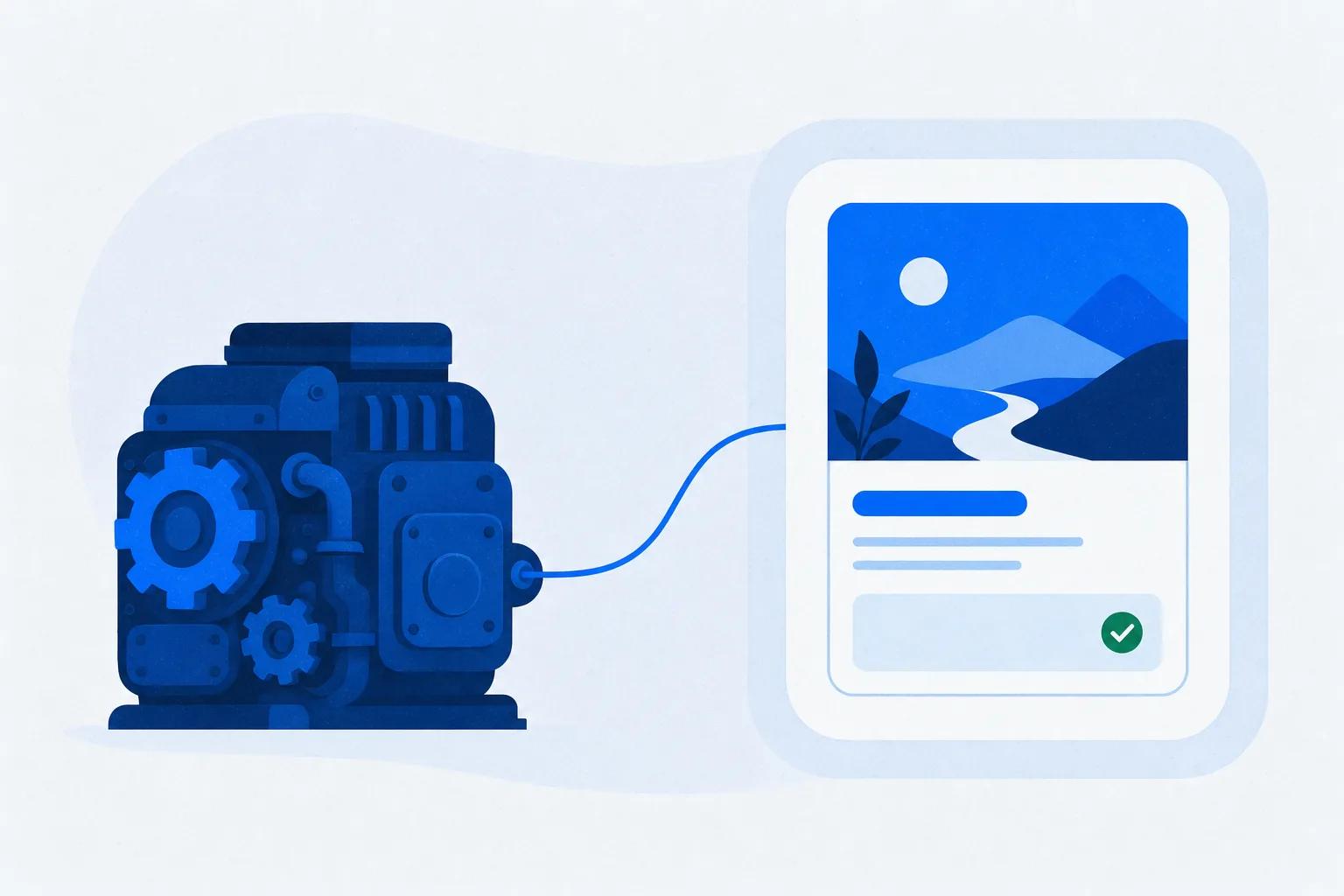
A headless LMS is a learning management system with no front end of its own. It stores courses, learners, progress, and certificates in a back end, and delivers all of it through an API, so the course appears wherever you render it: your product, your website, your partner portal. The industry also calls it an embedded LMS or a decoupled LMS.
The people asking this question usually arrive from a build. As one developer put it on r/webdev: “building everything from scratch (auth/payments/subscriptions/etc) seems like a lot of work when this problem has been solved before… I had a look and couldn’t find any headless LMS option (that looks mature enough, at least)” (r/webdev, 2025). That is the real question behind the term: can I get LMS machinery without the LMS’s face on it?
This guide answers it end to end. You’ll get the architecture in plain language, the boundaries against headless CMS and adoption tools, the auth and SCORM mechanics that trip most teams up, the honest build-vs-buy math, and the cases where headless is the wrong call.
Key Takeaways
- A headless LMS keeps the learning back end (courses, enrollment, progress, certificates) and drops the front end. Your app or site renders the experience through an API, widgets, or an embedded player.
- “Headless,” “embedded,” “decoupled,” and “API-first” describe the same architecture. One vendor also uses “headless” for course authoring, which is a different product.
- The phrase everyone borrows, “learning in the flow of work,” was coined by Josh Bersin in June 2018.
- xAPI (and cmi5) is the standard built for decoupled delivery; SCORM still matters at the edges for import and export. Most vendor pages skip both, so this guide covers them.
- One team building a headless LMS from scratch publicly logged 4,450 hours by April 2024. Buying the back end and building only your front end is the whole economic argument.
What Is a Headless LMS, Exactly?
In a traditional LMS, one system does two jobs: it manages learning (the back end) and it shows learning (the front end, that portal with the vendor’s login page, menus, and course player). A headless LMS keeps the first job and hands you the second. The “head” is the presentation layer. That is what gets cut off.
What remains is a learning engine behind an API: course structure, enrollment rules, learner records, quiz scoring, completion logic, and certificates. Your team decides where all of that surfaces. That could be a course player embedded in your SaaS product, a training tab in a partner portal, or a fully custom academy on your own domain.
One idea, four names
Vendors describe the same architecture with different words, and the vocabulary confusion is real. A practitioner on r/elearning asked for “a headless LMS experience so that I can customize my own front-end experience but utilize all of the backend processes” and the first reply asked whether they meant headless at all or just single sign-on (r/elearning, 2025). Here is the map:
| Term | What it means | Watch out |
|---|---|---|
| Headless LMS | Back end only, delivery via API | The umbrella term |
| Embedded LMS | The same thing, named for the result: courses inside your app | Some vendors treat the two words as one category |
| Decoupled LMS | The same thing, named for the architecture | Uncommon as a label, common in docs |
| API-first LMS | The same thing, named for the build philosophy | Not every “has an API” LMS qualifies |
| Headless authoring | Course creation tools embedded in your platform | A different product: creation, not delivery |
In software generally, headless means a system that runs without its own user interface. The same word describes headless browsers, headless commerce, and headless CMS platforms, and the LMS sense follows the same logic.
The idea has a birthday
The strategic case behind all of this has a source that rarely gets credited. In June 2018, analyst Josh Bersin published “A New Paradigm for Corporate Training: Learning in the Flow of Work,” arguing that training must come to the work instead of pulling people out of it (Bersin, 2018). His numbers still carry the argument: the average employee had 24 minutes a week for formal learning, and LinkedIn research found 49% of workers prefer to learn in the flow of work. A headless LMS is the architecture that makes that paradigm buildable.
The behavioral evidence points the same way. Field research found that people who switch away from a task take an average of 25 minutes and 26 seconds to return to it (Mark, González, and Harris, CHI 2005). A separate training portal is a designed-in task switch. Delivery inside the flow of work removes it.
How a Headless LMS Actually Works
Here is the whole loop, one learner request, in plain terms:
- The learner opens a lesson inside your app. They’re already signed in to your product. Nothing new to log into.
- Your app identifies the learner to the LMS. It requests a token or a signed course link from the LMS API for this specific user. This handoff is the heart of headless auth (full section below).
- The LMS returns course data. Structure, lesson content, quiz items, and the learner’s current progress come back as data, typically JSON, not as a finished web page.
- Your front end renders it. Your code, or the vendor’s embeddable player, displays the lesson in your design system. If it’s an embedded player, the browser’s postMessage API is usually what lets the frame and your page talk.
- Progress flows back. Completions, scores, and time data post back to the LMS, which remains the system of record.
- Webhooks tell everyone else. When a learner completes, the LMS calls your endpoint, and your integration updates the CRM, the HRIS, or the onboarding checklist inside your product. For the wider stack, see which systems to connect first.
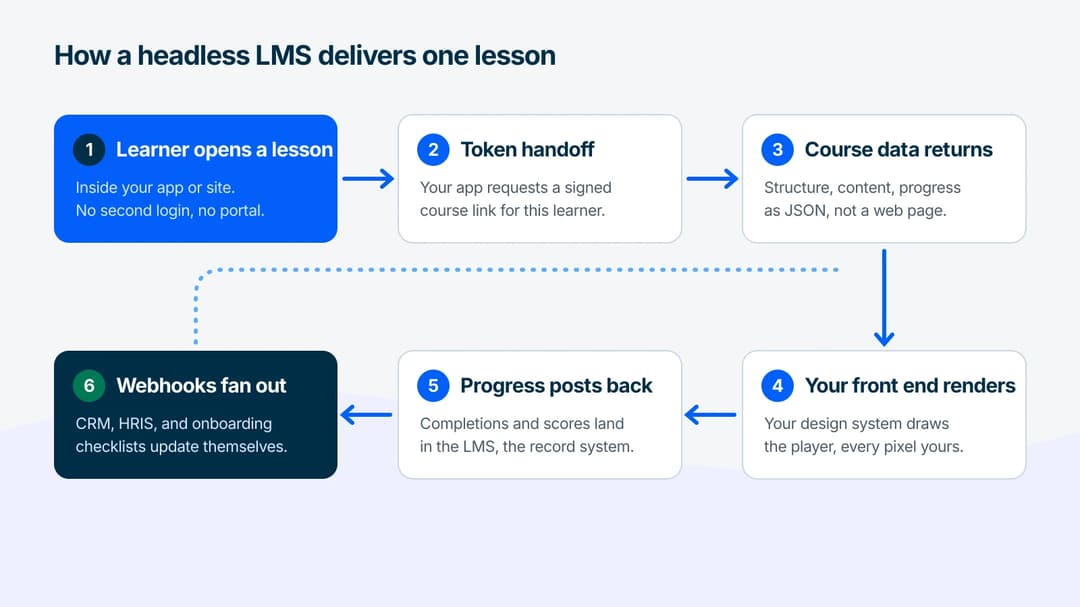
Two things follow from this loop. First, the LMS back end keeps doing the hard, boring, regulated work: enrollment rules, scoring, records, certificates. Second, every visible pixel is yours. That is exactly what the r/elearning practitioner meant by wanting members to “never leave the platform.”
Headless LMS vs Traditional LMS
The architecture came to learning late. Commerce and content went headless first, and the LMS world inherited both the pattern and the vocabulary about a decade later. The differences that matter:
| Traditional LMS | Headless LMS | |
|---|---|---|
| Front end | The vendor’s portal, themed at best | Yours: product, site, portal, app |
| Learner login | The LMS’s own account system | Your auth, passed through a token or SSO |
| Where learning lives | A destination learners must visit | Inside the surfaces learners already use |
| API role | Often an afterthought bolted onto the portal | The product itself |
| Effort to launch | Low: configure and go | Real: your team builds or embeds the front end |
| Brand control | Logo and colors | Total |
The “afterthought API” line deserves emphasis because it’s the practical test. Plenty of traditional platforms advertise an API that covers user provisioning and little else. The r/elearning buyer thread asked it correctly: “Which other LMS solutions provide enough API access to make it possible to build a completely customized front end?” (r/elearning, 2024). If the answer is no for course delivery, progress write-back, and webhooks, the platform isn’t headless no matter what the page says.
The destination-portal model this replaces has a measurable failure mode. In the largest published MOOC dataset, 52% of registrants never entered the courseware at all (Reich and Ruipérez-Valiente, Science, 2019). Those are standalone-portal numbers, not corporate ones, but they show what happens when learning lives somewhere people have to go.
Headless LMS vs Headless CMS: Where the Boundary Is
A headless CMS (Contentful, Strapi, Sanity, and their peers) stores content and serves it through an API. The description sounds identical. One CMS vendor even publishes a tutorial for building an LMS on top of a headless CMS. The steelman version of that argument is fair: if your “courses” are structured articles and videos, a content API plus your front end genuinely covers it.
The boundary appears at the learning semantics. An LMS adds machinery a CMS has no primitives for. Six pieces of it:
- Enrollment: who may take what, starting when, expiring when
- Progress semantics: started, resumed, completed, scored, with rules about what counts
- Assessment: question banks, attempts, passing thresholds, anti-guessing logic
- Certification: issued credentials with dates, expiry, and re-certification
- Standards runtime: SCORM and xAPI support, so records are portable to other systems
- Learner records: a transcript that survives your next front-end rewrite
Build on a bare CMS and every item above becomes a custom data model your team writes and maintains. The best-known build tutorial on the subject models “progress” as a custom field with custom controllers. It contains no SCORM, no xAPI, no certification, and no estimate of the effort involved. That is not a criticism of the CMS, which was never designed for it. It is the definition of the boundary: choose a headless CMS for content, a headless LMS for learning, and connect them when you need both. The full LMS vs. CMS vs. LCMS comparison draws that boundary in detail, including where the LCMS fits.
Headless LMS vs LXP vs Digital Adoption Platform
Three more categories share shelf space with this term, and buyers mix them up constantly:
- LXP (learning experience platform): a discovery-and-recommendation layer over content. Industry analyst Fosway Group’s 2026 landscape put it bluntly: “The LXP as a standalone category of learning system is finally behind us” (Fosway, 2026). Its features folded back into learning platforms. If a vendor pitches you an LXP as a headless solution, ask where the enrollment and certification live.
- Digital adoption platform (DAP): tooltip and walkthrough overlays inside software. Bersin’s original 2018 article named this tool class as flow-of-work learning. A DAP answers “what do I click next?” It doesn’t deliver a course, track a curriculum, or issue a certificate.
- Headless LMS: full learning machinery, rendered in your surfaces.
The practical rule is short. Guidance inside one product: that is a DAP. Structured learning across your audience, delivered anywhere: that is a headless LMS. Many SaaS teams eventually run both, with the DAP handling first-run hints and the embedded courses handling real onboarding depth.
What Teams Build With a Headless LMS
The use cases cluster into four patterns:
- In-product customer academies. Courses render inside the SaaS application, so education meets users where the confusion happens. The support case is documented: Gartner found 73% of customers use self-service, yet only 14% of issues get fully resolved there (Gartner, 2024). Articles resolve known questions. Teaching workflows takes structured courses, and in-product delivery is how they get completed rather than deflected into tickets.
- Partner and extended-enterprise training. Resellers and franchisees learn inside the partner portal they already use, with completions feeding certification requirements. This is the oldest embedded-LMS pattern in the wild.
- Employee learning inside the ecosystem. The LMS becomes a data supplier: a certificate earned in training surfaces on the employee’s intranet profile, completions land in the HRIS, and learning data joins business KPIs in the BI stack instead of staying trapped in a portal’s reporting tab.
- Custom academies on your own domain. Your brand, your information architecture, your customer training funnel, with the LMS invisible underneath.
Across all four, the delivery surfaces are wider than a website: product UIs, help centers, portals, mobile apps through WebViews, even messaging tools. The pattern is always the same loop from the architecture section, pointed at a different surface.
How Learners Sign In: The Auth Mechanics That Matter
Sign-in is where headless projects actually get stuck. Here are the four real levels:
- Public access. Anyone who reaches the surface can learn. Fine for marketing academies, useless for anything tracked per person.
- Email-gated access. The learner confirms an email to enter, with password-less magic links removing the account-creation wall. Right for lead-generation content and small known audiences, and it requires zero developer time.
- Signed links or tokens (the standard SaaS pattern). Your app asks the LMS API for a per-learner course URL or a short-lived token, usually a JWT, and renders it. The learner never sees a second login because your app vouches for them. This is what “tokenized access” means in practice.
- Full SSO (SAML or OIDC). The LMS trusts your identity provider directly. This is the enterprise pattern, and on most platforms it lives in the top pricing tier.
One warning belongs in every evaluation. Embedded players that depend on third-party cookies for their in-frame session are breaking under modern browser privacy controls. Token-based access survives because the link itself carries the identity. If a vendor demo only shows cookie-session embedding, test it in a browser with strict tracking protection before you sign anything.
Do SCORM and xAPI Survive Decoupling?
Most explanations of headless delivery never mention xAPI, and almost none explain how SCORM behaves in a headless setup. The standards that make learning records portable are missing from most of the category conversation.
The short answers:
- SCORM packages bundle content and tracking logic for a hosted player. In a headless world, SCORM still matters at the edges: importing legacy content into the back end, and exporting courses as SCORM so a client’s corporate LMS can run them. What SCORM can’t do is travel through a JSON API as a native format, because it assumes it owns the player.
- xAPI (and its stricter profile, cmi5) was built for exactly this decoupled world. Learning events post as statements (“learner X completed lesson Y, scored Z”) to a Learning Record Store (LRS), regardless of where the learning happened. If your architecture spans surfaces, xAPI is the standard that keeps records coherent.
- Proof it ships: the open-source EscolaLMS project maintains dedicated SCORM, cmi5, and LRS packages for its headless back end (EscolaLMS on GitHub). Standards support in headless delivery is a solved problem. Vendors are silent about it, not incapable of it.
Ask any vendor one question. “Where do completions live, can I get them out as xAPI statements, and what happens to my transcript data if I rebuild my front end?” A real headless LMS has boring, confident answers.
Who Should Not Go Headless
Intellum publishes a candid list of who headless is wrong for. Credit where due, and here is the superset. Skip headless if:
- No engineering capacity. The realistic minimum is developer time plus design attention, and often a project owner. If that team doesn’t exist, headless becomes shelfware with an API.
- Speed matters more than control. A configured traditional platform launches in days. A custom front end doesn’t.
- The program is still proving itself. Don’t architect for scale before anyone completes course one. Validate on the boring path first.
- Your budget only covers the license. The subscription is the visible cost. The front end you now own is the recurring one, and it needs maintenance every time the back end evolves.
- Nobody owns the front-end vision. An API returns possibilities, not decisions. Someone must define what learners actually see.
- Compliance needs the paved road. If audit-ready reporting out of the box is the requirement, the vendor’s own portal is usually the shortest path to it.
Intellum’s solution-consulting team frames this as a customization spectrum, arguing that even companies with deep engineering benches often land in the middle: able to go headless, choosing not to, because learning infrastructure is context, not their core product. That logic is worth stealing for your own decision memo. The strategic question isn’t “can we build a front end?” It’s “is a learning front end the thing our engineers should be building?” If Intellum is itself on the shortlist that memo lands on, our Intellum alternatives comparison sets it beside the other platforms in this market.
Build vs Buy vs Embed: The Effort Math
Let’s put numbers on the three paths.
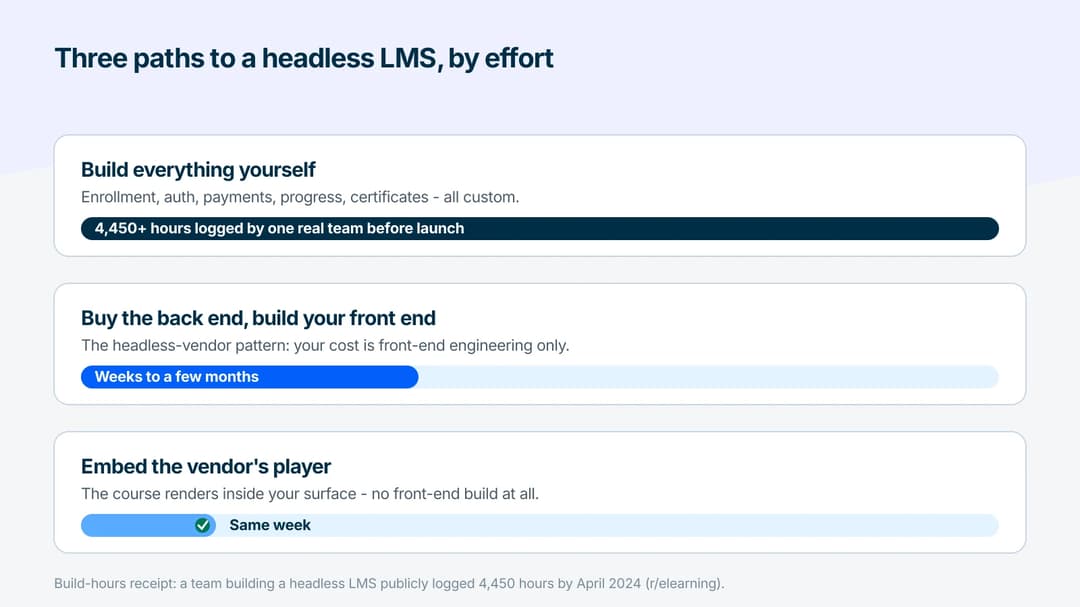
- Path 1: Build everything yourself. One team building a headless LMS from scratch has publicly logged its progress: “4,450 hours into building a headless LMS” in April 2024, roughly 5,000 hours by that August (r/elearning, 2024). What building one actually costs is its own guide. That is two to three developer-years before your first course, spent on enrollment, auth, payments, and progress plumbing that already exists elsewhere.
- Path 2: Buy the back end, build your front end. The headless-vendor pattern. Your cost is front-end engineering only. A focused team typically measures this in weeks to a few months, not years. The range depends almost entirely on how custom the player experience needs to be.
- Path 3: Embed the vendor’s player. The embed widgets route: the vendor renders the course inside your surface, you skip front-end development entirely, and you trade some pixel-level control for a same-week launch. For most teams this is the honest starting point, with the full API held in reserve.
On pricing, expect three models across the market: a platform fee plus active-learner counts, per-creator seats, or self-hosted open source where the license is free and the infrastructure and developer time are the cost. What you should not expect is a public price list. Most headless offerings sit behind demo requests, so budget conversations start in sales calls. Factor that into your evaluation timeline.
Open-Source vs SaaS Headless LMS
The open-source option is easy to overlook, and it includes a genuine historical footnote. Thought Industries announced what it called the “industry’s first” headless LMS in October 2022 (PRNewswire, 2022). The open-source EscolaLMS project, whose public repository dates to January 2021 and carries the tagline “World’s first headless LMS,” predates that announcement by about 21 months.
The practical comparison:
| Open source (EscolaLMS / Wellms) | SaaS headless vendors | |
|---|---|---|
| License cost | Free (Apache-2.0 core) | Subscription, typically demo-gated |
| Real cost | Your infrastructure + your developers | The subscription + your front end |
| Standards | SCORM, cmi5, and LRS packages exist | Varies: ask the vendor directly |
| Control | Total, including data residency | High on delivery, vendor-bound on core |
| Risk | You operate it: upgrades, security, uptime | Vendor lock-in, roadmap dependency |
Open source fits teams with real platform engineering capacity and a data-sovereignty need. Everyone else should do the math first. Self-hosting costs usually dwarf the subscription they avoid. It is the same core-vs-context logic from the previous section, wearing different clothes.
Where Mini Course Generator Fits
Mini Course Generator sits on the light end of the headless spectrum: an AI course creation platform with a lightweight LMS that delivers through embed widgets in four formats (Sidebar, Modal, Embed link, and Direct link), so a course runs inside your site or product without front-end development. For the full API route, the REST API and Headless LMS sit on the Custom plan, with a demo available for teams evaluating that path. Details and plan gates are on the pricing page.
Access control comes from Gateways, including in-app authentication for product-side delivery, and the Mini Course Generator badge can be removed on every paid plan, with custom domains keeping course URLs on your brand.
The scope note, honestly: MCG’s sweet spot is teams who failed the “who should not go headless” checklist above, in the best way. If you don’t have engineers to spend on a learning front end but still want courses living inside your surfaces, the embed path delivers most of the headless outcome at none of the build cost. Platforms designed for deep multi-surface API work serve the other end, and this guide’s checklists apply to both.
If you want the fuller picture of delivering courses inside a product, the headless LMS platform page covers the in-app training route, and every course built in the AI LMS can go out through links, embeds, or SCORM export.
The Short Version
A headless LMS is learning machinery without a face: enrollment, progress, assessment, and certificates behind an API, rendered wherever your learners already are. It’s the same idea as headless commerce and headless content, arriving in learning with the extra weight of SCORM, xAPI, and certification that a plain content API can’t carry. Four names, one architecture, one honest question underneath: should your team build a learning front end, embed a player, or stay on the paved portal road?
Answer with the checklists, not the marketing. If you have the engineering capacity and a clear front-end vision, headless pays its rent. If you don’t, embedding a player inside your surfaces captures most of the value this week. And if a vendor can’t explain where your completion records live, keep walking, whatever the architecture is called.
Frequently Asked Questions
What is a headless LMS?
A headless learning management system, or headless LMS, is one without its own front end. It manages courses, learners, progress, and certificates in a back end and delivers everything through an API, so your website, product, or portal renders the learning experience instead of the vendor’s portal.
Is an embedded LMS the same as a headless LMS?
Yes, for evaluation purposes. “Headless” names the architecture (the decoupled back end) and “embedded” names the result (courses appearing inside your surfaces). Vendors use the terms interchangeably, so compare the actual mechanisms offered: embeddable players, widgets, or a full delivery API.
What is the difference between a headless LMS and a headless CMS?
A headless CMS serves content through an API. A headless LMS adds learning semantics on top: enrollment, progress rules, assessments, certification, standards support like SCORM and xAPI, and a durable learner transcript. Building those on a bare CMS means writing and maintaining them yourself.
Does SCORM work with a headless LMS?
At the edges, yes: a good headless back end imports SCORM packages and exports courses as SCORM for corporate systems. Inside the decoupled architecture itself, xAPI is the standard designed for the job, posting learning events to a Learning Record Store from any surface. For choosing between the standards themselves, see the xAPI vs SCORM comparison.
Which LMS has the best headless architecture?
Judge it by four tests instead of a brand. Does the API cover delivery, progress write-back, and webhooks rather than user provisioning alone? Does auth support token handoff and SSO? Can records leave as xAPI statements? And is there a working embed path for surfaces you don’t control? Any platform passing all four is architecturally serious.
How much does a headless LMS cost?
Vendors rarely publish figures: headless offerings usually sit behind demo requests. Expect one of three models: a platform fee plus active-learner pricing, per-creator seats, or free open-source licenses where infrastructure and developer time are the real cost. Budget for the front end you now own, not just the subscription.
Sources
- Josh Bersin, “A New Paradigm for Corporate Training: Learning in the Flow of Work” (2018)
- Mark, González & Harris, “No Task Left Behind?” (CHI 2005)
- Reich & Ruipérez-Valiente, “The MOOC Pivot” (Science, 2019)
- Gartner press release, “Only 14% of Customer Service Issues Are Fully Resolved in Self-Service” (2024)
- Fosway Group, 9-Grid for Learning Systems (2026)
- MDN Web Docs, Window.postMessage
- Thought Industries press release (PRNewswire, October 2022)
- EscolaLMS on GitHub
- Wellms
- r/webdev, “Are there services that offer a sort of ‘Headless LMS’…?” (2025)
- r/elearning, “Looking for Headless LMS recommendations!” (2025)
- r/elearning, “Looking for recommendations for enterprise-grade headless LMS” (2024)
- r/elearning, “4,450 hours into building a headless LMS” (2024)