

An LMS RFP template does its job when every vendor answers the same closed questions, fills in one pricing schedule that states what it counts, and quotes its renewal and exit clauses. The template below does all three, and its scoring sheet adds up to exactly 100. Leave those parts out and you’ll get forty “yes” answers you can’t compare, while the real differences turn up at renewal: a 10% price rise, a seat count you can’t lower, a notice window you missed.
This guide starts with whether you need a learning management system RFP at all. Then it gives you the eight sections to copy, the scoring sheet, the pricing schedule, and a ten-week timeline that finishes before your current contract renews.
Key Takeaways
- Knockouts come before scoring. LearnUpon starts at 100 users on its employee plan, SkyPrep at 100 active users, and Docebo says it fits 250 or more learners, so a 150-person team can be out before page two.
- Vendors don’t count users the same way. Docebo lets you pick monthly, yearly or registered active users, iSpring counts anyone who logs in once a month, and SkyPrep resets its count every billing cycle.
- Docebo’s agreement renews for 12 months unless you give 60 days’ written notice, can raise the fee up to 10%, and doesn’t let you lower your user count during the term.
- Weight the sheet before responses arrive: 25 functional fit, 10 reporting, 15 integrations, 10 security, 10 implementation, 20 three-year cost, 10 contract terms.
If the budget isn’t set yet, work out what an LMS costs at your headcount first, so the pricing schedule below has a number to beat.
Decide First: Do You Need an RFP at All?
An RFP is one step in choosing an LMS, and it takes eight to ten weeks from release to signature. It pays off when you need vendors to put commitments in writing, and it’s wasted when the vendors already publish them.
Send an RFP when any of these is true:
- Your procurement policy requires a competitive bid for a contract of this size.
- The contract runs longer than a year, or auto-renews.
- IT will run a security review, or you need SSO and an HRIS connection on day one.
- The vendors you want publish no price. Docebo, LearnUpon, SkyPrep and Continu all sell by quote, and nine of the twenty platforms in our LMS cost comparison publish no price at all.
Skip it and run a shortlist-and-demo process when all of these are true:
- No policy requires a bid.
- The contract is monthly or a year at most, with no auto-renewal you can’t cancel.
- At least three platforms on your list publish their price and terms, so you can compare them without asking.
A shortlist-and-demo process uses the same raw material as this template. Send the functional requirements in section 3, or your LMS requirements checklist, to three vendors, book a scripted demo on your own course content, call one reference each, and run a trial with ten real learners.
These LMS demo questions make a good demo script, and the whole process fits in three to four weeks. Keep the scoring sheet either way, because your director will ask why you picked the winner.
What Makes an LMS RFP Produce Comparable Answers
Most LMS RFPs fail the same way. They ask vendors to “describe” their platform, and every response comes back as a brochure. Four design rules fix that.
- Knockouts first. Some requirements aren’t worth scoring, because failing them ends the conversation: SSO with your identity provider, a data hosting region, SCORM playback, and a minimum contract size below your headcount. Seat floors are real. LearnUpon starts from 100 users on its employee product, 150 for associations and 300 for customer education. SkyPrep’s plans start at 100 active users, and its enterprise suite at 1,000. Docebo says it fits organizations training 250 or more learners.
- Closed answers. Every requirement gets Yes, Partial or No, plus one line of evidence. Yes means the feature is in the product on signing day and in the quoted price. Anything planned, custom-built or delivered by a partner counts as No or Partial, and the vendor has to say which.
- One pricing schedule. Vendors fill in your format. Their own price sheet is an attachment, never the answer.
- Contract clauses as questions. Ask for the renewal term, notice period, price-rise cap and downgrade rule by clause number in the vendor’s own agreement. A vendor that won’t answer has still told you something.
The LMS RFP Template
Copy the eight sections below into a document and replace everything in brackets. Keep the numbering: vendors answer by it and scorers score by it.
Section 1: Company background
- Who we are: [industry], [headcount], [number of locations and countries], [languages your learners work in].
- Why now: [replacing current LMS / first LMS], current contract ends [date], notice period [days].
- Systems in place: HRIS [name], identity provider [name], current LMS [name], messaging [Slack or Teams].
- Decision: scoring panel of [roles], final approval by [role]. Single point of contact: [name, email]. All questions go to this person only.
- Confidentiality: responses are shared only with the scoring panel and procurement.
Section 2: Scope and audiences
| Audience | Headcount today | Expected in 3 years | How they sign in | Main device |
|---|---|---|---|---|
| Employees | [ ] | [ ] | [SSO / email] | [desktop / phone] |
| New hires per year | [ ] | [ ] | [ ] | [ ] |
| Frontline or contract staff | [ ] | [ ] | [ ] | [ ] |
| Managers who need team reports | [ ] | [ ] | [ ] | [ ] |
| Admins and course authors | [ ] | [ ] | [ ] | [ ] |
| External learners (customers, partners) | [ ] | [ ] | [ ] | [ ] |
Then list what moves with you: [number] courses, [number] SCORM packages and their versions (1.2 or 2004), [years] of completion history, and [number] active certificates with expiry dates.
Section 3: Functional requirements
Mark knockouts with K. Answer Yes, Partial or No, with one line of evidence (a help article, a screenshot or a demo timestamp).
| ID | Requirement | K | Answer | Evidence |
|---|---|---|---|---|
| F1 | Assigns courses automatically by role, department or start date from HRIS data | K | ||
| F2 | Sets recurring due dates and reassigns courses when a certification expires | K | ||
| F3 | Imports and plays SCORM 1.2 and 2004 packages and records completion and score | K | ||
| F4 | Accepts xAPI content and stores its statements, built in or through an external learning record store | |||
| F5 | Shows managers their team’s completions and overdue items without admin rights | |||
| F6 | Exports completion reports as CSV on a schedule | |||
| F7 | Keeps an audit trail of who completed which version of a course, and when | |||
| F8 | Issues certificates with expiry dates | |||
| F9 | Works in a phone browser with no app install | |||
| F10 | Builds courses and quizzes inside the platform, including drafting from an existing document | |||
| F11 | Offers the learner interface in [languages] | |||
| F12 | Supports learning paths with prerequisites | |||
| F13 | Sends reminders by email and [Slack or Teams] | |||
| F14 | Limits admin permissions by department or group | |||
| F15 | Collects feedback after a course |
If you need help choosing between SCORM and xAPI for F3 and F4, xAPI vs SCORM covers what each one records.
Section 4: Technical and security questionnaire
| ID | Question | Answer format |
|---|---|---|
| T1 | Do you support SSO for learners through SAML 2.0 or OpenID Connect with [identity provider]? Which plan includes it? | Yes/No, plan name |
| T2 | Do you create and remove accounts through SCIM or a native HRIS sync? List native HRIS connectors. | List |
| T3 | How many integrations are included in the quoted price? | Number |
| T4 | Is API access included, and what is the rate limit in calls per minute? | Yes/No, number |
| T5 | Do you send webhooks when a learner completes a course? | Yes/No |
| T6 | How many sandbox or test environments are included? | Number |
| T7 | In which regions is our data hosted, and can we choose? | List |
| T8 | Attach your current list of subprocessors. | Attachment |
| T9 | Attach your most recent SOC 2 Type II report or ISO/IEC 27001 certificate, with the audit period. | Attachment |
| T10 | When was your last independent penetration test? | Date, summary |
| T11 | Attach an accessibility conformance report for the learner interface against WCAG 2.2 AA. | Attachment |
| T12 | What uptime does the contract commit to, and what credits apply if you miss it? | Percentage, clause |
T3, T4 and T6 ask for numbers because “included” has a ceiling. Docebo’s Enterprise tier, for example, includes up to six integrations and API access at 100 calls a minute, and its Elevate tier includes four integrations. If you’re weighing Docebo, our Docebo alternatives guide sets its terms beside other platforms. For what each connection involves on your side, see the LMS integration guide.
Section 5: Implementation and support
- Provide an implementation plan in weeks, with named owners on your side and a list of what you need from us.
- State the implementation fee: fixed, hourly or a percentage of the license, and whether it is required or optional.
- List which records you migrate (courses, completion history, certificates), in which format, and who does the work.
- State support hours and response times by severity after go-live, and name the contact.
- State how much admin training is included.
- Give two references at our size and in our industry, one of whom has renewed with you at least once.
Section 6: Pricing schedule
Fill in the schedule exactly as laid out, for three years, at our headcount today and at the three-year figure in section 2. A response that replaces it with a price sheet is incomplete.
| Cost line | Unit you count | Year 1 | Year 2 | Year 3 | Included or capped | Price above the cap |
|---|---|---|---|---|---|---|
| Platform license | [flat fee or per user] | [admins, courses, storage] | ||||
| Learners | [registered, monthly active or yearly active, with your definition] | [number] | ||||
| Implementation | [one-time fee or % of license] | – | – | [hours or scope] | ||
| Integrations, SSO and API | [per connector or bundled] | [connectors, rate limit] | ||||
| Sandbox and extra domains | [per environment] | [number] | ||||
| Support tier | [tier name] | [hours, response times] | ||||
| Renewal | [maximum increase, %] | – | [notice period, days] |
Section 7: Contract and exit terms
Answer each question with the clause number in your standard agreement, and attach the agreement.
- How long is the initial term, and does it renew automatically?
- How many days’ written notice do we need to give to stop a renewal?
- What is the maximum price increase at renewal, as a percentage?
- Can we lower the contracted number of users at renewal, and during the term?
- How is usage above the contracted number measured, when is it billed, and at what rate?
- Can we terminate for convenience, and are prepaid fees refunded?
- On exit, how do we get our courses, learner records, completion history and certificates, in which formats, within how many days, and at what cost?
- How long after exit is our data deleted, and do we get written confirmation?
Section 8: Response instructions
- Questions by [date, end of week 1]. Every answer goes to every vendor.
- Responses by [date, end of week 4], in this document’s numbering, with the pricing schedule as a spreadsheet.
- Yes means available in the product on signing day and included in the quoted price.
- Prices stay valid for 120 days.
- Shortlisted vendors will run a scripted demo on our content in weeks 6 and 7.
The Pricing Schedule: Make Every Vendor Say What It Counts
The column that matters most in section 6 is “unit you count”, because vendors use the word “user” for different things. Docebo lets you pick monthly active, yearly active or registered active users. iSpring counts anyone who logged in at least once during a month.
SkyPrep counts a person who logs in, resets the count every billing cycle, and charges an overage fee unless you upgrade before the bill is due. Continu counts anyone who logs in or does anything in a calendar month, and 360Learning mixes registered and monthly active users in one contract.
Here’s why that decides the bill. Take a company with 1,000 employees, about 600 of whom log in during a normal month, and an annual compliance deadline that brings all 1,000 in. On a monthly active contract sized at 600, the deadline month is an overage month.
On a registered-user contract, you pay for all 1,000 every month. Neither is wrong, but only the pricing schedule shows you which one you’re buying.
Two more lines hide cost. Implementation isn’t always a flat fee: Continu prices it at 10% of the first-year contract value, and Trainual charges a $1,000 implementation fee it marks as required on every tier.
The other line is the cap. Docebo’s agreement has it notify you at about 90% of your active-user limit, then bill anything above the contracted count monthly as “Extra User” overage, with no published cap. The same agreement doesn’t let you lower the contracted user count during the term (section 5.2(d)), so if you forecast 1,200 users and hire 900, you pay for 1,200 until the term ends.
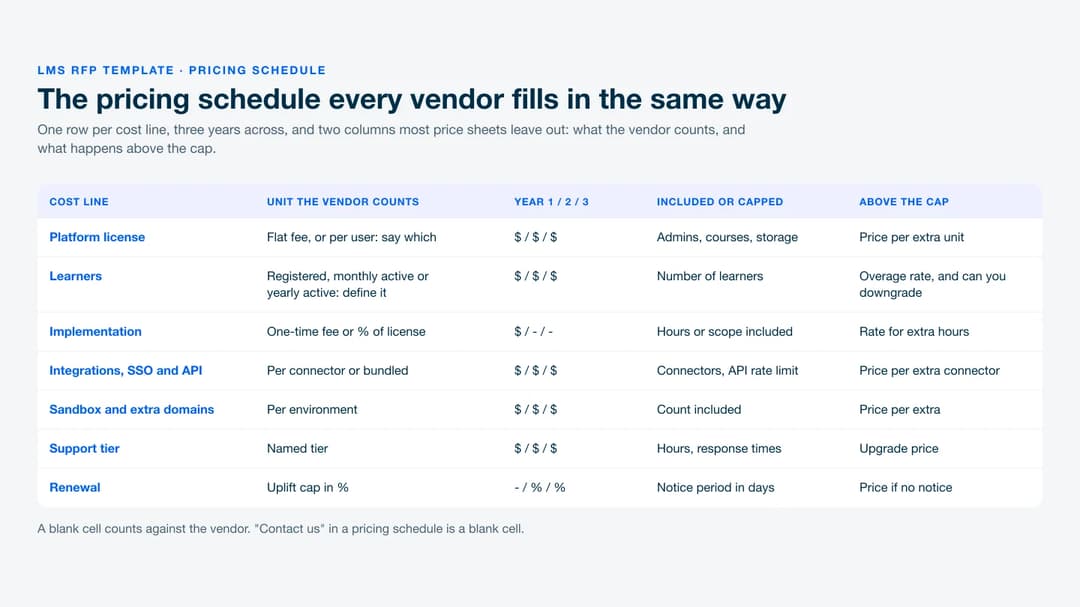
Score a blank cell, or “Contact us”, as a missing answer.
The Contract Questions That Decide Year Two
Renewal terms are where platforms that look alike on features stop looking alike. Here’s what three platforms’ own agreements say:
| Platform | Term and renewal | Notice to stop renewal | Price change at renewal |
|---|---|---|---|
| Docebo | Renews for 12-month periods (MSA 12.2) | 60 days, written | Up to 10% over the previous term’s highest annual fee, or the then-current fee if lower |
| SkyPrep | Renews for a term equal to the initial term | 60 days, written | Up to 15% increase; no refund on early exit |
| LearnUpon | Renews for 12 months (ToS 9.1) | 30 days, written | Can change on 30 days’ email notice at the next renewal, no cap; current period non-refundable (10.1) |
A vendor that prints its notice period and price-rise cap lets you budget the renewal on the day you sign. One that prints neither leaves the renewal price to whatever gets proposed in month eleven, so negotiate a cap into the order form now. LearnUpon’s printed terms and floors sit beside other platforms in our LearnUpon alternatives comparison.
Exit terms are easy to overlook while you’re buying. Question 7 in section 7 asks for four things separately, because they’re stored separately: courses as SCORM or xAPI packages, learner records, completion history as a file you can open, and certificates that stay valid after the platform is gone. A compliance audit two years after you switch will ask for completion history, not for the course.
The Weighted Scoring Sheet
Set the weights before responses arrive and share them with the panel, not the vendors. Each category is scored 0 to 5, and the weighted score is the weight times the score, divided by 5. A perfect vendor scores 100.
| Category | Weight | What earns a 5 |
|---|---|---|
| Functional fit for learners and admins | 25 | Every section 3 requirement Yes, with evidence |
| Reporting and compliance records | 10 | Audit trail, scheduled exports and manager view all Yes |
| Integrations and identity | 15 | SSO, HRIS sync and API included in the quoted price |
| Security and privacy | 10 | Current audit report attached, hosting region of your choice |
| Implementation and support | 10 | Fixed fee, named owners, a reference who has renewed |
| Three-year total cost | 20 | Lowest three-year total in the pricing schedule |
| Contract and exit terms | 10 | Printed notice period and price-rise cap, user count can go down, full export |
| Total | 100 |
Score cost by formula, so nobody argues about it: the lowest three-year total gets a 5, and every other vendor gets 5 times the lowest total divided by its own, rounded to the nearest whole number. In the worked example below, Vendor A’s three-year total is $60,000 and Vendor B’s is $150,000, so B scores 5 × 60,000 ÷ 150,000 = 2.
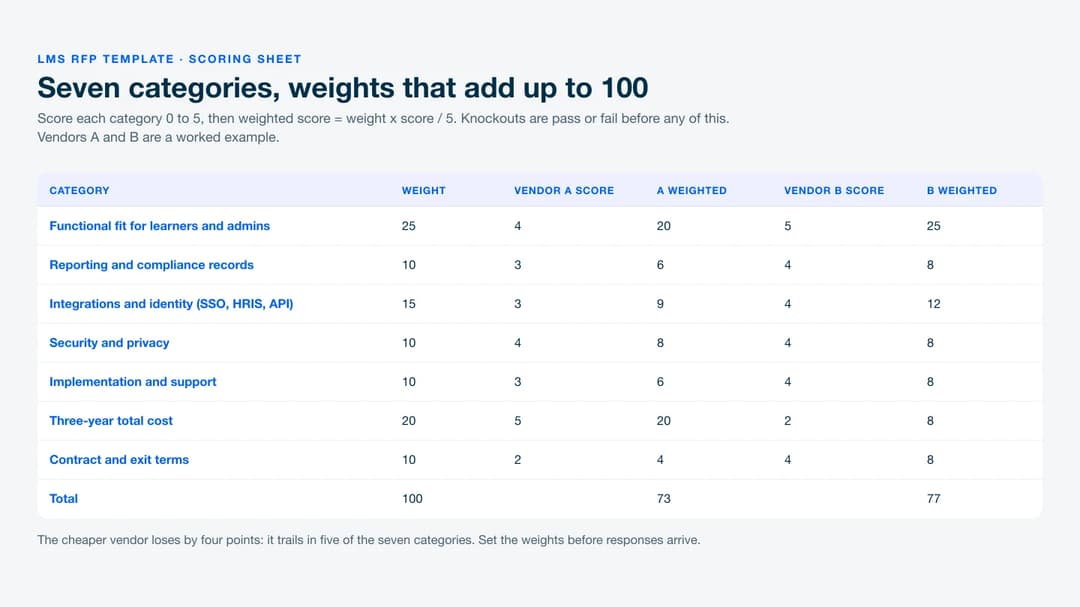
Here’s the worked example in full. Vendor A scores 4, 3, 3, 4, 3, 5 and 2 across the seven categories, which weights to 20 + 6 + 9 + 8 + 6 + 20 + 4 = 73. Vendor B scores 5, 4, 4, 4, 4, 2 and 4, which weights to 25 + 8 + 12 + 8 + 8 + 8 + 8 = 77.
B wins despite costing two and a half times as much, because it scores higher in five of the seven categories. If that result makes your director uncomfortable, change the weights before the next RFP, not after this one.
Have two panel members score each response on their own, then compare. Talk through any category where they’re more than two points apart.
The Response Timeline
Ten weeks from release to signature is realistic for a panel that also has day jobs.
| Week | Step | Owner |
|---|---|---|
| 0 | Release the RFP to five to eight vendors | You |
| 1 | Vendor questions due | Vendors |
| 2 | Answers sent to every vendor | You and procurement |
| 4 | Responses due | Vendors |
| 5 | Knockouts, independent scoring, shortlist of three | Scoring panel |
| 6–7 | Scripted demos on your own course content | Shortlisted vendors |
| 8 | Reference calls, trial with real learners, security review | You and IT |
| 9 | Final pricing, contract redlines, decision | Procurement |
| 10 | Contract signed, implementation kickoff | Everyone |
If you’re replacing a platform, count back from your current vendor’s notice date, not from its renewal date. For example, a contract that ends January 31 with 60 days’ written notice needs that notice by December 2. The decision lands in week 9, so count back nine weeks to September 30 and add two weeks of slack: release the RFP by September 16. Miss that and you’re negotiating with a new vendor while the old contract renews for another year.
The week 10 kickoff hands over to your LMS implementation plan, so ask the winning vendor to fill in its owners and dates before you sign.
What to Leave Out
A shorter RFP gets better answers, because vendors fill it in instead of pasting from a library of stock responses. Cut these:
- “Describe your platform” questions. They produce marketing copy. Turn each one into a requirement that can be answered Yes, Partial or No.
- Features you won’t use in year one. Every extra row costs your panel scoring time.
- Free-text pricing. “Please describe your pricing” gets back a price sheet built around the vendor’s best number. Section 6 replaces it.
- Custom demos before the shortlist. Demos cost vendors days. Ask for them from three, not eight, and script them on your content.
If a requirement wouldn’t change your decision when a vendor answers No, delete it.
Send the Short RFP, or Skip It
If a policy, a multi-year term or a quote-only vendor forces a bid, send the eight sections above with the weights already set, and put your current vendor’s notice date in the calendar before you write a word. If none of those apply, send section 3 to three vendors that publish their price and terms, and use the scoring sheet on the demos.
Either way, fill in the pricing schedule for every platform you consider. Mini Course Generator is our product, and it answers sections 6 and 7 on its pricing page: learners count as a yearly allowance, there’s no minimum annual commitment and no implementation fee, and courses export as SCORM or PDF at any time. SSO for learners and the REST API are on the Custom plan.
Frequently Asked Questions
What should an LMS RFP include?
Eight sections: company background, scope and audiences, functional requirements, a technical and security questionnaire, implementation and support, a fixed pricing schedule, contract and exit terms, and response instructions. The pricing schedule and contract section are what let you compare vendors. Weight them at 30 of the 100 points.
How long should an LMS RFP be?
Short enough to answer from the product, not from stock answers. Fifteen functional requirements, twelve technical questions and eight contract questions cover most companies of 300 to 3,000 people. If your list runs past sixty rows, some of those rows won’t change the decision.
How many vendors should get the RFP?
Five to eight. Knockouts such as a 100-user or 250-learner minimum and a missing SSO option will usually remove a few, which leaves three for demos.
What’s the difference between an RFI and an RFP for an LMS?
An RFI asks vendors to describe themselves so you can build a longlist across the kinds of learning management system on offer. An RFP asks for committed answers, prices and contract terms you can score and hold them to. If you already know which five to eight vendors you’re considering, skip the RFI.
Should an LMS RFP ask for a demo?
Only from the shortlist, and scripted. Give each vendor the same three tasks on your own content, for example assigning a compliance course to a department, showing a manager the overdue list, and exporting completion history. Then score what you saw against the sheet.
Sources
- Docebo Master Services Agreement, sections 5.2 and 12.2, and Docebo pricing page
- SkyPrep Terms and Conditions and pricing page
- LearnUpon Terms of Service, sections 9.1 and 10.1, and pricing page
- iSpring LMS pricing FAQ
- Continu pricing FAQ
- 360Learning pricing FAQ
- Trainual pricing FAQ
- W3C WCAG 2.2
- IETF RFC 7644 (SCIM)
- ISO/IEC 27001
- ADL xAPI
- Mini Course Generator pricing page


