
Four completely different kinds of product are sold as “employee onboarding software”, and almost every guide you will read lists all four together without saying which is which.
One kind files your tax forms. One kind sends your new hire a well-timed welcome sequence. One kind teaches them the job. One kind records how the work is done so somebody else can copy it.
They cost different amounts, they solve different problems, and buying the wrong one is the most common expensive mistake in this category. It usually surfaces in week three, when somebody asks whether the new hire has actually been trained and the answer is that eleven checkboxes have been ticked.
This guide sorts ten products into those four categories, and applies a single test to every one of them.
Try Mini Course Generator free – turn the documents your team already has into onboarding courses new hires actually finish.
The Test We Applied to Every Product
Does the product deliver actual courses, with completion tracking and assessment, or only task checklists that mark themselves done?
That sounds narrow. It is the single most useful question in this category, because almost every product here uses the word “training” and only some of them mean it.
A checklist item called “Complete security training” is marked done by a human clicking a box. Nothing was taught. Nothing was measured. Nobody knows whether the person read anything at all.
A course is a different object. It records that a specific person opened specific material, answered questions about it, and reached a score. Building one costs more than writing a checklist line, which is exactly why so many products offer the line instead. If what you actually want is the checklist, our onboarding checklist template is free, on the page, and needs no software.
The distinction matters in three real situations:
- Compliance. An auditor asking for evidence of training will not accept a ticked box, and current state is tracked in a training matrix rather than a completion report.
- Ramp time. If you cannot see where people stall, you cannot shorten the time it takes them to become productive.
- Repeatability. A checklist tells the manager what to cover. A course covers it, identically, for every hire, whether or not that manager had a good week.
So each entry below carries a plain verdict: courses, checklists, or checklists plus a bolt-on course catalogue.
The Four Categories, at a Glance
| Product | Category | Entry price (published) | Delivers courses? |
|---|---|---|---|
| BambooHR | HRIS, paperwork and records | $250/mo flat under 25 employees, then $10 per employee/mo | No. Checklists, plus a rationed third-party compliance catalogue |
| Rippling | HRIS, paperwork and IT provisioning | None published | Only if you buy its separate Learning Management product |
| Gusto | HRIS, payroll first | $49/mo + $6 per person/mo | No |
| Enboarder | Journey orchestration | None published | No. It sequences and measures your existing LMS content |
| Talentech Onboarding | Journey orchestration | None published | No. Content pages on a schedule, plus a quiz builder |
| Trainual | Training delivery | None published, plus a $1,000 implementation fee | Yes, on Pro and above |
| TalentLMS | Training delivery | Free for 5 users, then $119/mo for up to 40 | Yes |
| Connecteam | Training delivery, plus HR basics | Free for life under 10 users, then $29/mo for 30 users | Yes |
| Mini Course Generator | Training delivery | Free plan, then published paid tiers | Yes |
| Tango | Documentation and process capture | Free for 10 users, then $15 per user/mo | No. It writes the guide, it does not run the course |
Prices and plan details were checked on the vendors’ own pages in August 2026. Where a vendor publishes nothing, this guide says so instead of estimating.
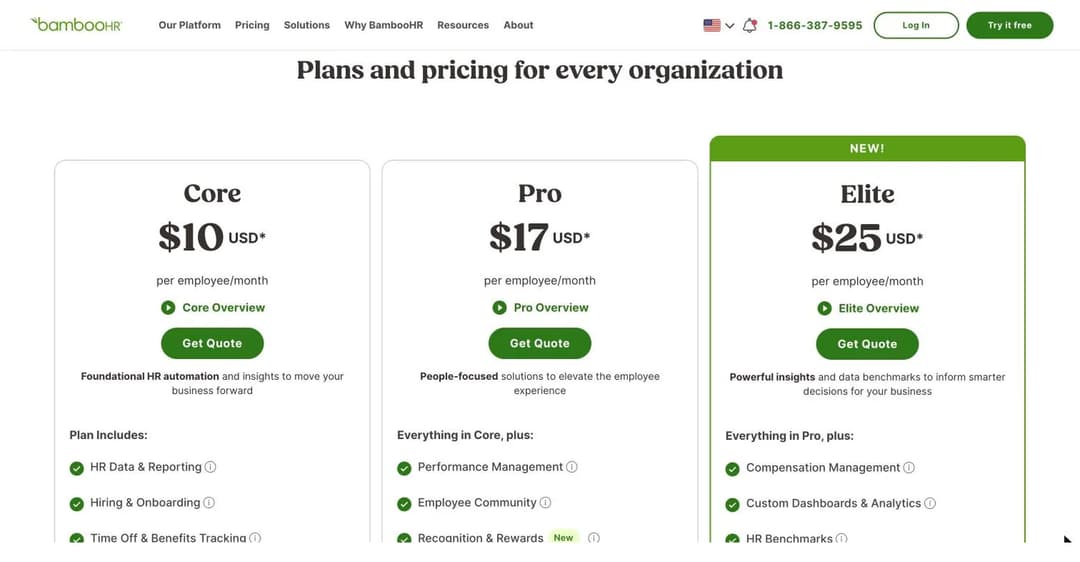
BambooHR is among the most transparent vendors in this category, publishing a rate for all three tiers.
Category 1: HRIS, Where Onboarding Means Paperwork
This is what most buyers need, and it’s what most buyers get.
An HRIS is the system of record for employment. Who works here, what they’re paid, what they signed, what documents exist about them.
Onboarding inside an HRIS is the module that gets a new person into that record correctly. Offer letter, electronic signature, tax forms, eligibility verification, direct deposit, benefits election, a welcome packet, and a checklist telling HR and the hiring manager what to do next.
That is genuinely valuable work, and it is genuinely not training.
1. BambooHR
BambooHR is the name that comes up most often in this category, and it earns that on transparency alone.
It publishes a rate for all three tiers: $10, $17 and $25 per employee per month. It also publishes a floor for very small companies, which almost nobody in this category does: “For companies with 25 employees or fewer, our HR software pricing is charged at a monthly flat rate starting at $250 USD/mo.” That’s the 25-seat Core price held as a minimum. Contract terms are optional rather than annual by default, and the trial takes no card.
The onboarding module does the paperwork properly. Electronic signature, I-9 and E-Verify workflows powered by Mitratech, tax forms, direct deposit, and document status reporting so you can see who has signed what.
Here is the part that costs people money. The onboarding page’s own headline promise is that this is “an onboarding software that streamlines training”. The rest of that page never mentions courses, learning, skills, quizzes, assessments or certification. What the module actually delivers is task management: customisable checklists, automated tasks and reminders, and a progress bar that fills as steps are ticked.
Courses do exist at BambooHR. They’re in a different module, from a different supplier, on a different axis.
The compliance page is headed “COMPLIANCE TRAINING” and offers interactive courses on harassment, cybersecurity and similar topics, “powered by EasyLlama”. Four things about that catalogue matter:
- It is licensed third-party content, not an authoring environment. There is no published way to build your own onboarding course or upload your own material.
- It is metered by price tier. The plan comparison lists 1 Compliance Training Course on Core, 15 on Pro, and 300+ on Elite. The buyer paying $10 per employee gets exactly one course.
- Assignment is by role, department or location. The vendor never describes triggering these courses on hire, as part of an onboarding workflow.
- Progress is tracked, but the vendor does not mention quizzes, pass marks, scores or certificates for these courses.
BambooHR also maintains a “Learning & Training” category in its integrations marketplace. That means it expects you to buy an LMS somewhere else and connect the two. If that’s the route you take, the mechanics are in our guide to LMS integration.
Best for: US companies from roughly 25 to 500 people whose onboarding problem is genuinely a paperwork problem, and who want one system of record with published pricing.
Not for: anyone who needs role-specific training built, delivered and assessed. Also not for IT-led onboarding: account provisioning, app access and device shipping are not native capabilities.
2. Rippling
Rippling’s pitch is the one thing the rest of this category is weakest at.
One new-hire event fires the employment record, the payroll enrolment, the app accounts, the identity provisioning and the laptop. If your onboarding pain is that people arrive on day one without a working login, this is the corner of the market built for it.
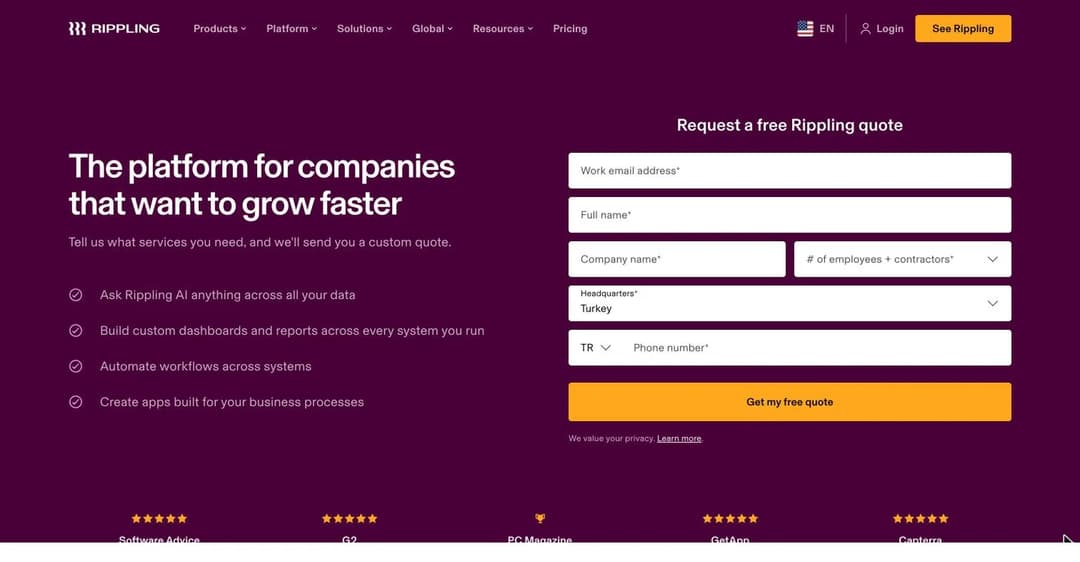
Rippling’s pricing page publishes no dollar figure of any kind. It is a form.
Rippling publishes no price. Its pricing page is a quote-request form. Two FAQ answers on that page are the only pricing facts the vendor states outright, and both are worth knowing before a sales call:
- “While most Rippling products are billed on a simple per-employee, per-month basis, some may be charged at (or include) a monthly basis fee.”
- “Each HR, Finance, and IT product (e.g. Payroll, Expenses, Benefits, Device Management) can be purchased separately, alongside the core, required Rippling Platform.”
Read that second sentence carefully. There’s a required platform, and everything else is a separate line item on top of it. That’s the pricing model, stated by the vendor, with no numbers attached to any part of it.
Now the training question, and here Rippling breaks the pattern.
It brands Learning Management as its own product, listed alongside HRIS, Payroll, Benefits and Device Management. Unlike every other HRIS in this guide, that product is real:
- A course builder that takes “videos, images, quizzes, case studies, and more”.
- A library of 80,000-plus pre-built courses from its partner Go1.
- Automatic assignment “based on employee attributes, like role, department, or tenure”.
- Real-time reporting on course completions and overdue training.
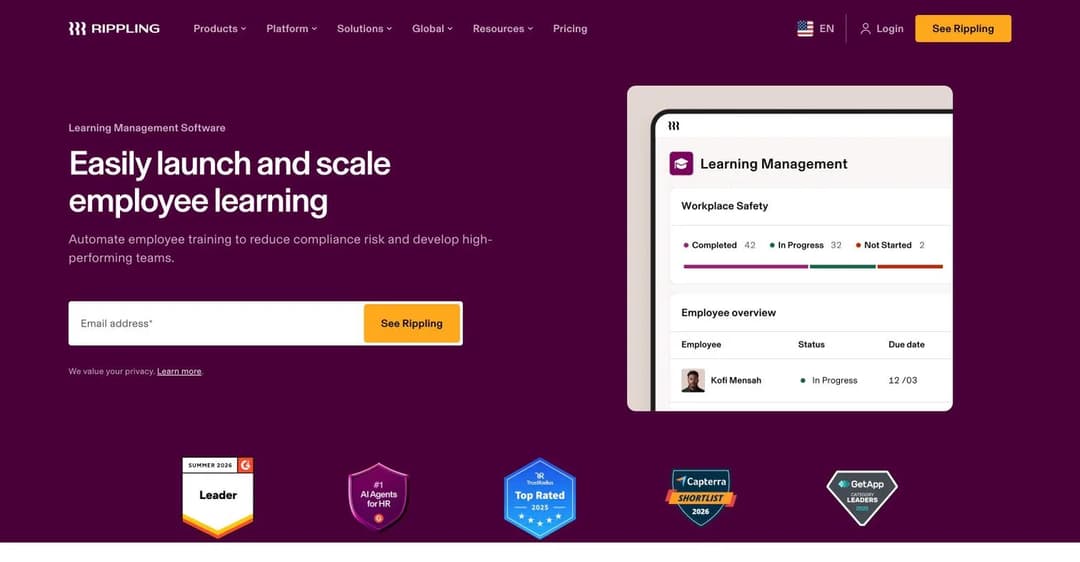
Rippling’s LMS is a genuine course product. It is also a separate purchase, and its own page never mentions onboarding.
Two caveats keep this from being the easy answer.
First, it’s a separate purchase on top of the required platform, so nobody can tell you what an onboarding-plus-training configuration costs without a quote.
Second, and more revealing: **Rippling does not present Learning Management as an onboarding product at all.** It is positioned around compliance and professional development, not new-hire ramp. Neither SCORM nor xAPI is claimed, which matters if you need the records to travel; the difference between those two standards is covered in xAPI vs SCORM.
Best for: companies where day-one IT readiness is the actual problem, and who are prepared to buy several modules.
Not for: buyers who need to know the total before a sales conversation, and small teams who will be quoted a platform fee before anything useful is switched on.
3. Gusto
Gusto is the most honest product in this category, in the sense that it never claims to train anyone. It publishes plain pricing: $49 a month plus $6 per person for Simple, $80 plus $12 for Plus, and $180 plus $22 for Premium, under a heading that reads “Simple, transparent pricing”.
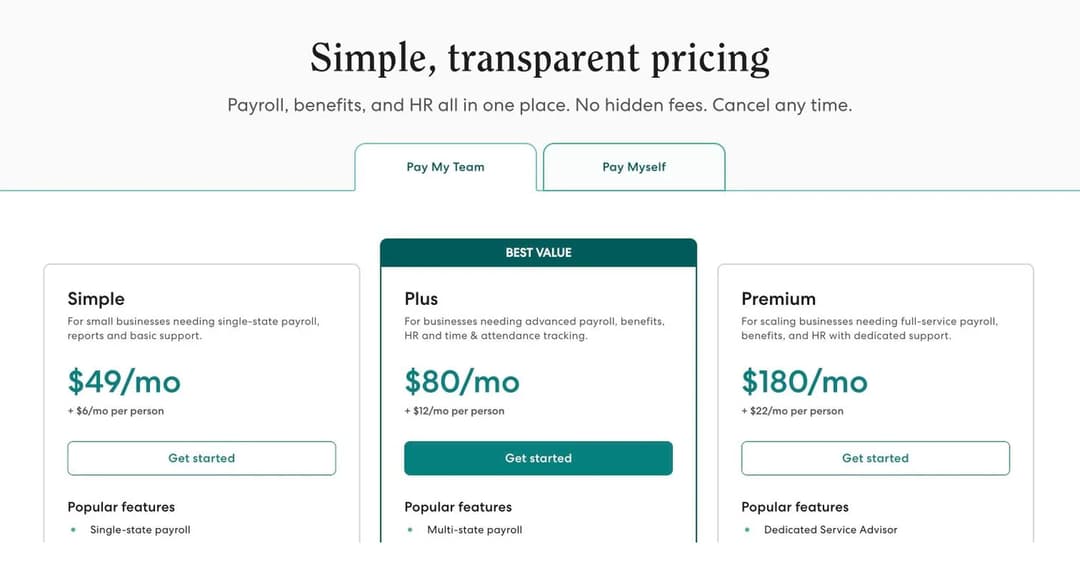
Gusto publishes a base fee and a per-person rate for all three tiers, and mentions training nowhere on the page.
That pricing page does not mention training, courses or learning at all.
Gusto’s developer documentation tells the same story. It catalogues every packaged end-user experience Gusto ships. There’s no course, lesson, curriculum, quiz, assessment or certification flow anywhere in it. The nearest thing to onboarding is a flow described as being “for employee to manage their own onboarding”, which is data entry.
What Gusto actually ships is a paperwork state machine. A new hire is not trained, they are moved between statuses, from awaiting a self-onboarding invite to onboarding completed.
Best for: small US companies where payroll is the centre of gravity and onboarding means getting somebody paid correctly and legally.
Not for: training of any kind. Gusto never claims to be onboarding *training* software, and it isn’t.
Category 2: Journey Orchestration, Where Onboarding Means Sequencing
This is the least understood of the four categories, and the one most often mistaken for training.
A journey platform holds neither your employment record nor your course content. It sits between systems and decides what reaches whom, and when:
- A nudge to the hiring manager three days before the start date.
- A message to the assigned buddy on day one.
- A prompt to the new hire in week two asking whether anything is unclear.
- A reminder to finish the course sitting untouched in your LMS.
Done well, this is the difference between an onboarding programme that exists on paper and one that actually happens. It is also, unambiguously, a layer on top of other systems. Buy it first and there’s nothing underneath it.
4. Enboarder
Enboarder is refreshingly explicit about what it is, to the point of putting the boundary in its own headings. Its new-hire learning page carries the line “An LMS Alone Does Not Drive Readiness”, and explains the position directly: “Providing access to courses does not guarantee comprehension, application, or performance.”
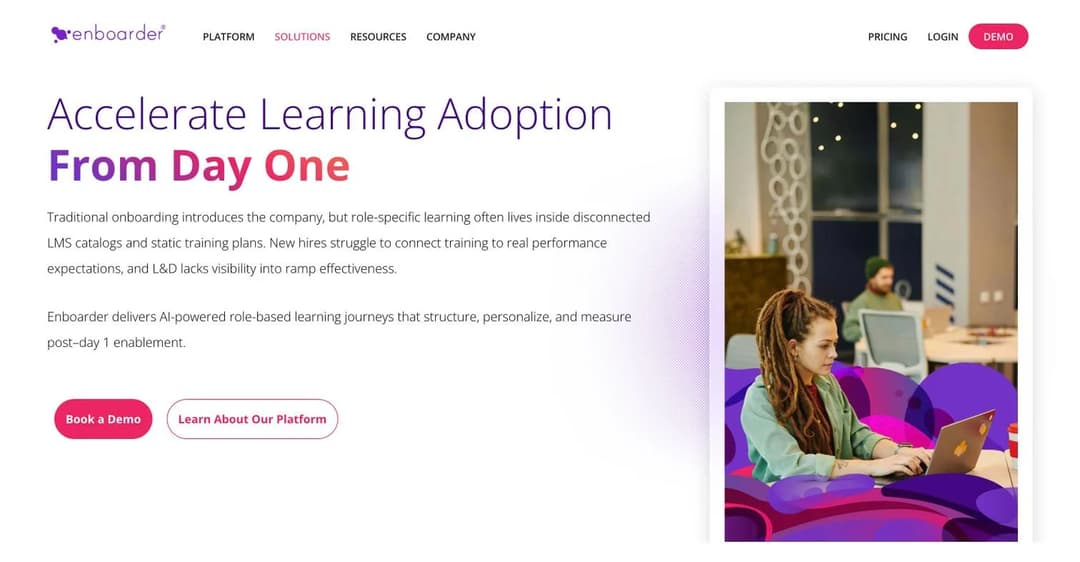
Enboarder describes itself as the layer that makes existing LMS content land, not as the LMS.
The mechanism is stated just as plainly: it will “pull LMS content into guided journeys while tracking completions, certifications, and proof of learning across teams”, and it “transforms LMS content and internal documentation into structured, AI-generated enablement journeys”.
Enboarder does not claim course authoring, a content library, SCORM or xAPI support, a question bank, scored exams, or certificate issuance.
It tracks completions and certifications that originate in your LMS. It doesn’t award them.
That gives Enboarder a hard prerequisite: if you have no LMS and no training content, Enboarder gives you nothing to sequence.
Pricing is quote-only. The site’s own pricing statement is “We don’t have one-size-fits-all pricing, your quote is tailored to your company and goals.”
Best for: organisations that already own an LMS full of content nobody finishes, and whose real problem is that managers do not do their part.
Not for: anyone whose problem is that the training does not exist yet.
5. Talentech Onboarding, formerly Talmundo
**Talmundo is no longer a brand.** The product is now sold by Talentech as Talentech Onboarding, so if Talmundo was on your shortlist, this is the entry to read.
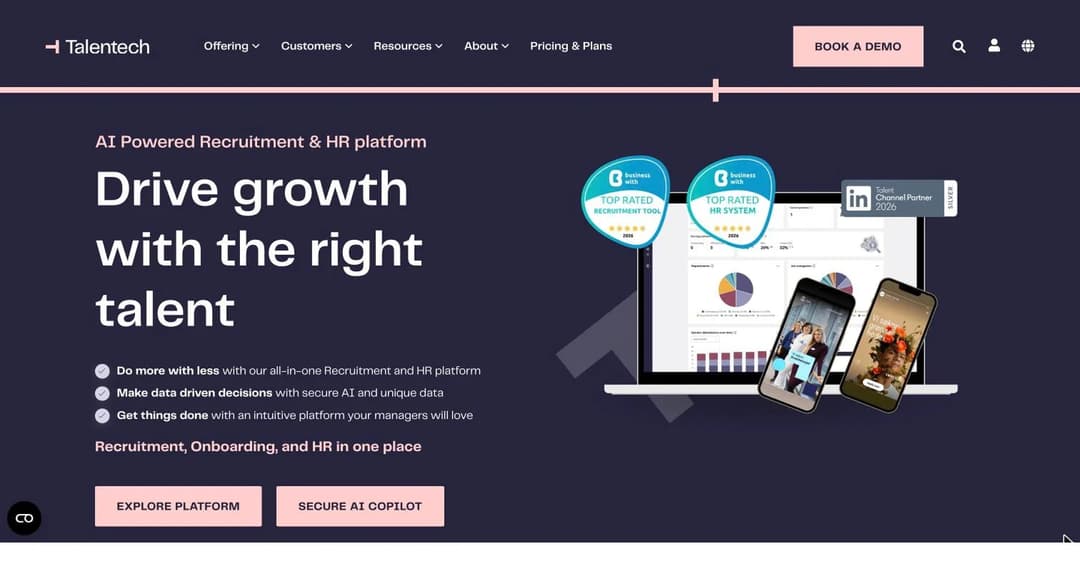
*Talentech now sells the former Talmundo product as its Onboarding app.*
The product is a good example of how close journey orchestration gets to training without quite arriving. The feature list runs: customisable content pages, timed content delivery, a multi-tab page builder, a quiz and questionnaire builder, short-form pulse checks, centralised information hubs, and a company fact carousel. Talentech’s own Danish-language marketing goes further and calls the headline feature planned and individualised training.
So there’s scheduled content, and there’s a quiz.
What Talentech never claims: a *course*, a *curriculum*, an *LMS*, *SCORM*, *xAPI*, a *learning path*, *certification*, a *gradebook* or a *passing score*. Completion tracking exists, but at task level, monitoring “the completion of tasks and activities with automatic notifications”.
Two phrases on Talentech’s site invite misreading. “Onboarding academy” and “in-depth team training” both belong to its Support and Service offer, and they describe Talentech training your administrators, not your new hires.
Pricing is quote-only: “Our prices are adjusted to the size of your company and the complexity of the solution you need.”
Best for: European organisations, particularly Nordic ones, that want a branded pre-boarding and first-weeks experience alongside recruitment in one suite.
Not for: auditable, scored, certifiable training. That has to be paired with an actual LMS.
Category 3: Training Delivery, Where Onboarding Means Teaching the Job
This is the category that answers the test with a yes. These products build courses, deliver them, track who finished, and in most cases assess whether anything stuck.
They’re also, with one exception, useless for paperwork. None of them will file an I-9 or run payroll.
That’s the trade, and it’s why the honest answer for many companies is two products rather than one. If the training half is the half you’re missing, our employee training software page covers what that side has to do.
6. Trainual
Trainual grew out of process documentation and moved toward training, and its own marketing draws the line the same way this guide does: “Most training tools stop at courses and checklists.”
On Pro and above it delivers real training:
- SCORM upload, with 5 GB of storage on Pro and 15 GB on Premium.
- AI-generated tests “that reinforce key takeaways and show what’s sticking”.
- Quizzes written by hand in the editor, or generated from your existing content.
- Completion tracking, stated plainly: “Every training assignment includes completion tracking, so you’ll always know who’s done what, and who hasn’t.”
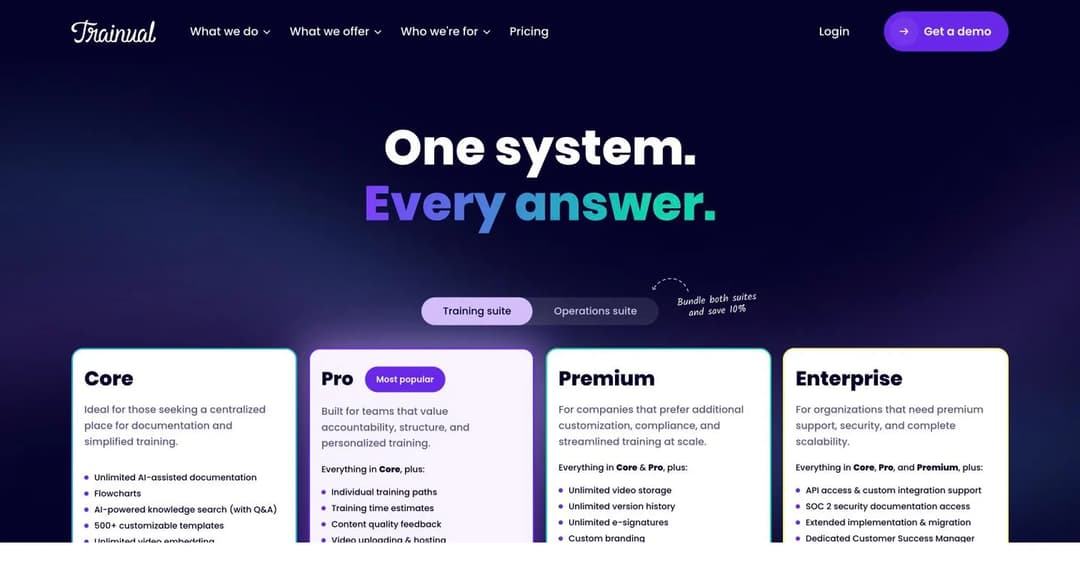
Trainual publishes four tiers and no rates. The only figure on the page is a one-thousand-dollar implementation fee.
Three caveats before you shortlist it.
First, the Core tier is not a training system. It has no individual training paths, no SCORM and no electronic signatures. It is documentation with group assignment.
Second, the pricing page publishes no prices. Four plans, four “Get a demo” buttons, and one sentence: “Pricing and plans vary depending on the size of your team and the features you need.” The only dollar figure anywhere on it is a cost you will pay regardless: “A one-time implementation fee of $1,000 applies.”
Third, the 400-plus course library is an add-on at every tier including Enterprise, and its price is not published either.
Best for: companies whose onboarding problem is that nobody has written down how the work is done, and who want documentation and training in the same tool.
Not for: buyers who need a number before a demo, or teams under about ten people, where a $1,000 setup fee is a meaningful share of year one.
7. TalentLMS
TalentLMS is the closest thing this category has to a default, and it earns that by being buyable without talking to anyone. The pricing page is headed “Transparent pricing, no setup fees” and publishes a rate for every tier tied to a user band:
| Plan | Users | Price |
|---|---|---|
| Free | 5 users, 10 courses | $0, no expiry, no card |
| Core | 1 to 40 | $119/month billed yearly |
| Grow | 1 to 70 | $229/month billed yearly |
| Pro | 1 to 100 | $449/month billed yearly |
| Enterprise | from 1,000 | Quote |
Each plan carries its own user-band selector, so the two dimensions multiply. Core at 1 to 40 users is $119 a month; the same Core plan at 71 to 100 users is $219. Grow and Pro start higher and climb the same way.
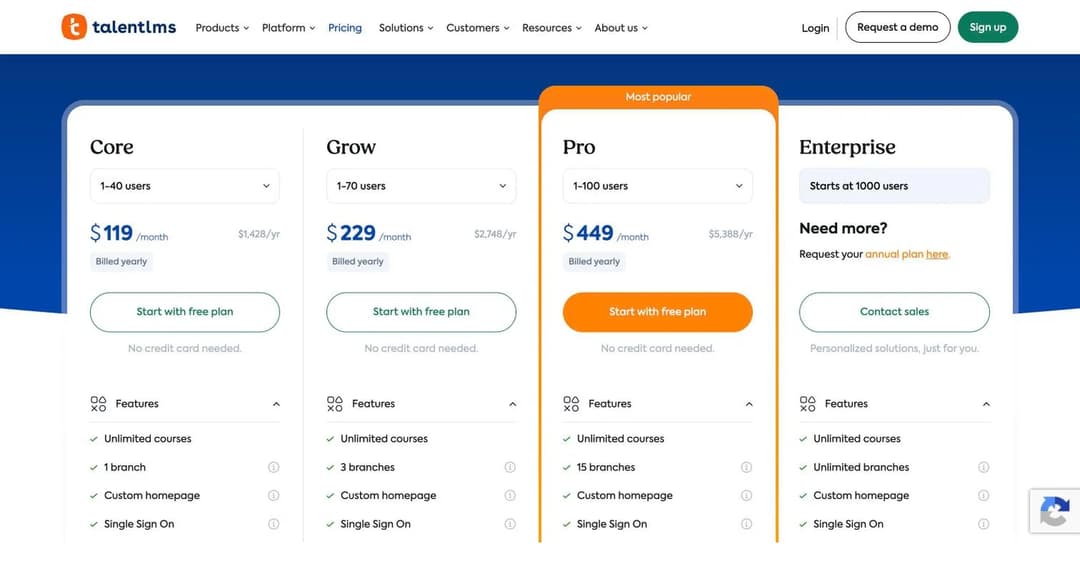
TalentLMS ties each plan to a user band, so the step between bands is a step in price, not a slide.
Note the shape of that ladder, because it catches people out.
Price is banded rather than per-seat. The marginal cost of hiring one more person is zero until you cross a band, at which point it’s over a hundred dollars a month.
That also means the effective per-person cost falls sharply as you fill a band. At the top of Pro it’s among the lowest in the market. At 41 users it isn’t.
The free plan is genuinely permanent, with no time limit. The cap is five users total, and in TalentLMS a user is anyone in the portal, so one admin and one instructor leave you three learner seats. We compared that plan against every other permanent free tier in our guide of the [best free LMS platforms](/blog/best-free-lms/).
For a fuller comparison of how LMS vendors meter and bill, see our breakdown of what an LMS actually costs, and for the wider small-company shortlist, the best LMS for small business.
Best for: companies of 10 to 100 people who want a conventional LMS with a published bill and no sales call.
Not for: paperwork, provisioning, or anything else in category 1. It is an LMS.
8. Connecteam
Connecteam is built for teams who do not sit at desks, and it is structured as hubs rather than one product. The HR and Skills hub is the relevant one, and its contents are unusually complete for the price: Courses, Quizzes, Documents, Recognition, Rewards, Time Off, Hiring, Onboarding and an org chart, in one place.
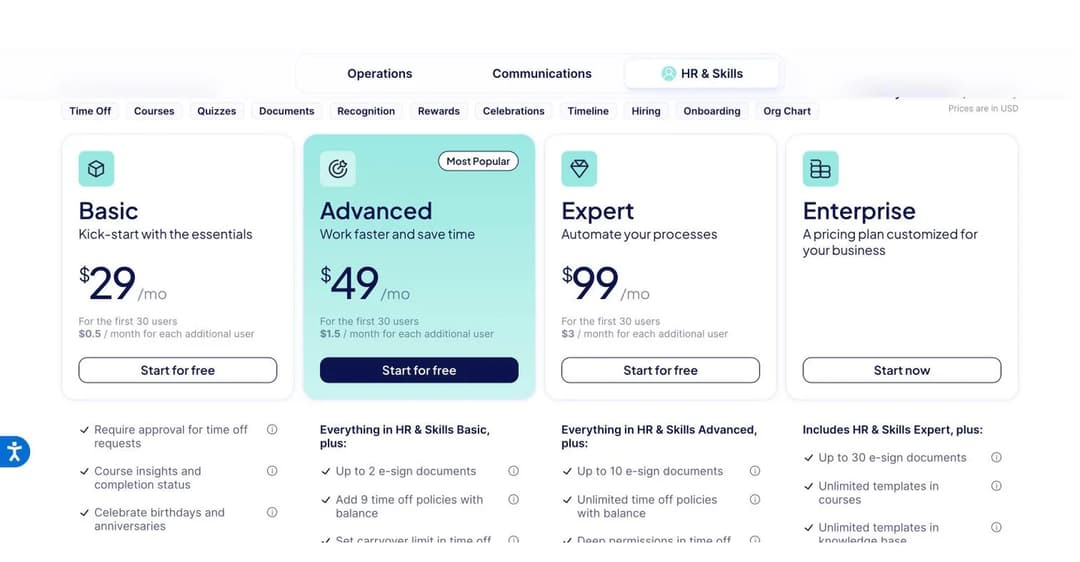
Connecteam’s HR and Skills hub carries courses and quizzes alongside onboarding and documents, at a published price.
The free tier is the most generous in this guide, and it’s not a trial. All hubs, all features, free for life, up to 10 users.
Above that, the HR and Skills hub runs $29 a month for the first 30 users billed yearly ($35 billed monthly), plus $0.50 per additional user. Advanced is $49 and Expert is $99, on the same 30-user base. Course insights and completion status are included from the entry tier, and quizzes can be attached to courses there too.
The paperwork side is real but capped. Electronic signatures are limited to 2 documents on Basic, 10 on Advanced and 30 on Expert. That’s enough for a small operation and nowhere near an HRIS.
Best for: deskless and shift-based teams under a few hundred people who want onboarding checklists and actual courses in one app, on one mobile-first product, at a published price.
Not for: office companies that already own an HRIS and want a deeper authoring tool, or anyone needing payroll and benefits administration.
9. Mini Course Generator
Full disclosure: this is our product, so treat what follows as a description rather than a review, and check it against the others above.
Mini Course Generator exists for one specific bottleneck.
In most companies the onboarding training doesn’t exist, and not because nobody knows the material. It doesn’t exist because turning what people know into a course is slow. The process documentation, the product notes and the policy PDFs are all sitting there already. Building a course from them by hand takes days that nobody has.
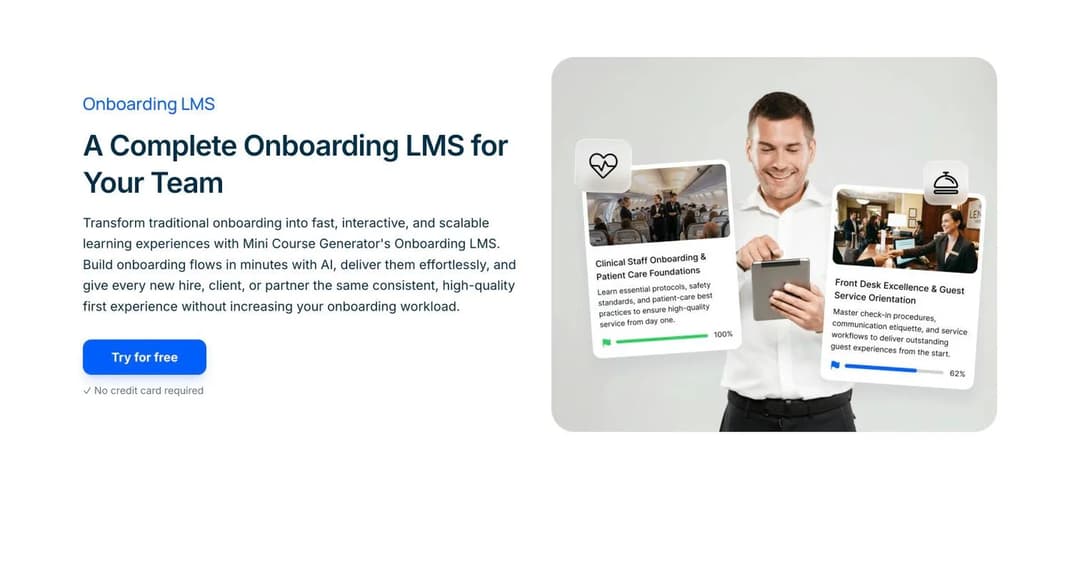
Mini Course Generator turns existing documents into short interactive courses and tracks who finishes them.
So the product takes a document you already have and produces a structured, interactive mini-course from it, with the AI generating from your material rather than from the open internet.
Delivery is by share link, embed or SCORM export. New hires don’t need another portal account, and companies already running a corporate LMS can push the course into it instead. Completion is tracked, certificates can be issued, and there’s a free plan for testing the idea before anyone signs anything. Our onboarding LMS page covers how teams assemble that, and delivering mini courses covers the distribution side.
What it does not do, stated plainly: no offer letters, no electronic signature for employment documents, no tax or eligibility forms, no payroll records, no IT account or device provisioning, no org chart, no time off, no performance reviews. Anyone whose actual problem is a W-4 should buy from category 1. This is the training half only.
Best for: teams that have the knowledge written down somewhere and need it turned into training that people finish and that somebody can report on.
Not for: replacing an HRIS. It was never trying to.
Category 4: Documentation, Where Onboarding Means Writing It Down
Documentation tools end up on onboarding shortlists because, in software-heavy roles, a large part of onboarding is learning how the work is done inside the tools. That is a real need, and it is not the same as training.
10. Tango
Tango records what you do in a browser and turns it into a step-by-step guide with screenshots. It can then walk somebody else through the same process live, inside the tool, with an overlay pointing at where to click.
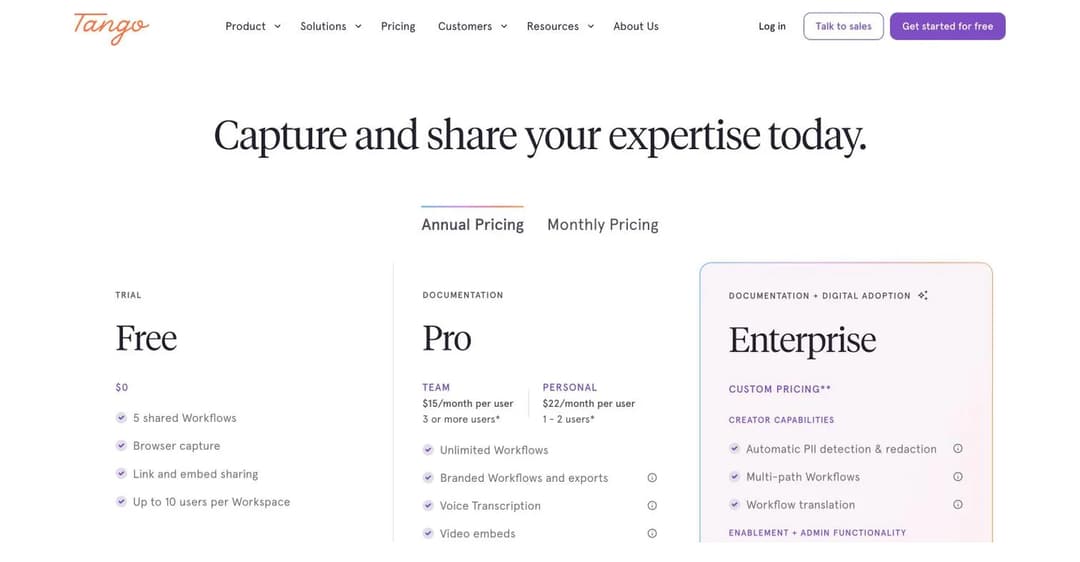
Tango prices per user with a free tier for up to ten, and describes itself as documentation rather than training.
Its own framing is explicitly anti-course: “Skip the training sessions and screenshares. Tango shows new hires exactly what to do, right in the tools they need to learn.”
Tango offers no quizzes, no assessments, no scoring, no certificates, no SCORM and no enrolment, and that holds even for its training video feature, the one most likely to suggest otherwise.
The closest thing to completion data is walkthrough telemetry: seeing who’s completing processes. Tango names LMS among the systems it embeds into, which places it accurately. It’s a content source for a training system, not the training system.
Pricing is published and reasonable: free for up to 10 users per workspace with 5 shared workflows, then $15 per user per month for teams of 3 or more on annual billing, or $22 for one or two users. Enterprise is custom, and the browser-agent automation tier starts at $12,500 a year for teams of 20 or more.
Best for: software-heavy roles where most of onboarding is learning six tools, and where a written, screenshotted, always-current guide beats a video that goes stale.
Not for: anything you have to prove happened.
How to Choose, in Four Questions
Work down this list. The first yes tells you which category to shop in.
1. Is anyone currently doing new-hire paperwork by hand, or chasing signatures?
Buy category 1. An HRIS pays for itself on the administrative time alone, and everything else can wait. BambooHR if you want published pricing and a system of record. Gusto if payroll is the centre of gravity. Rippling if IT provisioning is the actual pain and you can absorb a multi-module quote.
2. Do new hires arrive without working accounts or equipment?
Buy Rippling, or budget separately for device and identity management. No other product in this guide does it natively.
3. Do you already have training content that nobody finishes?
That is an orchestration problem, not a content problem. Enboarder is built precisely for it. Talentech if you want the pre-boarding experience and recruitment in one European suite.
4. Does the training simply not exist yet?
Buy category 3, and pick on how the content gets made. TalentLMS if you want a conventional LMS with a published bill. Trainual if documentation and training should live together and a demo call is acceptable. Connecteam if your people are deskless and you want checklists and courses in one mobile app. Mini Course Generator if the material already exists as documents and the bottleneck is turning it into courses. Whatever you buy, the teaching itself stays a manager’s job, and the method is in how to train new employees.
Most companies over about 30 people end up with two products, one from category 1 and one from category 3. That isn’t a failure of shopping. It’s what the market actually sells.
The mistake is buying one and assuming it covers both.
For the process those tools are meant to support, see our guide to the employee onboarding process. For the first thirty days specifically, the new hire training plan, and for the document you hand a manager, the employee training plan template.
Frequently Asked Questions
What is the best tool for employee onboarding?
There is no single best tool, because four different product categories share the name:
- Paperwork: an HRIS such as BambooHR or Gusto.
- Day-one IT readiness: Rippling.
- Making an existing programme actually happen: a journey platform such as Enboarder.
- Teaching somebody the job: a training platform.
Decide which of those four is costing you the most, then shop only in that category.
What is the best app for staff onboarding?
For deskless and shift-based staff, Connecteam is the strongest single app here, because it puts onboarding checklists, documents, courses and quizzes on one mobile product with a free tier for up to ten people. For office staff, the honest answer is usually two apps rather than one.
Do I need onboarding software if I only hire a few people a year?
Probably not a dedicated one. Under about ten employees, a shared checklist and a payroll product will cover the administrative side, and a free training tier will cover the rest. The threshold where dedicated software starts paying back is usually somewhere between 20 and 50 employees, or earlier if you are in a regulated industry where training has to be evidenced.
How much does employee onboarding software cost?
The published entry points here run from free to $250 a month, and the pattern is category-specific.
HRIS products charge a base fee plus a per-employee rate, so a 50-person company on Gusto’s entry plan pays $49 plus $300. Training platforms charge by user band or per seat, from free up to a few hundred dollars a month at 100 users. Journey platforms publish nothing at all.
Budget for two products if you need both halves.
What are the 5 C’s of employee onboarding?
The original framework has four C’s, published by Talya N. Bauer in 2010: Compliance, Clarification, Culture and Connection. A fifth and sixth were added by the same author in 2022 on an onboarding vendor’s blog, which is why the fifth C changes depending on which page you read. The full attribution, including who published what and where, is in our employee onboarding process guide.
What is the 30-60-90 onboarding rule?
It is a planning convention, not a rule: you define what a new hire should be able to do at day 30, day 60 and day 90, and you hold a real conversation at each point. It works because the intervals are short enough that a problem surfaces while there is still time to fix it. The detail belongs in a training plan rather than a tool.
Does onboarding software replace a manager?
No, and the products that come closest to claiming it are the ones to be most careful with. Every platform here depends on somebody deciding what a new hire needs to know. Software can sequence it, deliver it and prove it happened. It cannot decide it.
The Bottom Line
The reason this category is confusing is that the phrase “employee onboarding software” describes four unrelated jobs, and every vendor uses the vocabulary of all four.
Sort the products before you compare them, apply the one test, and the shortlist gets short fast. If a product’s own pages never say course, quiz, assessment or completion, it is a checklist tool, whatever the headline says. That is fine, as long as you know it before the first new hire finishes their third week having been taught nothing.
Start building your onboarding courses free and see how quickly the documents you already have become training somebody can finish.
Sources
- BambooHR pricing and plan comparison, bamboohr.com/pricing
- BambooHR onboarding and compliance product pages, bamboohr.com/platform
- Rippling pricing page and pricing FAQs, rippling.com/pricing
- Rippling Learning Management product page, rippling.com/products/hr/lms
- Gusto pricing page, gusto.com/product/pricing
- Gusto developer documentation and flow-type catalogue, docs.gusto.com
- Enboarder new hire learning and ramp plan pages, enboarder.com
- Talentech Onboarding product pages, talentech.com
- Trainual pricing page and courses page, trainual.com
- TalentLMS pricing page, talentlms.com/pricing
- Connecteam pricing page, connecteam.com/pricing
- Tango pricing and product pages, tango.ai
- Talya N. Bauer, Onboarding New Employees: Maximizing Success, SHRM Foundation, 2010