
Almost every training matrix template you can find uses ticks, crosses, or a traffic light with no key.
That works right up until somebody asks the question a training matrix exists to answer: who is out of date? A tick can’t say “completed in 2023, expired last month”. It says done, forever, which is the one thing that’s never true about training with a renewal date on it.
This page has a matrix with five defined states instead, the skills matrix it keeps getting confused with, and the column that spreadsheets handle worst.
Try Mini Course Generator free – build the courses your matrix is tracking, and get the completion dates automatically.
What Is a Training Matrix?
A training matrix is a grid: people down the side, requirements across the top, and the current state of each person against each requirement in the cells.
It answers three questions and nothing else:
- Who is compliant right now?
- Who is about to stop being compliant?
- Where is the gap if somebody leaves or is off sick?
It isn’t a plan. A training plan is forward-looking and per-person: what this individual will learn, and when. A matrix is a snapshot of current state across everybody. Most teams that regulate anything need both, and they’re different documents with different owners and different update cadences.
The Five States
Here is the whole idea. Replace the tick with one of five values, and the matrix starts answering questions.
| State | What it means | Colour convention |
|---|---|---|
| N/A | Not required for this person’s role | Grey |
| Due | Required, not started | Amber |
| In progress | Assigned and started, not finished | Light blue |
| Current | Complete, and in date. Cell carries the expiry date | Green |
| Expired | Was complete. Is not any more | Red |
The fifth state is the one that matters, and it is the one almost every template leaves out.
A tick-based matrix has no way to represent “this person did the training, correctly, and it has since lapsed”. So the tick stays, the person shows as compliant, and the gap stays invisible until an auditor computes it from the dates, or an incident does it for you.
The second most useful is N/A. Without it, an empty cell means either “not required” or “required and nobody has done anything”, and you can’t tell which by looking. Every gap analysis you run on that matrix will be wrong.
The Template
Filled in, for a mixed operations team:
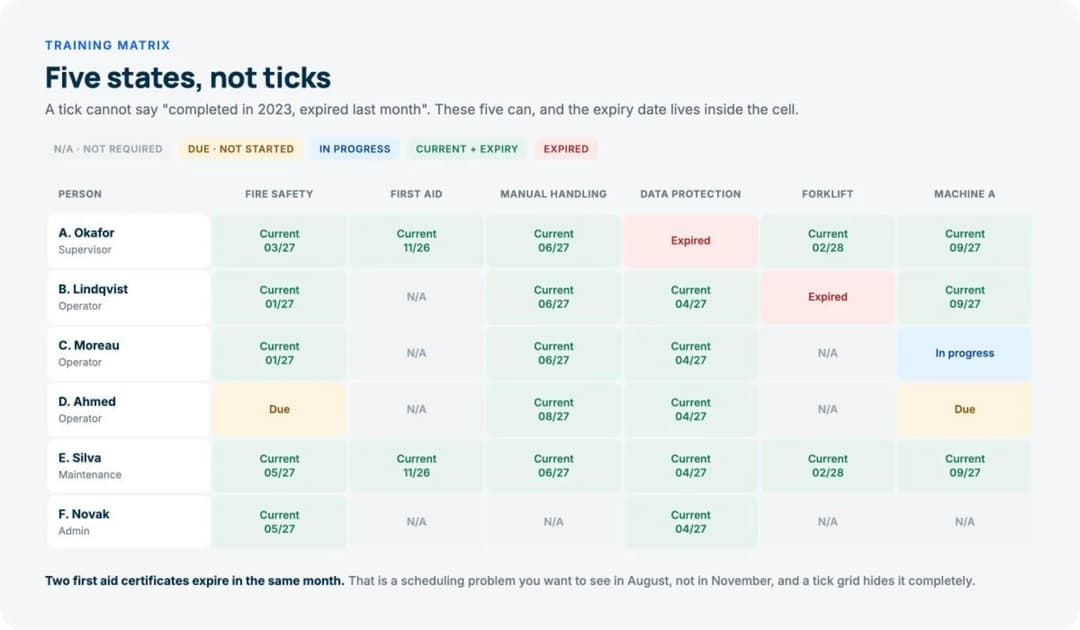
| Person | Role | Fire safety | First aid | Manual handling | Data protection | Forklift | Machine A |
|---|---|---|---|---|---|---|---|
| A. Okafor | Supervisor | Current, 03/27 | Current, 11/26 | Current, 06/27 | Expired | Current, 02/28 | Current, 09/27 |
| B. Lindqvist | Operator | Current, 01/27 | N/A | Current, 06/27 | Current, 04/27 | Expired | Current, 09/27 |
| C. Moreau | Operator | Current, 01/27 | N/A | Current, 06/27 | Current, 04/27 | N/A | In progress |
| D. Ahmed | Operator | Due | N/A | Current, 08/27 | Current, 04/27 | N/A | Due |
| E. Silva | Maintenance | Current, 05/27 | Current, 11/26 | Current, 06/27 | Current, 04/27 | Current, 02/28 | Current, 09/27 |
| F. Novak | Admin | Current, 05/27 | N/A | N/A | Current, 04/27 | N/A | N/A |
Empty, to copy:
| Person | Role | Requirement 1 | Requirement 2 | Requirement 3 | Requirement 4 |
|---|---|---|---|---|---|
Read the filled version for thirty seconds and you learn things a tick grid would hide:
- Only one person can drive the forklift right now. B. Lindqvist has expired and A. Okafor and E. Silva are current, so cover exists, but it is two people deep on a shift pattern that may not overlap.
- Machine A has a single point of failure forming. D. Ahmed is due, C. Moreau is in progress. Until one of them finishes, three people hold it.
- Two first aid certificates expire in the same month, November 2026. That’s a scheduling problem you want to see in August, not in November.
That last one is the real argument for putting expiry dates in the cell rather than on a separate tab. Clustered renewals are invisible when the matrix only says yes or no.
The Skills Matrix Is a Different Document
This is the most common confusion on this topic, and many templates labelled one are actually the other.
| Training matrix | Skills matrix | |
|---|---|---|
| Columns are | Requirements, usually mandatory | Capabilities, usually not mandatory |
| Cells contain | Compliance state and expiry | Proficiency level, typically 0 to 4 |
| Answers | Are we compliant, and when does that change? | Who can do what, and how well? |
| Owned by | HR, compliance, or the site lead | The team’s manager |
| Updated | When a course is completed or expires | At review cycles, or after a project |
| Auditable | Yes, and it will be | Rarely |
A skills matrix uses a scale instead of a state. The one that works:
- 0: no exposure
- 1: can do it with supervision
- 2: can do it alone
- 3: can do it alone and handle exceptions
- 4: can teach it to somebody else
Level 4 is the useful one. Counting how many people sit at 4 for each skill tells you where your training capacity actually is, and it’s usually much thinner than anyone assumes. A team of twelve with one level 4 on a critical skill has a training problem and a resilience problem at the same time, and only the matrix shows both.
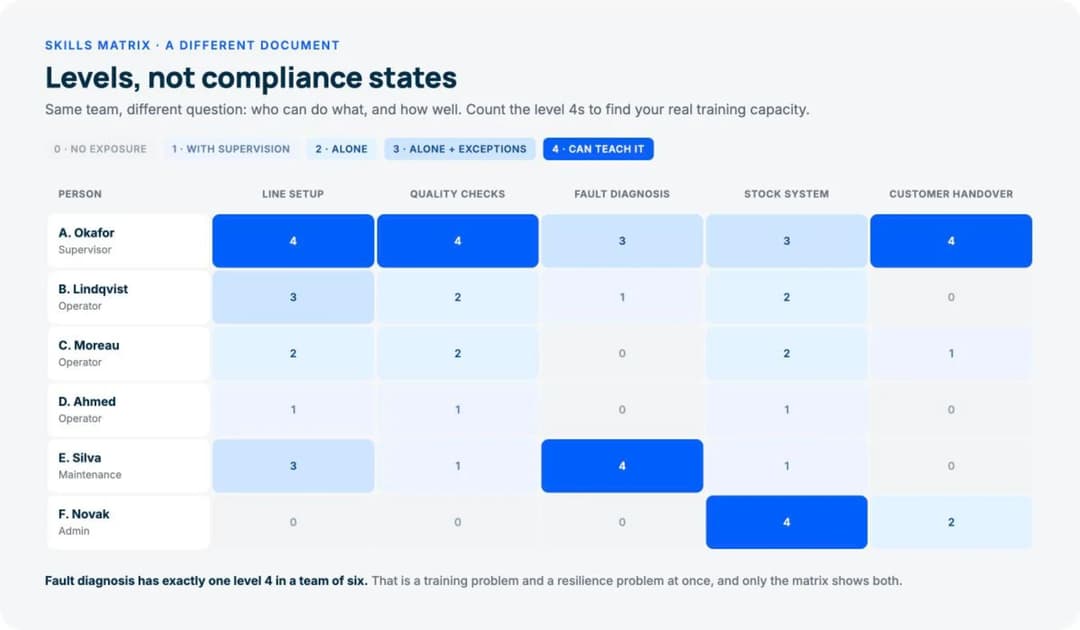
Skills matrix, empty:
| Person | Skill 1 | Skill 2 | Skill 3 | Skill 4 |
|---|---|---|---|---|
Keep the two documents separate. Merging them produces a grid where some cells mean “compliant until March” and others mean “quite good at this”. That’s the point at which nobody trusts it and everybody starts keeping a private copy.
How to Create a Training Matrix
Six steps. The first two are the ones people rush, and they’re the ones that decide whether the thing survives its first year.
1. List the requirements, not the courses. “Manual handling, refreshed every 3 years” is a requirement. “Manual Handling Level 2 (Provider X)” is how you currently satisfy it. Write the requirement, because the provider will change and you don’t want to rebuild the matrix when it does.
2. Define who each requirement applies to, by role. Not by name. Then a new starter inherits the right rows automatically, and the N/A cells fill themselves in.
3. Write the five-state key at the top of the sheet. In the sheet, not in a separate document. A key that lives elsewhere is a key that does not exist.
4. Put the expiry date inside the Current cell. “Current, 03/27” rather than green. It’s the difference between a matrix you look at and a matrix you can plan from.
5. Add a renewal window. Anything expiring within 90 days should be visibly different from anything expiring in two years. In a spreadsheet that’s one conditional format rule, and it’s the single highest-value thing you can do to the file.
6. Decide who updates it, and when. This is where matrices die. If updating is nobody’s named job, the matrix is accurate for about six weeks after it’s built and misleading for years afterwards.
What Is a Training Activity Matrix?
This phrase turns up in quality and manufacturing contexts, and it’s worth saying plainly: it isn’t a standardised term. Two different things are meant by it.
Sometimes it means a role-to-requirement map: a grid of training activities against job roles, showing which roles need which training, with no individual people in it at all. That’s genuinely useful as the source document for step 2 above, and it changes far less often than the people grid does.
Sometimes it just means a training matrix, with “activity” doing no work.
If somebody asks you for one, ask which they mean before you build it. The role map is one grid of maybe twenty rows, and it almost never changes. The people matrix changes every time anybody joins, leaves or completes anything.
Where the Spreadsheet Stops Working
A training matrix has one requirement no other HR document has: it has to tell somebody something without being opened.
Every other training document is one you read when you decide to read it.
A matrix is only useful if the expiry eleven weeks out reaches the person who has to book the course. A spreadsheet can’t do that. It’ll display the state beautifully and never once mention it to anyone.
Three specific failure modes follow:
- Completion is typed in by hand, which means the matrix records what somebody believed rather than what happened. The gap between “marked complete” and “completed” is where audits find things.
- Nothing is watching the dates. Conditional formatting colours a cell red on the day it expires, which is exactly too late to act.
- Versions multiply. A local copy, a filtered copy, a copy somebody sent to a manager in March. Within a year, nobody can tell you which one is authoritative.
The threshold is roughly 30 people, or the first time the matrix gets used as evidence for anything. Past that, the completion dates need to come from wherever the training is actually delivered, and the reminders need to fire on their own. That is a core function of employee training software, and published pricing starts lower than most people assume, as we set out in what an LMS actually costs.
Keep the matrix. Stop maintaining it by hand.
Frequently Asked Questions
Is there a free skill matrix template?
The empty skills matrix above is one, along with the 0 to 4 scale that makes it useful. Copy it into a spreadsheet. The scale matters more than the grid. Without defined levels, everybody rates by feel and the numbers stop being comparable across teams.
What should be in a training matrix?
People down the side, requirements across the top, and a defined state in each cell. The five states are N/A, Due, In progress, Current with an expiry date, and Expired. A key in the sheet itself, and a named owner for updates.
How often should a training matrix be updated?
At every completion and every expiry, which is why doing it by hand at any scale fails. If it’s manual, a monthly review is the practical minimum, and it should be somebody’s named responsibility rather than a shared intention.
Who owns the training matrix?
Whoever answers when an auditor asks. That’s usually HR, a compliance lead, or a site manager. The person who delivers the training and the person who owns the matrix are often different, and the handoff between them is the most common place records go missing.
Can a training matrix replace training records?
No. The matrix is a summary view. The underlying evidence, the completion record, the score, the certificate, the signature, still has to exist and be retrievable. An auditor will accept the matrix as a map and then ask to see three of the records behind it.
What is the difference between a training matrix and a competency matrix?
A competency matrix is a skills matrix by another name: capabilities rated by level. A training matrix tracks required training and its expiry. If a document is rating people, it’s the former. If it’s tracking whether something is in date, it’s the latter.
Should new hires appear on the matrix from day one?
Yes, with every applicable cell showing Due rather than blank. That’s the fastest way to see what a new start actually needs, and it turns the matrix into a checklist for their first month. The rest of that first month is covered in our onboarding checklist template and the employee onboarding process guide.
The Bottom Line
Ticks can’t express the state you actually care about, which is “was compliant, isn’t any more”.
Use five states, put the expiry date inside the cell, make anything renewing within 90 days look different, and give the file a named owner. Keep the skills matrix as a separate document with a 0 to 4 scale, because it answers a different question.
And when the matrix becomes evidence rather than a working note, stop typing the completion dates in by hand.
Build the training behind your matrix free and let the completion records write themselves.