Most employee training plan templates try to sell you something. Some want you inside a spreadsheet product. Some want a design tool. Several are paid downloads on Etsy.
The templates themselves are nearly identical, and they’ve all left out the same two columns.
This page has three versions, filled in with real content so you can see what a finished one looks like, and the empty grids underneath. Copy them into a spreadsheet, a document, or whatever your team already uses.
Try Mini Course Generator free – turn the rows in your plan into short courses people actually finish.
The Two Columns Everyone Leaves Out
Every template you’ll find has some version of these four columns: topic, method, duration, date. They’re fine. They describe what will be delivered.
None of them describes whether it worked. That’s the entire reason training plans get abandoned by their second quarter: nobody can tell, so nobody reviews it, so it drifts.
Column 5: Evidence. How will you know this happened and landed? A score, a piece of work reviewed, an observed task, a signed record. “Attended” is not evidence. It’s attendance.
Column 6: Owner. Not who delivers it, who is accountable for it happening. Those are different people more often than anyone admits, and unowned rows are the ones still incomplete in month four.
Add those two and a training plan stops being a schedule. It becomes something you can review, which is the difference between a document that gets updated and a document that gets quietly replaced by a new one next year.
Version 1: New Hire Role Training
Use this when somebody joins and has to learn the job. It’s the most common version and the one most templates are actually built for.
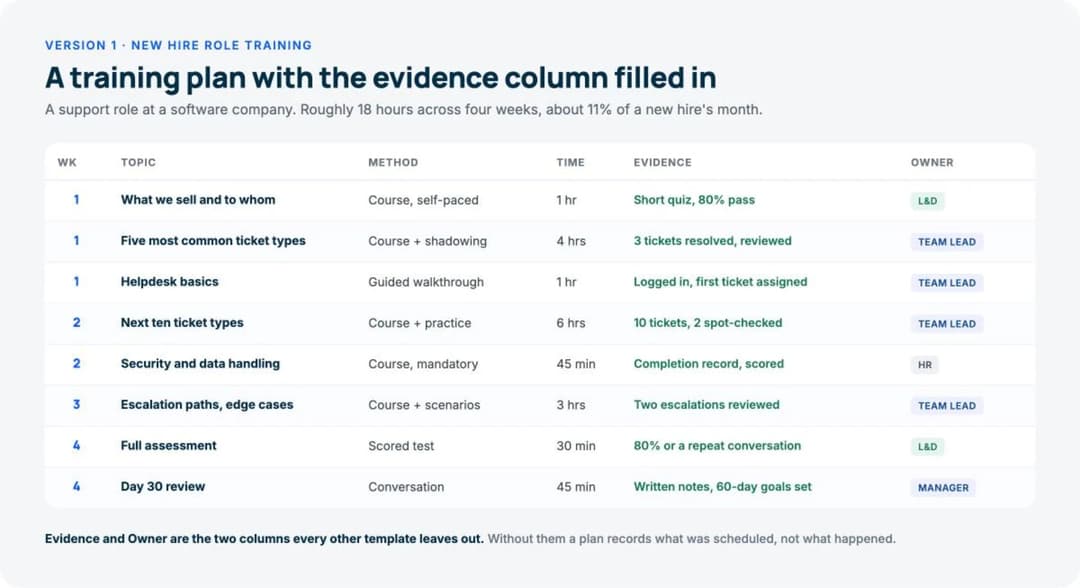
Filled in, for a support role at a software company:
| Week | Topic | Method | Time | Evidence | Owner |
|---|---|---|---|---|---|
| 1 | What we sell and to whom | Course, self-paced | 1 hr | Short quiz, 80% pass | L&D |
| 1 | Five most common ticket types | Course + shadowing | 4 hrs | 3 tickets resolved, reviewed | Team lead |
| 1 | Helpdesk basics | Guided walkthrough | 1 hr | Logged in, first ticket assigned | Team lead |
| 2 | Next ten ticket types | Course + practice | 6 hrs | 10 tickets, 2 spot-checked | Team lead |
| 2 | Knowledge base and macros | Guided walkthrough | 1 hr | Used macros unprompted | Team lead |
| 2 | Security and data handling | Course, mandatory | 45 min | Completion record, scored | HR |
| 3 | Escalation paths and edge cases | Course + scenarios | 3 hrs | Two escalations reviewed | Team lead |
| 3 | Reporting | Guided walkthrough | 1 hr | Ran own weekly report | Team lead |
| 4 | Full assessment | Scored test | 30 min | 80% or a repeat conversation | L&D |
| 4 | Day 30 review | Conversation | 45 min | Written notes, 60-day goals set | Manager |
Empty, to copy:
| Week | Topic | Method | Time | Evidence | Owner |
|---|---|---|---|---|---|
| 1 | |||||
| 1 | |||||
| 2 | |||||
| 2 | |||||
| 3 | |||||
| 4 |
Notice how the Time column totals. That plan is roughly 18 hours across four weeks, which is about 11% of a new hire’s month. If your filled-in version totals 60 hours, the person is in training rather than working, and somebody should decide that on purpose rather than discovering it.
For how to design the content that goes in those rows, in what order, see our new hire training plan guide.
Version 2: Annual and Compliance Training
Use this for the training that recurs, has a deadline attached, and usually has an auditor at the end of it. The structure is different because the unit is the person, not the week.
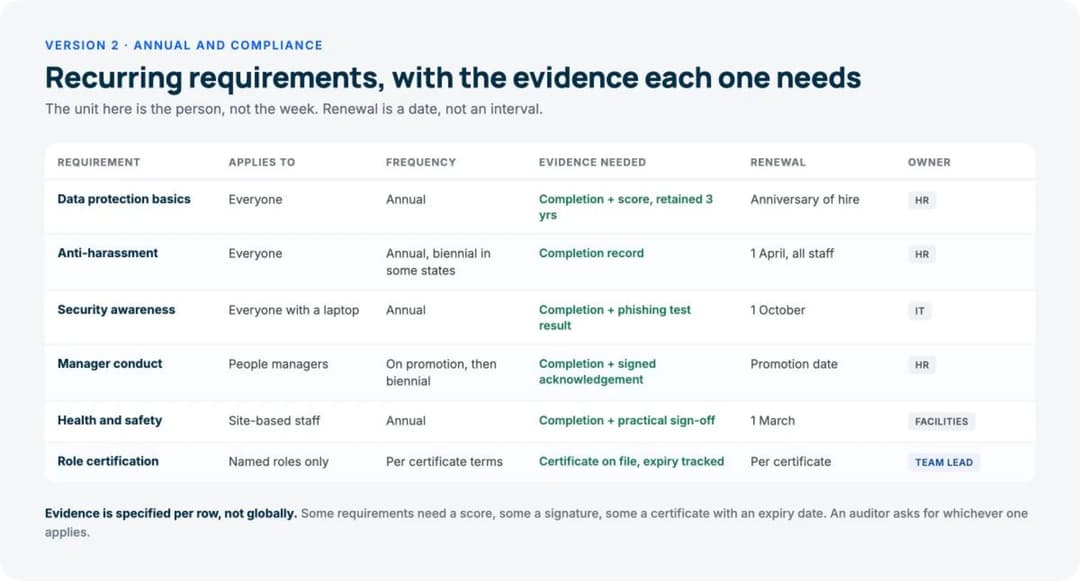
Filled in:
| Requirement | Who it applies to | Frequency | Evidence needed | Renewal | Owner |
|---|---|---|---|---|---|
| Data protection basics | Everyone | Annual | Completion + score, retained 3 yrs | Anniversary of hire | HR |
| Anti-harassment | Everyone | Annual, biennial in some states | Completion record | 1 April, all staff | HR |
| Security awareness | Everyone with a laptop | Annual | Completion + phishing test result | 1 October | IT |
| Manager conduct | People managers | On promotion, then biennial | Completion + signed acknowledgement | Promotion date | HR |
| Health and safety | Site-based staff | Annual | Completion + practical sign-off | 1 March | Facilities |
| Role certification | Named roles only | Per certificate terms | Certificate on file, expiry tracked | Per certificate | Team lead |
Empty, to copy:
| Requirement | Who it applies to | Frequency | Evidence needed | Renewal | Owner |
|---|---|---|---|---|---|
Two things make this version work.
The renewal column is a date, not an interval. “Annual” tells you nothing about when to act. “1 April, all staff” does. Where renewal genuinely follows the person rather than the calendar, say so, and accept that you’ve now got a tracking problem a spreadsheet handles badly. That’s what a training matrix is for.
Evidence is specified per row, not globally. Some requirements need a score. Some need a signature. Some need a certificate with an expiry date on it. An auditor asks for whichever one applies, and “we have a completion report” only answers one of the three.
Version 3: Skills and Development
Use this for people already doing the job who need to get better at it, or to move. It’s the version that most resembles a plan rather than a schedule, and the only one where the employee should be co-writing it.
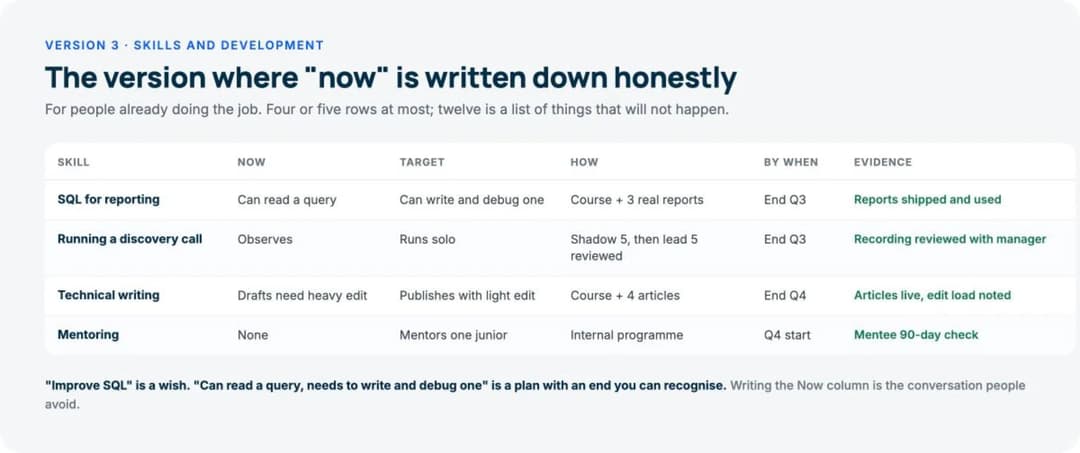
Filled in:
| Skill | Now | Target | How | By when | Evidence | Owner |
|---|---|---|---|---|---|---|
| SQL for reporting | Can read a query | Can write and debug one | Course + 3 real reports | End Q3 | Reports shipped and used | Employee |
| Running a discovery call | Observes | Runs solo | Shadow 5, then lead 5 reviewed | End Q3 | Recording reviewed with manager | Manager |
| Technical writing | Drafts need heavy edit | Publishes with light edit | Course + 4 articles | End Q4 | Articles live, edit load noted | Employee |
| Mentoring | None | Mentors one junior | Internal programme | Q4 start | Mentee 90-day check | Manager |
Empty, to copy:
| Skill | Now | Target | How | By when | Evidence | Owner |
|---|---|---|---|---|---|---|
The Now and Target columns are the point of this version. Writing them forces a specific claim about the current state, which is the conversation people avoid. “Improve SQL” is a wish. “Can read a query, needs to write and debug one” is a plan with an end you can recognise.
Keep this one to four or five rows. A development plan with twelve skills on it is a list of things that will not happen.
How to Create a Training Plan in Excel
You need no formulas and no macros.
Set up six columns, in this order: Topic, Method, Time, Evidence, Owner, Status.
Then three things make it usable rather than decorative:
- Make Status a dropdown, not free text. Data > Data Validation > List, with four values: Not started, Assigned, Done, Verified. Four values, because “Done” and “Verified” are genuinely different and the gap between them is where plans quietly fail.
- Freeze the header row. View > Freeze Panes. Trivial, and the reason people stop scrolling past row 20.
- One tab per person, or one row per person, never both. Mixing the two is how versions multiply. If you have more than about fifteen people in the file, you have outgrown the file.
Excel is genuinely fine for this up to roughly 20 or 30 people.
Past that, the cost isn’t the spreadsheet, it’s the reconciliation. Somebody’s local copy, somebody’s stale filter, and no way to tell whether the completion column reflects anything that actually happened. That is the point at which employee training software starts paying for itself, and published pricing starts as low as free, as we set out in our breakdown of what an LMS actually costs.
What Should Be Included in Employee Training?
Whichever version you’re using, the content sorts into four blocks:
- Context: what the company does, who the customers are, how the money works.
- Craft: the actual skills of the role. This should be roughly half of a new hire’s plan.
- Systems: the tools and processes used daily, taught next to the task that needs them rather than as a tools tour.
- Compliance: whatever is legally or contractually required, with the evidence each one needs.
The most common mistake is letting Context expand, because it’s the cheapest block to produce. Marketing already made most of it, so it fills week one, and the new hire finishes five days of videos having touched nothing. If you’re building the week-one sequence from scratch, the employee onboarding process guide covers what has to be true at each stage.
The second most common is putting compliance on day one. It has a deadline attached, so it gets front-loaded onto the worst possible day for retention. Week two still meets the deadline.
Where a Template Stops Being Enough
A template is a planning artefact. It’s excellent at that, and it has one hard limit: it records intentions, not events.
Look at the Evidence column in Version 1. Six of those ten rows need something that happened inside training material: a score, a completion, a specific attempt. A spreadsheet can hold a person’s assertion that those things occurred. It cannot produce them, and it cannot tell you:
- which specific question people keep getting wrong,
- whether two people in the same role received the same material,
- or what the completion rate is across everyone who was assigned it.
That last one matters more than it sounds. A plan that says “assigned to 40 people” and a system that says “12 of 40 finished” describe the same quarter very differently.
The fix is not more columns. It’s putting the training material itself somewhere that records what happened, and keeping the template for the planning. Our onboarding LMS page covers what that looks like for new hires specifically, and we compared the tools in the best employee onboarding software guide.
Adapting These
Staff training plan for a small team. Use Version 1, cut it to six rows, and delete the Owner column if there are only two of you. Keep Evidence, though. It’s the one column that survives being small, because it’s the only one that still tells you something when everybody already knows who’s doing what.
Shift-based and hourly staff. Compress Version 1 to two weeks and move the compliance rows earlier, because these roles usually hit the regulated work immediately. Version 2 does more of the load here than it does in an office.
Contractors and agencies. Version 2 with an extra column for which contract requires the training. When somebody asks why an external person completed your internal course, the answer should be in the row.
Remote teams. No structural change, but every row with Method “shadowing” or “guided walkthrough” needs a scheduled slot and a named person, or it won’t happen. In an office those rows self-organise. Remotely they don’t.
Frequently Asked Questions
How do you write an employee training plan?
Start with what the person should be able to do at the end, written in the language of the job rather than the language of training. Break that into topics, put them in the order the work actually needs them, then fill in method, time, evidence and owner for each row. Total the Time column before you commit to it.
What is the employee training format?
There is no standard format, which is why every template you’ll come across looks slightly different. What they share is a row per training item and columns for what, how, when. The two that separate a useful plan from a schedule are evidence and owner.
How long should an employee training plan be?
For a new hire, four weeks of rows and about 15 to 20 hours of content is a normal shape. For annual compliance, one row per requirement, usually five to ten. For development, four or five skills at most. If a plan runs past two screens, it will not be read.
Should the employee see the plan?
Yes, all three versions. For the development plan they should be writing half of it. New hires who can see the whole four weeks ask better questions and stop worrying about what they haven’t been told yet.
What is the difference between a training plan and a training matrix?
A training plan is forward-looking and per-person: what this individual will learn, and when. A training matrix is a grid of people against requirements showing current state: who’s compliant, who’s expired, who has a gap. Most teams need both, and they’re different documents with different owners.
Where does the checklist fit alongside this?
A checklist coordinates the administrative side of a new start across HR, IT and the manager, and it runs in parallel with Version 1 rather than replacing it. Ours is at onboarding checklist template, also on the page and also free.
Do I need a separate plan for each role?
Separate the role-generic part from the person-specific part. Roughly 80% of a plan is identical for anyone in that role, so write that once and reuse it. The remaining 20%, the individual goals and gaps, is per person. Rebuilding the whole thing per hire is how two people in the same job end up trained differently.
The Bottom Line
Every training plan template on the internet gives you topic, method, duration and date. Add evidence and owner, and the document becomes reviewable.
Pick the version that matches what you’re actually doing: role training for a new hire, recurring requirements with deadlines, or skills for somebody already in the seat. Fill in the Evidence column honestly, total the Time column before committing, and accept that the rows needing a score or a completion record need somewhere for that to be recorded.
Build the courses behind your plan free and turn the rows into material that produces its own evidence.