The largest public MCP directory lists more than 9,800 servers across fifteen categories: Development, Productivity, Database, Search, Web Scraping, File System, Version Control, Communication, Cloud Service, Cloud Storage, Marketing, Finance, Design, Memory, and Other. Education is not one of them.
That absence is the honest starting point for anyone searching for the best MCP servers for education. This isn’t a mature category with clear leaders and a comparison grid. It’s a thin, fast-moving long tail of mostly community-built projects, a handful of which are genuinely good.
So this guide sticks to what you can check yourself – repository names, star counts, tool counts, last-commit dates, published documentation – and sorts every server into the one distinction that decides whether it’s useful to you: whether the agent can only read your learning platform, generate text for it, or actually build and publish a course inside it. That last group is much smaller than the marketing in this space suggests.
Try Mini Course Generator free – connect an assistant and build a course from a document you already have.
Key Takeaways
- Education isn’t a category in the MCP ecosystem yet. The biggest directory lists 9,800+ servers across 15 categories and none of them is education, learning or training.
- Almost every verifiable education MCP server is a knowledge source: it reads and manipulates records inside an LMS somebody already runs. That’s useful, and it isn’t authoring.
- The strongest community project is vishalsachdev/canvas-mcp at 214 stars, with 80+ tools, 649 commits and daily activity. The Moodle and Google Classroom equivalents are much thinner.
- Not one community server in this guide creates and publishes a course. The authoring-and-publishing class is almost entirely vendor-built, and small.
- Star counts and last-commit dates are the honest quality signal here, because there are no G2 reviews for a GitHub repository.
What Is an MCP Server for Education?
An MCP server for course creation is a connector that lets an AI assistant work with an educational system – a learning platform, a course catalogue, a content library – rather than only writing text about it. MCP, the Model Context Protocol, is the open standard assistants use to reach outside tools; the server is what gives them permission to act.
In practice that means one of three quite different things, and the difference matters more than any feature list.
A knowledge source lets the agent read. Ask it which assignments are due, who has completed the compliance module, what’s in the course catalogue. It can answer, and it cannot change anything or create anything.
A component generator produces content as text. Quiz questions, lesson plans, an outline. You take that text and build the course somewhere else.
An authoring and publishing server creates the actual course object inside a platform – lessons, assessments, structure – and publishes it. A subset also exposes analytics, which is what allows an agent to act on learner results after the course is live.
Most of what gets called an “education MCP server” is in the first group. Almost all of the excitement is about the third. Keeping those apart is the single most useful thing you can do while evaluating this space, and it’s the axis this article is organised on. If you want the concept explained without the acronyms first, we wrote a plain-English version for L&D teams.
Why L&D and Education Teams Are Looking at MCP at All
The interest isn’t about the protocol. It’s about a specific, boring bottleneck that MCP happens to remove.
The documentation-to-training gap
Almost every organisation of any size has far more documented knowledge than training, and the gap grows every quarter. The reason isn’t ignorance – somebody wrote the runbook – it’s that converting documentation into a sequenced, assessed course is slow, unrewarding work that loses every scheduling argument it enters.
An assistant connected to both your documentation and a course platform closes that gap in a single request. That’s the case that gets L&D teams interested, and it’s the one that holds up best in practice.
The economics are worth spelling out, because they’re what changed rather than the technology. Building a five-lesson course from an existing runbook by hand is roughly two hours of assembly: creating lessons, pasting and reformatting content, writing quiz questions, setting access, publishing. Two hours is small enough that nobody refuses and large enough that it never reaches the top of anyone’s list. So the work sits, indefinitely, in a state of being obviously worth doing and never scheduled.
At one prompt plus half an hour of review, the same conversion moves from “we should do that” to “I did that before lunch”. Nothing about the value of the course changed. The activation energy did, and in practice that’s the variable that decided whether it existed.
Course maintenance that nobody has time for
A published course lives for years and decays invisibly. The quiz question 97% of learners pass is measuring nothing. The lesson where completion drops thirty points is losing people. The policy that changed in March is still described the old way in four places.
All of that is detectable from data the platform already holds, and almost nobody looks, because looking was manual and had no deadline. An agent with read access to results finds it in a fifteen-minute conversation – which is the argument we made at length in what an agent does after publish.
This is also the capability most likely to be missing from a server that otherwise looks capable. Authoring and analytics are separate tool groups, and plenty of servers expose the first without the second. If the value you’re expecting is “and then the agent notices something”, that expectation depends on a specific set of tools being present, and it’s worth confirming rather than assuming.
Answering questions about the LMS without opening the LMS
Underrated, and it’s where the knowledge-source servers earn their place. “Which of my team haven’t finished the security module?” is a two-minute click-path in most corporate LMS interfaces and a one-sentence question to a connected agent.
For managers who touch the LMS four times a year, that difference is the whole product. They never learned the interface, they won’t, and every quarter somebody in L&D pulls the report for them instead.
A knowledge-source server removes that request queue rather than the reporting. The report already existed; what was missing was a way to ask for it that didn’t involve learning a navigation tree designed for daily users. This is unglamorous and it’s the most reliably delivered benefit in the whole category, because reading data is the thing these servers do best.
Marking and feedback at a scale humans can’t reach
In academic settings specifically, the Canvas and Moodle servers get used for assignment triage, feedback drafting and progress summaries. This is the use case with the most active community development behind it, and it’s why the Canvas ecosystem is noticeably healthier than the rest.
The pattern behind that health is worth noting if you’re trying to predict which servers will still be maintained next year. Canvas MCP servers are largely built by instructors and graduate students who use Canvas daily and have the skills to fix what annoys them. That produces a virtuous loop – real usage, fast fixes, visible commits – which is exactly what the Moodle and Google Classroom ecosystems lack, despite Moodle’s far larger installed base.
Institutional buyers should read that as a signal rather than a coincidence. A server maintained by someone who depends on it personally is more durable than one built as a portfolio project, and the commit history tells you which is which.
Getting content out of one system and into another
Migration and export work is unglamorous and constant. An agent that can read a course structure from one platform and write it into another removes a class of copy-paste project that consumes real weeks.
The catch is that this needs two servers, not one – a read connection to the source and a write connection to the destination – and the write half is the scarce one. In practice most migration work done this way today is read-and-restructure, with the final import still handled by whatever bulk-upload facility the destination platform offers. That’s still a large saving, and it’s a smaller claim than “the agent migrates your LMS”.
The bet on where this goes
The honest one. Several teams adopting MCP in education aren’t solving today’s problem – they’re positioning for a workflow where the assistant is the primary interface and the platform is infrastructure behind it. That’s a reasonable bet and it’s still a bet, and it’s worth naming as one.
What to Look for in an Education MCP Server
Eight things worth checking, in roughly the order that eliminates candidates fastest.
Which of the three classes it’s in
Ask first, because it makes most other questions irrelevant. A knowledge source cannot build a course regardless of how capable the model driving it is. If your problem is that training doesn’t exist, a read-only server does not solve it and no amount of prompt engineering changes that.
The tool list
The single most useful evaluation move in this entire space, and almost nobody does it.
An MCP server exposes named actions. That list is the technical contract between server and client, and it’s definitive in a way marketing copy isn’t. If create_course isn’t in the list, the server cannot create a course.
Get it two ways: connect the server and ask your assistant to enumerate the tools it exposes, or ask the vendor to send the list. It’s a question with exactly one correct answer.
What to look for once you have it: verbs. A list dominated by get_, list_ and search_ is a knowledge source regardless of how the page describes it. A list containing create_, update_ and publish_ is something else. This takes about thirty seconds to assess and it settles a question that a sales conversation can take two calls to reach.
Last-commit date
For community projects this is the quality signal that matters most, and it’s freely available.
The APIs underneath these servers change. A Canvas MCP server last touched fourteen months ago is running against an API that has moved, and the failures are silent – a tool that returns nothing looks the same as a course with no assignments. Check the repository’s commit history before you install anything.
Silent failure is the specific risk worth understanding, because it’s what makes staleness dangerous rather than merely inconvenient. When a REST integration breaks, something errors and somebody notices. When an MCP tool returns an empty result, the assistant reports it as a fact: there are no assignments due, nobody has outstanding training. The answer is confident, plausible, and wrong, and nothing in the conversation flags it.
The practical defence is to spot-check anything consequential against the platform’s own interface for the first few weeks, and to treat a suspiciously clean answer as a prompt to verify rather than a reason to relax.
Whose permissions it uses
The answer should be yours, established through an authorization step you performed. Remote servers using OAuth bind to your account and act within your existing permissions.
Be more careful with self-hosted community servers that want an API token: an LMS admin token handed to an agent is a much broader grant than most people intend, and it usually can’t be scoped down afterwards.
The asymmetry is easy to miss. OAuth binds the connection to a person and inherits that person’s permissions, so an instructor’s connection sees an instructor’s courses. An admin API token carries admin authority regardless of who is prompting, which means a well-meaning question can return data the asker would never have been able to reach through the interface. Where a server offers both, take the OAuth path even if it’s more setup.
Whether analytics are exposed
Plenty of servers let an agent create things. Far fewer let it read what happened afterwards, and a write-only connection cannot do any post-publish work at all.
If the value you’re expecting includes “and then it notices the quiz question everyone passes”, confirm that learner results are in the tool list. This is the most common gap between what people expect and what they get.
Client support
Remote MCP servers work with clients that support them: Claude, ChatGPT in Developer Mode, Manus, Cursor and others. If your organisation has standardised on an assistant without support, capability is academic.
For enterprise buyers there’s a second question underneath: whether your admin policy permits adding third-party MCP servers at all. In managed environments that decides it more often than the technical answer.
Data handling and student records
The one to slow down on in an academic context. A server that gives an agent access to Canvas or Moodle is giving it access to student records, and in US institutions that’s FERPA-governed data.
Community servers do not come with a compliance posture. They come with a licence file. That doesn’t make them unusable, and it does mean the assessment is yours to make rather than one you can outsource to a vendor – which is a materially different position from buying software.
Three specifics worth establishing before an institutional deployment. Where the data goes: a locally-run server keeps LMS data on your machine and still sends whatever the agent reads to the model provider, which is the part people miss. What gets retained: a stateless server holds nothing between calls, which is why that design choice appears in the entries below as a genuine plus. Who is accountable: with a vendor there’s a contract; with a community repository there’s a maintainer with no obligation to you at all.
None of that is a reason to avoid community servers. It’s a reason to route the decision through whoever normally signs off on data handling, rather than treating an install command as a technical detail.
Whether the content can leave
For anything authoring-related, check export before you commit. SCORM and PDF, confirmed in a trial rather than promised in a call. A server that builds courses quickly into a platform you can’t export from has moved your problem rather than solved it.
The Best MCP Servers for Education and L&D
Below is every education MCP server with a published, checkable record, sorted into the three classes.
Methodology, stated plainly. There are no G2 or Capterra reviews for a GitHub repository, so the usual review-sourced pros and cons don’t exist in this category. Every entry below is assessed on evidence you can check yourself: star count, tool count where published, last-commit date, stated client support, and the vendor’s or maintainer’s own documentation. Figures were checked in August 2026 and this category moves monthly, so re-check before you rely on anything here.
One disclosure up front: Mini Course Generator is our product, and it appears in the authoring section below. We’ve included its limitations along with everything else, and you should weight our description of our own server accordingly.
Comparison table
| Server | Class | Evidence | Best for |
|---|---|---|---|
| Mini Course Generator MCP | Authoring + publishing + analytics | Vendor-documented, OAuth, 3 documented clients | Building and running courses from documents you own |
| vishalsachdev/canvas-mcp | Knowledge source (Canvas) | 214 stars, 80+ tools, 5 agent skills, MIT, active daily | Instructors and students working inside Canvas |
| DMontgomery40/mcp-canvas-lms | Knowledge source (Canvas) | 103 stars, 54 tools, v2.2, updated 31 May | Canvas API coverage in JavaScript environments |
| peancor/moodle-mcp-server | Knowledge source (Moodle) | 42 stars, updated 22 Feb | Moodle sites needing basic agent access |
| loyaniu/moodle-mcp | Knowledge source (Moodle) | 32 stars, Python, updated 29 Jun | Python-based Moodle integrations |
| kaorii-ako/Shiori-v1 | Study companion (Classroom) | 44 stars, updated 25 Jul | Students, not institutions |
| zainf2327/mcp-classroom | Knowledge source (Classroom) | 6 stars, stateless, updated 28 May | Light Google Classroom access |
| Udemy Business MCP | Knowledge source | Reported GA March 2026 | Surfacing licensed course library content |
| Fastio MCP | Storage / memory / search | Vendor-documented | Agent file storage, not course work |
| NotebookLM MCP | Knowledge source | Community, in the main directory | Grounded answers from your own notebooks |
Nothing in that table between rows two and ten authors a course. That’s how small the authoring class is, not a gap in the table.
Authoring and Publishing
The smallest class, and the only one that ends with a course somebody can take.
1. Mini Course Generator MCP
Top features
- Creates structured courses with lessons, quizzes and interactive blocks inside the platform
- Publishes to a live URL from the same prompt
- Reads learner results after publish, so an agent can harden quizzes and rewrite lessons
- OAuth authorization scoped to your own account permissions
- Documented setup for ChatGPT Developer Mode, Claude Connectors and Manus
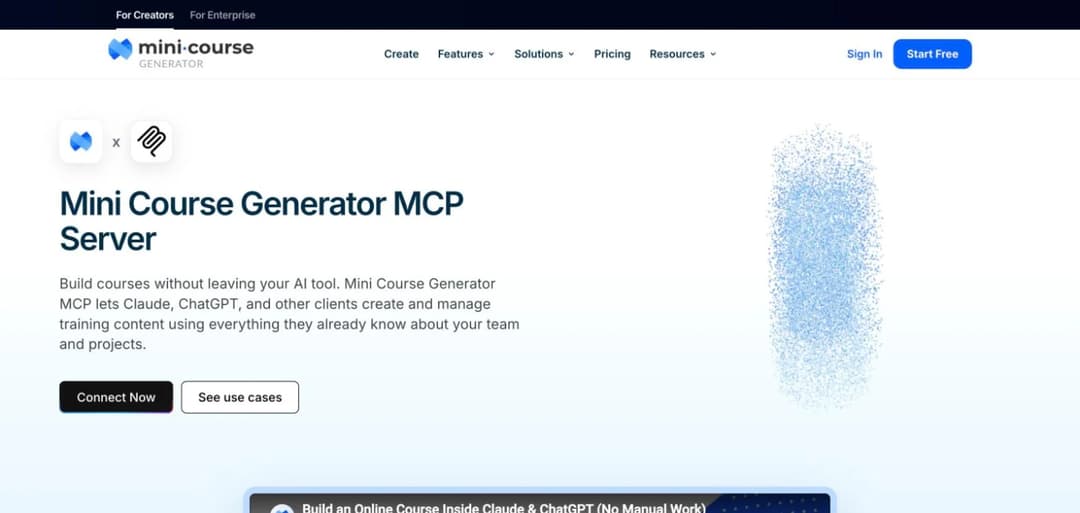
This is our own server, so treat the description as ours and check the tool list yourself. It sits in the authoring class: the agent builds the course object rather than returning text, publishes it, and can subsequently read how it performed. The connection endpoint is documented publicly, authorization is OAuth against your account, and setup is four steps in whichever client you use.
The use it’s built around is the documentation-to-training conversion. Because your assistant is already connected to Confluence, Notion, Slack or Drive, you name the source rather than pasting it, and the course is generated from your own material – which is what makes it specific to your organisation rather than generically correct. The Confluence recipe is the worked example.
Pros
- Sourced from the vendor’s published documentation: authoring, publishing and analytics are all exposed to the agent, which is uncommon in this space
- Setup is documented for three named clients rather than described generically
- OAuth-scoped permissions rather than an API token handed over
Cons
- Requires an account with us, unlike the community servers, which is a real cost if you already run an LMS you’re happy with
- No published SOC 2, ISO or GDPR compliance statement covering the MCP server; if you need one, ask for it in writing rather than inferring it
2. Udemy Business MCP
Top features
- Surfaces content from a licensed Udemy Business library to a connected agent
- Positioned as a knowledge source for existing subscribers
- Reported generally available since March 2026
It’s the most prominent public-company entry in the education MCP space, and it shows the pattern: a large content vendor exposing its library to agents rather than exposing authoring.
Pros
- The first widely reported MCP server from a major corporate learning vendor, and an early sign of where the category is heading
- Useful if you already pay for the library, since it surfaces content into the assistant your team already uses
Cons
- A knowledge source, not an authoring surface: it can tell an agent what courses exist and cannot build one
- Requires an existing Udemy Business subscription, so it isn’t an option you can evaluate independently
- The current capability set isn’t documented on a public vendor page, so confirm it with Udemy before you rely on the March 2026 status
Knowledge Sources: Canvas
The healthiest community ecosystem in education MCP by a wide margin, and it isn’t close.
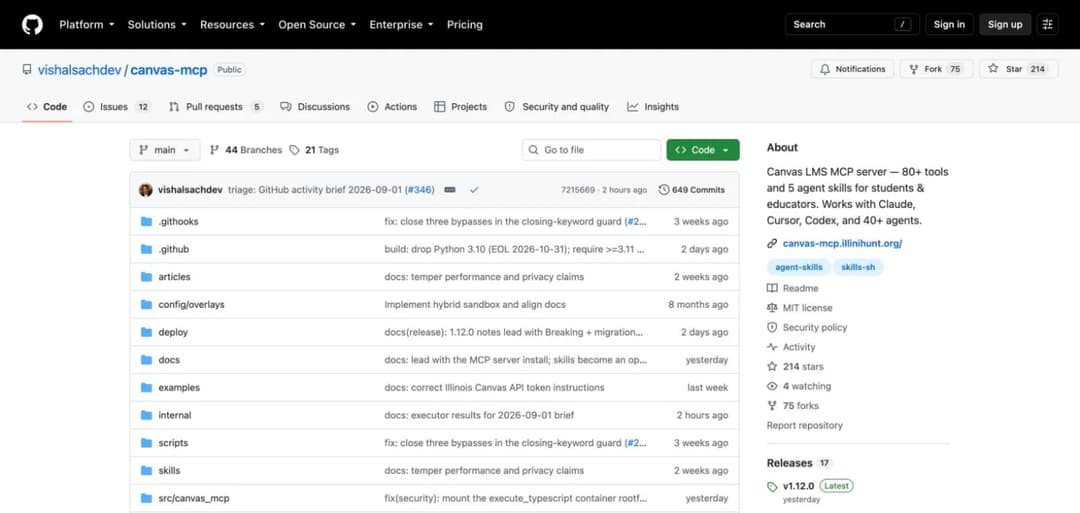
3. vishalsachdev/canvas-mcp
Top features
- 80+ tools covering a broad span of the Canvas API
- 5 bundled agent skills
- Stated compatibility with Claude, Cursor, Codex and 40+ agents
- Written in Python
- 214 stars, 75 forks and 649 commits, with new commits landing daily
- MIT licensed, with releases through v1.12.0
The strongest community education MCP server in this guide, on every observable signal. The tool count is the highest of any education server here, the commit cadence is daily rather than sporadic (649 commits, with releases through v1.12.0), and the client compatibility claim is unusually broad.
It’s aimed at students and educators working inside Canvas: assignments, grading, course content, submissions, calendar. Read and manipulate, not author from scratch.
Pros
- Evidence from the repository: 80+ tools is roughly 50% more coverage than the next Canvas server, and the daily commit cadence means API drift gets fixed
- The broadest stated client compatibility of anything in this list
- Bundled agent skills lower the setup effort compared with a bare API wrapper
Cons
- Community-maintained by an individual, with the succession risk that implies for anything institutional, though the MIT licence means a fork is always possible
- No compliance posture, which matters because Canvas holds FERPA-governed student records
- Canvas-only, so it does nothing for an organisation running a corporate LMS
4. DMontgomery40/mcp-canvas-lms
Top features
- 54 tools, at version 2.2
- JavaScript implementation
- 103 stars
- Last updated 31 May 2026
The second Canvas option, and the natural pick if your environment is JavaScript rather than Python. Version 2.2 with 54 documented tools indicates real iteration rather than a weekend project.
Pros
- A published version number and tool count, which makes it easier to assess than repositories that document neither
- JavaScript implementation fits Node-based deployments without adding a Python runtime
Cons
- Last commit 31 May 2026 against a daily-updated alternative; three months is long enough for API drift in this space
- Roughly a third fewer tools than the leading Canvas server
- Same FERPA and succession considerations as any community server
5. Other Canvas servers
Three more exist and are worth knowing about rather than adopting: lucanardinocchi/canvas-mcp (18 stars, TypeScript, updated 8 May), r-huijts/canvas-mcp (12 stars, TypeScript, 30 June) and plyght/canvas-mcp (12 stars, updated 30 October 2025).
All three are functional starting points and none has the tool coverage or maintenance cadence of the top two. Their main value is as reference implementations if you’re building something internal.
Knowledge Sources: Moodle
A thinner ecosystem than Canvas, and worth setting expectations about. GitHub holds 58 repositories, of which only about five have more than four stars.
6. peancor/moodle-mcp-server
Top features
- 42 stars, the highest of any Moodle MCP server
- JavaScript implementation
- Interacts with Moodle through its web services API
- Last updated 22 February 2026
The most-starred Moodle option. Given Moodle’s enormous installed base, a 42-star ceiling tells you something real about how early this is for self-hosted LMS platforms.
Pros
- The most-adopted Moodle server, which usually means the most-tested happy path
- Works through Moodle’s standard web services API, so it doesn’t require unusual server configuration
Cons
- Last commit 22 February 2026 – more than six months without an update, which is a long time in this category
- 42 stars on a platform with hundreds of thousands of installations means a very small user base to learn from
- Moodle web services must be enabled and tokens issued, which many institutional admins won’t do casually
7. loyaniu/moodle-mcp
Top features
- 32 stars, Python implementation
- Documented as providing capabilities to interact with Moodle LMS
- Last updated 29 June 2026
The better-maintained of the two leading Moodle servers by four months, and the right choice if your environment is Python.
Pros
- More recent maintenance than the more-starred alternative, which matters more than star count for API compatibility
- Python fits the environments most institutional data teams already run
Cons
- Documentation is thin relative to the Canvas leaders, with no published tool count
- Same token-based access model, with the same over-broad permission risk
- Read and interact only; it will not author a course
8. Other Moodle servers
1alexandrer/moodle-mcp (16 stars, TypeScript, 21 April) describes itself as a template rather than a finished server. Deeptanshuu/mydy-lms-helper (7 stars, Python, 28 April) bundles a terminal UI with the server. Snaw80/moodle-mcp (4 stars, Python, 13 June) exposes Moodle web services to Claude and Cursor.
Useful as starting points for an internal build. Not things to depend on institutionally.
Knowledge Sources: Google Classroom
The thinnest of the three LMS ecosystems. 22 repositories, and only two above single-digit stars.
9. kaorii-ako/Shiori-v1
Top features
- 44 stars, JavaScript
- Google Classroom sync, Gemini-generated study plans, spaced-repetition flashcards
- Last updated 25 July 2026
The most-starred Google Classroom project, and it’s worth being precise: it’s an AI study companion that syncs with Classroom, not a general-purpose MCP server for institutions. That distinction matters when you’re evaluating.
Pros
- The most complete Classroom-adjacent project available, combining sync with actual study functionality
- Recent maintenance relative to most of this ecosystem
Cons
- Built for students rather than institutions or L&D teams, so the shape is wrong for organisational use
- Not a neutral API server; it carries product opinions about how studying should work
- Ties into Gemini specifically, which reduces client flexibility
10. zainf2327/mcp-classroom
Top features
- Stateless MCP server for Google Classroom
- Python implementation
- 6 stars, last updated 28 May 2026
The most credible neutral Classroom server. Stateless design is a genuine plus for a server handling education records, since it holds nothing between calls.
Pros
- Stateless architecture reduces the data-at-rest question, which is the right instinct for student data
- Neutral API access rather than an opinionated product
Cons
- 6 stars means essentially no community validation; you are an early user
- No published tool list, so capability has to be established by connecting it
- Google Classroom’s API is narrower than Canvas’s, which caps what any server here can offer
Other Classroom servers
The remaining Classroom repositories – faizan45640/google-classroom-mcp-server (5 stars), adriasantacreu/google-classroom-mcp (1), Shiv-D-Coder/google-mcp-agent (1), plus several at zero – are experiments, and not something to build on.
Adjacent Servers Worth Knowing
Not education servers, and they show up in education workflows constantly.
NotebookLM MCP lets agents query your own notebooks for grounded answers. It appears in the main directory as a community server and is the closest thing to an education entry in a catalogue of 9,800+.
Fastio MCP provides storage, agent memory and search. It’s a genuine utility server and it has nothing to do with course work.
Filesystem and Brave Search MCP servers appear on most education lists. They’re general-purpose servers being used for education tasks, which is fine, and listing them as education servers inflates the apparent size of this category.
That last point is worth sitting with. A meaningful share of what gets called an “education MCP server” is general-purpose infrastructure with an education use case attached. Strip those out and the category is smaller than it first looks.
How to Install and Test One Without Breaking Anything
A short, practical sequence that catches most problems before they reach anyone who matters.
Start in a sandbox, not production
Every major LMS offers a test instance, and this is what they’re for. Canvas has free-for-teacher accounts, Moodle can be stood up locally in an afternoon, and Google Classroom accounts are free.
Connecting a community server to a live institutional instance as a first step is the mistake that generates the stories. The failure mode isn’t usually dramatic – it’s an agent enthusiastically performing a bulk operation somebody asked for loosely.
Issue the narrowest credential that works
If the server takes an API token, create a dedicated one rather than reusing yours, and give it the smallest role that lets the tools function. If the platform supports scoped tokens, scope them.
Write down what you issued and where. Six months from now, an unlabelled token with broad permissions is a security finding waiting to be written up.
Ask for the tool list first, before anything else
The first prompt after connecting should be “list the tools this connector exposes and what each one does”. Read it. That tells you what the server can do, and it frequently disagrees with the README.
Run five read-only questions
Before asking it to change anything, verify it reads correctly. Ask five questions you already know the answers to – how many assignments in this course, who is enrolled, what’s the average score on this quiz – and check each one against the interface.
This is the step that catches a stale server, because a stale server answers confidently and wrongly rather than erroring.
Then one small write, and verify it in the interface
Create one item. Then open the platform and look at it. Confirm it landed where you expected, with the properties you expected.
The whole sequence takes about half an hour and it’s the difference between an evaluation and a hope.
The Student Data Question, in More Detail
The section institutional buyers should read twice.
What connecting actually exposes
An MCP server connected to Canvas or Moodle with instructor or admin credentials can reach names, enrolments, submissions, grades, feedback and access patterns. In US institutions that’s FERPA-governed education records. In the EU it’s personal data under GDPR, with the institution as controller.
The agent doesn’t have to be asked for that data specifically. Any question broad enough to require it – “summarise how this cohort is doing” – pulls it into the conversation, and therefore to whichever model provider is serving that conversation.
The three questions your institution will ask
Which model provider sees the data, and under what terms? This is a question about your assistant’s agreement, not the MCP server’s. An enterprise agreement with a no-training-on-your-data clause is a materially different position from a personal account.
Is the server storing anything? A stateless server holds nothing between calls. One that caches for performance has created a second copy of student records in a location nobody has documented.
Who approved this? Nobody wants to discover an unreviewed integration after an incident. Route it through the normal process, even when the install is one command.
Why this is harder than a normal integration review
Because the usual artefacts don’t exist. There’s no vendor security questionnaire for a GitHub repository, no SOC 2 report, no DPA to sign, no support contract, and no named party who owes you anything.
That doesn’t make community servers unusable – plenty of institutions run open-source software responsibly. It means the assessment shifts to reading the code, or to running it in an environment where the blast radius is understood, rather than to reviewing documents somebody else prepared.
The pragmatic middle path
Most institutions that have adopted these successfully did the same thing: individual instructors using OAuth-scoped connections against their own courses, rather than an institutional deployment with an admin token.
That confines the data to what that instructor could already see, keeps accountability with a person, and produces most of the benefit. It scales worse and it’s much easier to approve, and for a category this young that’s usually the right trade.
How to Choose the Best MCP Server for Your Situation
Four questions, in the order that resolves fastest.
Do you need to read a platform, or build training?
The class question, and it settles most decisions on its own.
If you run Canvas or Moodle and want an agent that answers questions, drafts feedback and triages assignments, a community knowledge-source server is the right answer and it costs nothing. Start with the most-maintained one for your platform.
If your problem is that the training doesn’t exist, no knowledge-source server helps. You need something in the authoring class, and that group is small and mostly vendor-built.
Is the project maintained well enough to depend on?
For community servers, check three things before installing: the last commit date, the number of open issues relative to stars, and whether the README documents a tool list.
A server last touched six months ago in a category where the underlying APIs shift quarterly is a maintenance liability, and the failure mode is silent – a tool returning nothing looks exactly like a course with no assignments.
What data does it touch, and under what authority?
The question that gets skipped and shouldn’t.
An MCP server connected to Canvas or Moodle can reach student records. In US institutions those are FERPA-governed. Community servers ship with a licence file rather than a compliance posture, which means the assessment is yours to perform rather than one you can point at a vendor for.
Prefer OAuth-scoped connections over API tokens where you have the choice. An LMS admin token handed to an agent is a far broader grant than most people intend, and it usually can’t be narrowed afterwards.
Will this still be true in six months?
Probably not, and planning for that is the mature move.
This category changes monthly. Servers ship, get extended, get abandoned. The habits that survive it: date every capability claim you rely on, prefer the live tool list to any published page, and re-verify before signing rather than before demoing. The same rule runs through our evaluation framework for LMS MCP servers.
MCP vs the Alternatives You Already Have
Worth working through, because most institutions evaluating an MCP server already own two or three other ways to do something similar, and nobody compares them side by side.
MCP vs LTI
LTI – Learning Tools Interoperability – is the standard that has connected external tools to LMS platforms for over a decade. If you’ve launched a third-party tool from inside Canvas or Moodle without logging in again, that was LTI.
They solve genuinely different problems. LTI puts a tool inside the LMS, with the LMS controlling launch, identity and grade passback. MCP puts the LMS inside an agent’s reach, with the agent controlling what happens and the LMS as one of several systems it can act on.
Which means the question isn’t which is better. It’s where you want the user to be. If learners should stay in the LMS and use a tool, that’s LTI. If staff should stay in an assistant and reach the LMS, that’s MCP.
The practical note: LTI is mature, certified and understood by every LMS administrator you’ll deal with. MCP is none of those things yet, and an integration review will go faster if you don’t describe MCP as a replacement for something it isn’t.
MCP vs writing against the REST API
Every LMS worth using has a REST API, and an MCP server is generally a wrapper around one. So why not just write the integration?
Write the integration when the workflow is fixed. A nightly job syncing enrolments should be code. It runs the same way every time, it needs to be testable, and you do not want a language model in that path.
Use MCP when the workflow is a question. “Which cohorts are behind, and draft feedback for the ones that are” is not a job you’d write, because the shape changes every time you ask it. That’s the space MCP occupies, and it’s why the two coexist rather than compete.
The failure mode to avoid is using an agent for something deterministic. It’s slower, less reliable and more expensive than the twenty lines of Python that would have done it.
MCP vs your LMS’s own AI features
Most major LMS platforms now ship AI features – content suggestions, quiz generation, summaries – inside their own interface.
Those are usually easier to adopt, because they’re already procured, already reviewed and already inside the security perimeter. If a native feature does what you need, use it.
The two things a native feature can’t do: work across systems, since it only sees its own platform, and let you choose the model or the interface. An agent connected over MCP can read your documentation store, your ticket system and your LMS in one conversation. A native feature sees the LMS.
For most course-creation work the cross-system property is the whole point, because the source material lives somewhere the LMS has never heard of.
A quick decision table
| If you need | Use |
|---|---|
| A tool launched inside the LMS, with grade passback | LTI |
| A scheduled, repeatable, deterministic sync | The REST API |
| Content help inside the platform you already run | Your LMS’s native AI features |
| Ad-hoc questions across several systems at once | An MCP knowledge-source server |
| Training created from material held outside the LMS | An MCP authoring server |
What to Expect Over the Next Year
Four predictions, offered as predictions rather than facts, because this article will be read after some of them have resolved.
LMS vendors will ship official servers, and most will be read-only. The incentive points that way: exposing your catalogue to agents drives usage, exposing authoring invites an agent to build content the vendor didn’t. Expect the official-server wave to be knowledge sources, with authoring arriving later and more cautiously.
The community long tail will consolidate. Fifty-eight Moodle servers is what an early ecosystem looks like. In a year expect three or four with real adoption and the rest archived. The ones that survive will be the ones whose maintainers use them daily.
The security conversation will get formal. Right now institutional adoption is mostly individual instructors with scoped credentials. The first well-publicised incident involving an agent and student records will change that, and the sensible move is to have your position written down beforehand.
The Skills-versus-MCP question will keep being asked. Whether something is replacing MCP servers is already one of the most common questions people ask about the protocol. That debate isn’t going to resolve into one winner, because the two things aren’t substitutes – we set out why in Skills vs MCP for course creation.
What we’d bet against: education becoming a top-level category in the major directories within a year. The volume isn’t there yet, and directory categories follow volume.
Now Over to You
The best MCP servers for education in 2026 are, with few exceptions, servers that read a learning platform you already run. The Canvas ecosystem is genuinely healthy – 214 stars and 80+ tools on the leading project, with daily commits. Moodle and Google Classroom are much thinner, and the absence of an education category in a directory of 9,800+ servers tells you where this sits in the wider ecosystem.
What almost nothing in the community space does is build a course. That gap is the whole reason this category feels smaller than the conversation around it, and it’s the distinction to hold onto while evaluating: reading your LMS and creating training inside it are different products wearing similar words.
If you run Canvas or Moodle and want better answers out of it, install the best-maintained community server for your platform, check the commit date first, and be deliberate about the token you issue it.
If the problem is that training doesn’t exist while your documentation keeps growing, that’s an authoring problem, and it’s what the MCP server for course creation was built for. The honest test takes about a minute to set up and one prompt to run: point it at a document you’ve been meaning to turn into a course for six months, and see what comes back.
Frequently Asked Questions
What is the best MCP server for education?
It depends on which of two problems you have. For working inside Canvas, vishalsachdev/canvas-mcp is the strongest community option on every observable signal – 214 stars, 80+ tools, daily commits, MIT licensed. For creating training that doesn’t exist yet, no community server does that, and you need something in the authoring class.
Are there MCP servers for Moodle?
Yes, but the ecosystem is thin. GitHub holds 58 Moodle MCP repositories and only about five have more than four stars. peancor/moodle-mcp-server leads on adoption at 42 stars; loyaniu/moodle-mcp is better maintained, with a June 2026 commit against February. Both read and interact rather than author.
Can an MCP server create a course in my LMS?
Not the community ones. Every Canvas, Moodle and Google Classroom server in this guide reads and manipulates existing content. Creating and publishing a course is an authoring capability, and that class is small and almost entirely vendor-built.
Is it safe to connect an AI agent to student records?
It requires a deliberate decision rather than a default. Community servers ship with a licence, not a compliance posture, and Canvas or Moodle access means FERPA-governed data in US institutions. Prefer OAuth-scoped connections over API tokens, and treat an LMS admin token handed to an agent as the broad grant it is.
How do I know what an MCP server can actually do?
Ask for the tool list. An MCP server exposes named actions, and that list is the technical contract – definitive in a way a marketing page isn’t. Connect it and ask your assistant to enumerate the tools, or ask the vendor to send the list.
Why are there so few education MCP servers?
Partly timing – MCP is young and education adopts slowly. Partly incentives: most servers are built by developers scratching their own itch, and there are more developers using Canvas as students than there are building corporate learning tools. And partly counting: a large share of published education lists are general-purpose servers with an education use case attached.
How often do these servers change?
Monthly, in practice. Tool lists get extended, projects get abandoned, and the underlying LMS APIs shift. Anything you rely on should be re-verified before you commit rather than before you demo.