Ask instructional designers which branching scenario software to use and you’ll be pointed at a Reddit thread from r/instructionaldesign where people ask each other the same thing.
That’s not a joke. Instructional designers have been building branching scenarios for twenty years using a combination of a free 2009 hypertext tool, a $1,749-a-year authoring suite, and – genuinely, on Christy Tucker’s widely-cited comparison – Google Forms. The tooling never consolidated, so practitioners still ask each other.
Vendors spend real money marketing to this category, and practitioners still send each other to a forum thread.
This article covers ten tools with the prices they actually publish, and then the part the existing comparisons don’t: three quite different things are now being sold as “AI branching scenario authoring”, and only one of them removes the week of work.
Try Mini Course Generator free – build an interactive scenario without an authoring seat.
Key Takeaways
– The published cost of the incumbent route is high: Articulate 360 AI is $1,749 per user per year (Teams) and iSpring Suite runs $970 to $1,290 per author per year. Twine is free and always has been.
– “AI authoring” now means three different things: AI inside the editor (BranchTrack, Near-Life, Articulate), AI writing the scenario text for you to build, and an agent producing the finished scored activity. Only the third removes the assembly.
– The design failure that kills branching scenarios isn’t the tool. It’s building a tree where one path is obviously correct, which teaches reading comprehension.
– Most teams need three to five decision points, not thirty. Scope discipline beats tool choice.
What Is Branching Scenario Software?
Branching scenario software builds training where the learner makes choices and each choice changes what happens next. Instead of reading about how to handle a situation, they handle one, and the consequences follow from what they picked.
Structurally it’s a decision tree: a situation, two to four options, and a different next node depending on the choice. Good ones end in materially different outcomes rather than converging back to the same lesson.
The reason this format persists despite being expensive to build is that it tests something no quiz does. A multiple-choice question asks whether somebody knows the rule. A branching scenario asks whether they’d apply it while a customer is being persuasive, the pressure is on, and the wrong option is the comfortable one. Those come apart constantly in practice, which is why compliance training that everybody passes still fails to change behaviour.
Three related terms get used interchangeably and shouldn’t be. Scenario-based learning is the broader family, including linear case studies with no choices. Simulation usually implies a modelled system, like software or equipment, rather than a conversation. Branching scenario specifically means learner choice changing the path.
Why Branching Scenarios Work, and When They Don’t
Worth being honest in both directions, because this format gets oversold and then abandoned.
They surface the gap between knowing and doing
The core argument. Somebody can pass a policy quiz at 100% and still agree to the thing they shouldn’t when a customer is friendly and persistent about it. The quiz tested recall; the scenario tests application under social pressure.
If your training problem is “they know the rule and don’t follow it”, this is the format that addresses it, and almost nothing else does.
Consequences teach better than corrections
In a quiz, a wrong answer produces a red X and an explanation. In a branching scenario, a wrong answer produces a customer who escalates, and the learner spends the next two nodes dealing with it.
That’s a different kind of learning, and it’s stickier. It’s also why the design has to let people fail properly rather than gently redirecting them.
They’re the only good format for judgement calls
Where the right answer depends on circumstances – when to escalate, when to make an exception, when to walk away from a deal – there’s no rule to memorise. There’s a pattern of judgement, and a branching scenario is the only common training format that can represent one.
Where they fail: the obvious-answer tree
The most common failure, and it’s a design problem rather than a tool problem.
If one option is clearly the professional choice and the other two are obviously wrong, you’ve built a reading-comprehension test with extra production cost. Every learner picks the right one, everyone passes, and nothing was measured.
The fix is uncomfortable: make the wrong option attractive. The tempting shortcut, the answer that makes the customer happy right now, the thing an experienced person might actually do. If your subject-matter expert can’t defend at least two options, the scenario isn’t ready.
Where they fail: scope
Thirty decision points and forty-eight endings is a project, not a training asset. It takes months, nobody maintains it, and completion rates are poor because learners can tell how long it is.
Three to five decision points with genuinely different endings does most of the work at a fraction of the cost. Scope discipline is the single highest-leverage decision in this format.
Where they fail: no scoring
A branching scenario that ends with “here’s what happened” and no score produces an experience rather than an assessment. That’s fine if it’s practice. If somebody needs to evidence that a team can handle the situation, the scenario needs criteria and a result – the same discipline covered in building a rubric-graded roleplay.
What to Look For in Branching Scenario Software
Eight things, roughly in the order that narrows the field.
How you see and edit the structure
The thing you’ll spend most of your time fighting. Branching scenarios are graphs, and editing a graph in a linear interface is miserable.
Twine’s whole reputation rests on this: it shows the map, and dragging nodes around is trivial. Tools that hide the structure behind slide navigation make revision expensive, which matters because the first draft of a branching scenario is always wrong and you’ll restructure it two or three times.
Ask to see the editing view for a scenario that already has fifteen nodes, not a blank one.
Whether it scores
Some tools produce an experience; others produce an assessment. If you need evidence rather than engagement, confirm there’s a score, that you control what it’s based on, and that it can leave the tool.
SCORM or xAPI export
The practical constraint for most corporate teams. If the scenario has to run inside an LMS you don’t control, export is the whole question.
Coverage varies more than you’d expect: Articulate publishes SCORM, xAPI, cmi5 and AICC export across its plans. Others don’t state it on their marketing pages at all, which means asking rather than assuming. If you’re new to the mechanics, our AI SCORM generator guide covers what the package actually has to contain.
Media requirements
Be honest about this before choosing, because it drives cost more than licence fees do.
A text-and-image scenario can be built in an afternoon. A video-based scenario needs a shoot, actors, and a re-shoot every time the process changes. Near-Life builds around interactive video and VR, which is genuinely powerful and commits you to a production pipeline.
Most teams get most of the value from text.
Cost per author, not cost per seat
The pricing model in this category is usually per author per year, and that’s the number to compare.
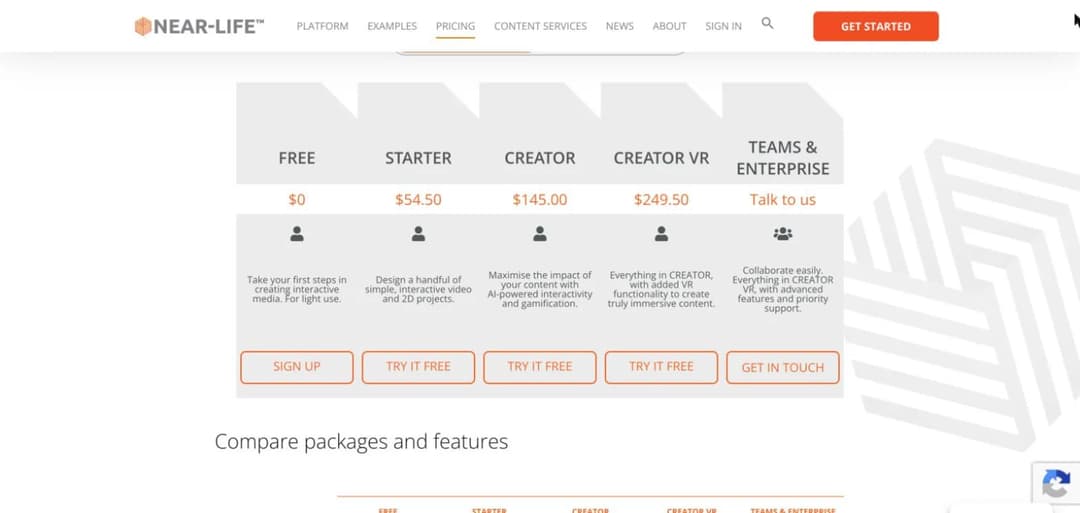
The published figures: Articulate 360 AI Teams at $1,749 per user per year, Personal at $1,449; iSpring Suite at $970 per author per year, Suite AI at $1,290, Cloud AI at $720; H5P.com Premium from $1,560 a year for around three authors; BranchTrack Professional from $83 a month and Team from $299 a month, annual billing only, on top of a genuinely free single-simulation tier; Near-Life from $54.50 a month (Starter) through $145 (Creator) to $249.50 (Creator VR), with a free tier and a 14-day trial. Twine is free. Google Forms is free.
That range is the point. The dedicated scenario tools are an order of magnitude cheaper than the general authoring suites, and two of them have free tiers you can ship from.
If one person builds all your scenarios, the seat cost is fine. If you want twelve subject-matter experts contributing, per-author pricing decides your architecture.
What happens when the process changes
The maintenance question, and it’s usually unasked.
A branching scenario encodes a process. When the process changes, every affected node changes, and in a heavily-branched tree the affected nodes aren’t obvious. Ask how you’d find them. If the answer is “click through every path”, factor that into the total cost.
Accessibility
Branching scenarios are interaction-heavy, which makes them easy to build inaccessibly. BranchTrack publishes WCAG 2.0 compliance; most vendors don’t state a standard. If you have a legal obligation, get it in writing.
What “AI” means in this specific product
The question that most needs asking in 2026, because the same two words describe three different products. The next section separates them.
The Three Things Called “AI Branching Scenario Authoring”
Every tool in this category now advertises AI. They are not doing the same thing, and the difference determines whether you save an hour or a week.
Type 1: AI inside the editor
The most common, and the least transformative. The tool remains what it was; AI accelerates pieces of it.
BranchTrack’s AI Co-pilot generates visuals, adds automatic narration and handles translation. Near-Life’s generative AI creates characters you can place into different scenes. Articulate generates images, narration and quizzes.
What it saves: asset production. Real time, particularly on visuals and voice.
What it doesn’t save: the structural work. You still design the tree, write every node, decide the branches and wire it together. That’s the week.
Type 2: AI writes the text, you build the scenario
The workflow most instructional designers are actually using right now, and it involves no purpose-built AI feature at all.
You ask a general assistant for scenario text – situation, options, consequences – and paste the results into Twine or Storyline. Christy Tucker writes about using AI for scenario content along these lines, and it’s an accurate picture of how the work splits today: the assistant writes, the person builds.
What it saves: writing, which is genuinely half of it.
What it doesn’t save: the building. Every node, link and variable is still placed by hand.
Type 3: an agent produces the finished activity
The newest and the one that changes the arithmetic, because the output is the scenario rather than its ingredients.
You describe the situation, the branches and the grading criteria in conversation. The agent produces a working, scored, self-contained activity. No editor, no node-wiring, no export step.
What it saves: the assembly, which was the expensive part all along.
The trade: less pixel-level control than a Storyline build, and you’re describing rather than dragging. For a text-based decision scenario that’s usually the right trade. For a media-rich, precisely-designed piece, it isn’t.
The honest summary: types 1 and 2 make a week-long build take three days. Type 3 makes it take an afternoon and gives up some control. Which is right depends entirely on whether pixel control matters for your scenario, and for most compliance and judgement training it doesn’t.
The Branching Scenario Tools
Disclosure: Mini Course Generator is our product, listed first because it’s ours.
| Tool | Shape | Published price | Structure view | AI type |
|---|---|---|---|---|
| Mini Course Generator | Interactive blocks inside a course platform | On the pricing page | In-course editor | Type 3 (agent-produced) |
| Twine | Open-source hypertext editor | Free | Node map, best in class | None |
| Articulate Storyline 360 | Professional authoring suite | $1,749/user/yr (Teams) | Slide-based | Type 1 |
| iSpring Suite | PowerPoint-based authoring | $970-$1,290/author/yr | Slide-based | Type 1 |
| H5P Branching Scenario | Open-source content type | Free self-hosted; H5P.com from $1,560/yr | Tree editor | None |
| BranchTrack | Dedicated scenario platform | Free; from $83/mo, $299/mo | Purpose-built | Type 1 (AI Co-pilot) |
| Near-Life | Interactive video and VR | $0 / $54.50 / $145 / $249.50 per month | Purpose-built | Type 1 (character generation) |
| ChatMapper | Dialogue-tree tool | Not covered | Dialogue tree | Not stated |
| Yo Scenario | Browser-based scenario builder | Not covered | Browser-based | Not stated |
| Google Forms | The free hack | Free | None | None |
1. Mini Course Generator
Top features
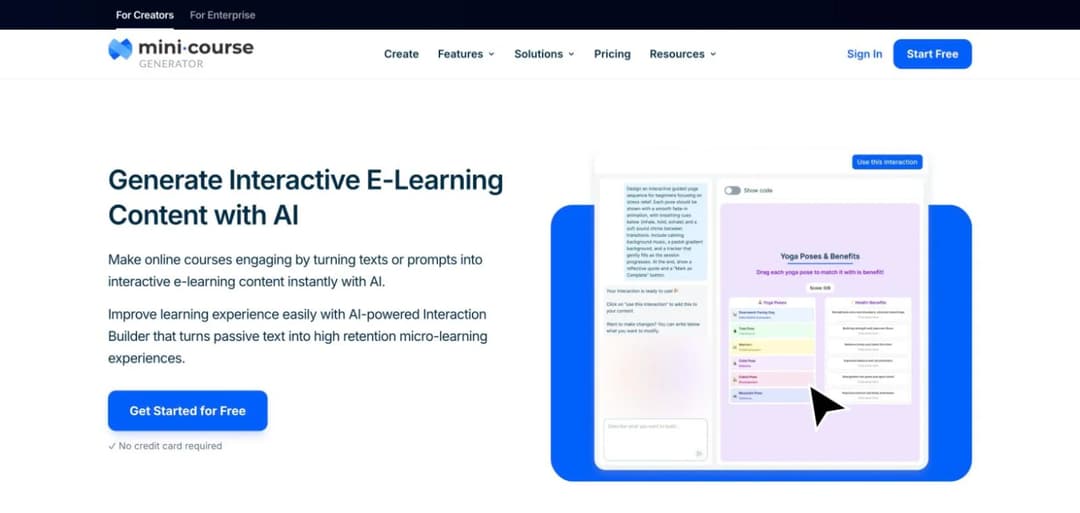
- AI Interaction Builder producing branching scenarios, dialogue simulations, flip cards, hotspot images and interactive quizzes inside a course
- Scenarios sit within a full course rather than as a standalone file
- SCORM export for the whole course
- Agent-authored via a connected assistant, so the scenario is described rather than built
- Published plans on the pricing page, with no per-author authoring licence
Our product, so weigh accordingly. There are two different branching-scenario surfaces here and they should not be blurred, so here is the distinction plainly:
The AI Interaction Builder block is live. It builds a branching scenario as a component inside a Mini Course Generator course. That’s what you get today, and it’s what our AI Interaction Builder page describes.
Pros
- No per-author licence, which changes the economics if you want subject-matter experts contributing rather than one designer building everything
- The scenario lives inside a course with lessons and quizzes around it, rather than as an orphan file somebody has to place
- Agent-authored: describe the situation and branches in conversation, which is Type 3 rather than Type 1
Cons
- The portable standalone Branching Scenarios Skill is not live; today the block lives inside an MCG course, so the SCORM route means exporting the course rather than the single activity
- Nothing approaching Storyline’s pixel-level control, and no interactive video or VR
- No node map view of the sort Twine offers, which experienced scenario designers will miss on complex trees
2. Twine
Top features
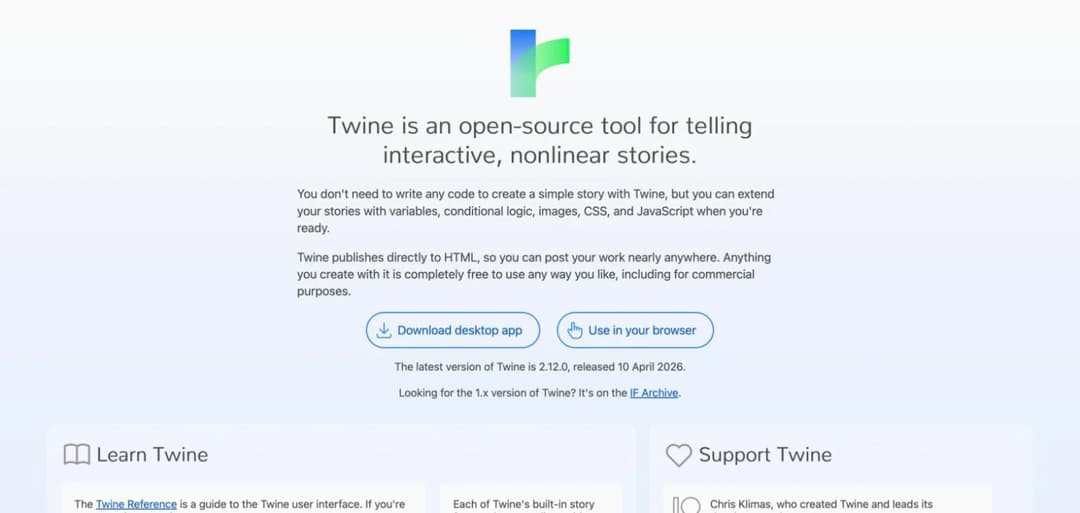
- Free and open source, since 2009
- The best structure view of any tool in this category
- Exports to a self-contained HTML file
- Enormous community and a deep body of published examples
- Runs in a browser or as a desktop application
The practitioner default, and it has survived fifteen years of better-funded competition for one reason: the map. You see the whole tree, drag nodes, and restructure in seconds. Since the first draft of every branching scenario is wrong, the cost of restructuring is the real cost, and Twine wins that decisively.
It’s a hypertext tool rather than an e-learning tool, which is the whole trade.
Pros
- Free, with no seat limit, so twelve people can build simultaneously at zero cost
- The structure view is genuinely the best available, and it’s the thing that matters most in practice
- Output is a standard HTML file with no vendor dependency whatsoever
Cons
- No native SCORM export, so getting results into an LMS requires a wrapper or a workaround
- No built-in scoring or reporting; anything beyond “here’s what happened” is custom work, and getting results into a system of record needs the plumbing covered in our LMS integration guide
- Visual design is basic unless you write CSS, and styling is entirely on you
- No AI features of any kind
3. Articulate Storyline 360
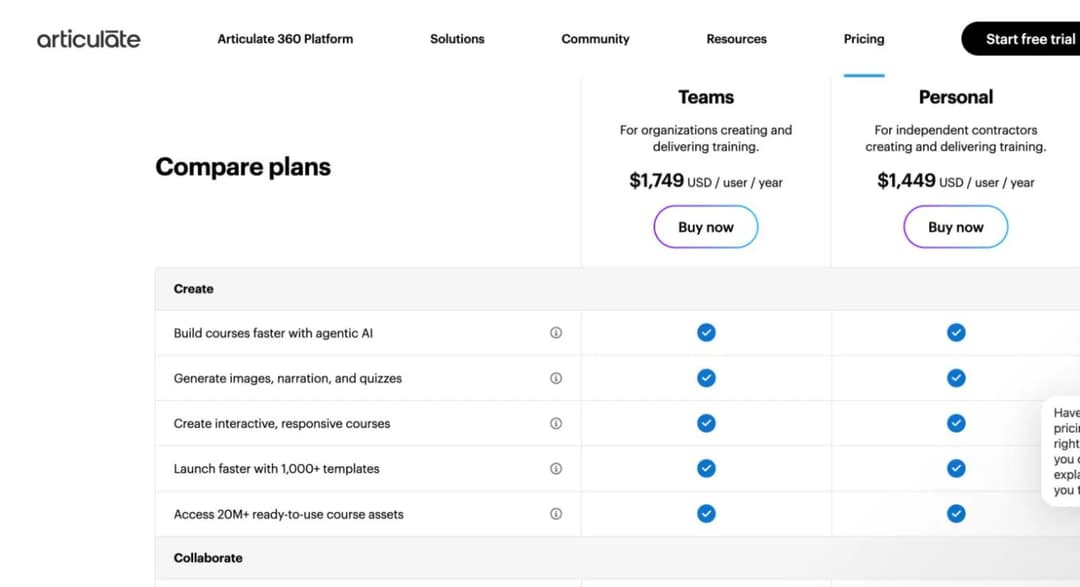
Top features
- Full-featured professional authoring with animation, states, triggers and variables
- Export to SCORM, xAPI, cmi5 and AICC
- 1,000+ templates and a large asset library
- AI generation of images, narration and quizzes
- Included with Rise 360 in the Articulate 360 AI subscription
The industry standard for polished e-learning, and it builds branching scenarios extremely well when you need production quality. Variables and conditional logic let you build things no dedicated scenario tool can.
The published price is the thing to weigh: $1,749 per user per year for Teams, $1,449 for Personal, billed annually. Localization is a separate add-on starting at $5,000 a year, and Reach Pro (their LMS) starts at $3,600 for 1,200 active learners.
Pros
- The most complete export coverage in this roster – SCORM, xAPI, cmi5 and AICC – which removes every LMS-compatibility question
- Variables and conditional logic support genuinely sophisticated branching that simpler tools can’t express
- The largest ecosystem of templates, community knowledge and available freelancers of anything here
Cons
- $1,749 per user per year is the highest published price in this roster, and it’s per author
- Slide-based editing makes the branching structure hard to see and expensive to restructure – the specific weakness Twine exists to solve
- A real learning curve; occasional authors don’t stay fluent in it
- AI features are Type 1, so the structural work is unchanged
4. iSpring Suite
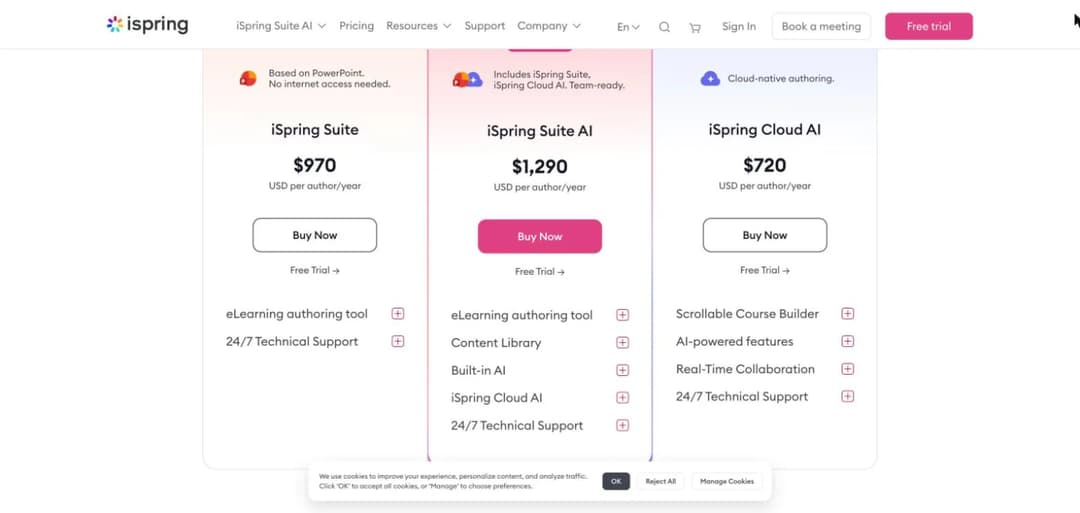
Top features
- Authoring inside PowerPoint, which most subject-matter experts already know
- Dialogue simulation for conversation-based branching
- Published pricing across three tiers
- Character and background libraries for scenario building
- Quiz and assessment tooling included
The pragmatic middle. Building in PowerPoint sounds like a limitation and is often an advantage: your subject-matter experts can contribute without learning a new tool, which is frequently the actual bottleneck.
Published pricing: iSpring Suite $970 per author per year, Suite AI $1,290, Cloud AI $720. Academic and nonprofit pricing on request. Note that the pricing page doesn’t itemise which tier includes the dialogue-simulation capability, so confirm that in writing before buying.
Pros
- Roughly half Articulate’s published price, with meaningful overlap in capability for scenario work
- PowerPoint authoring lowers the barrier for occasional contributors, which matters more than feature depth in many teams
- Three published tiers, so you can see the cost ladder without a sales call
Cons
- The pricing page doesn’t state which tier carries dialogue simulation, which is the feature you’d be buying it for
- PowerPoint-based means slide-based, so the structure-visibility problem is the same as Storyline’s
- Windows-centric heritage; check current platform support if your team is on Mac
5. H5P Branching Scenario
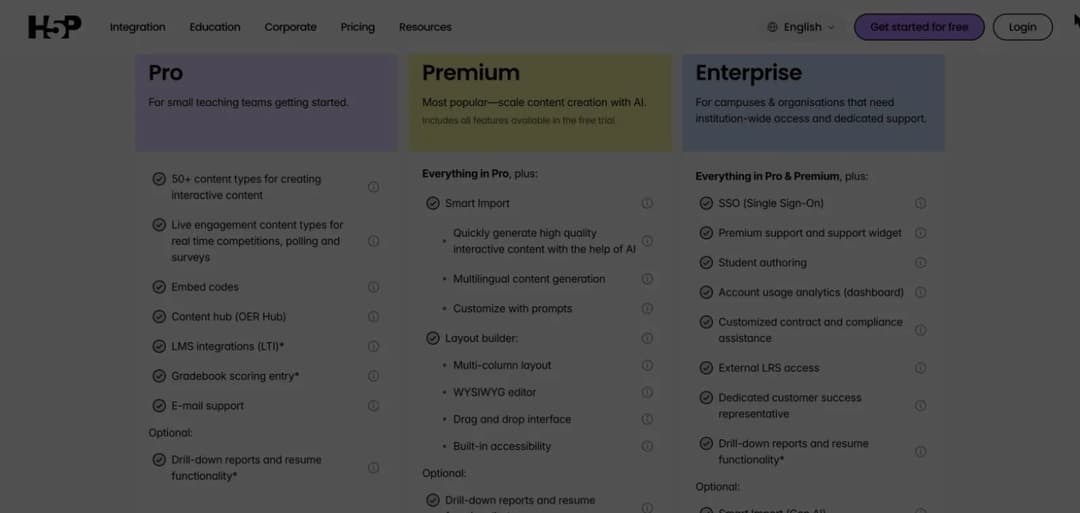
Top features
- Open-source content type with a dedicated branching editor
- Runs inside Moodle, Drupal, WordPress and Canvas via plugins
- Free when self-hosted
- H5P.com hosted plans from $1,560 a year
- 50+ interactive content types beyond branching
The right answer for a lot of academic institutions, because it runs inside the LMS they already have. If you’re on Moodle or Canvas, the H5P plugin makes branching scenarios a native content type rather than an imported file, which removes a whole class of integration friction.
Pros
- Free self-hosted, with a real branching editor rather than a workaround
- Native inside Moodle, Canvas, Drupal and WordPress, so no SCORM packaging step at all
- Open source, so the content isn’t locked to a vendor’s continued existence
Cons
- Self-hosting means you own the maintenance, upgrades and plugin compatibility
- The hosted H5P.com pricing is only published for the Premium tier; Pro and Enterprise require a conversation
- No AI features
- Visual polish is well below Storyline’s
6. BranchTrack
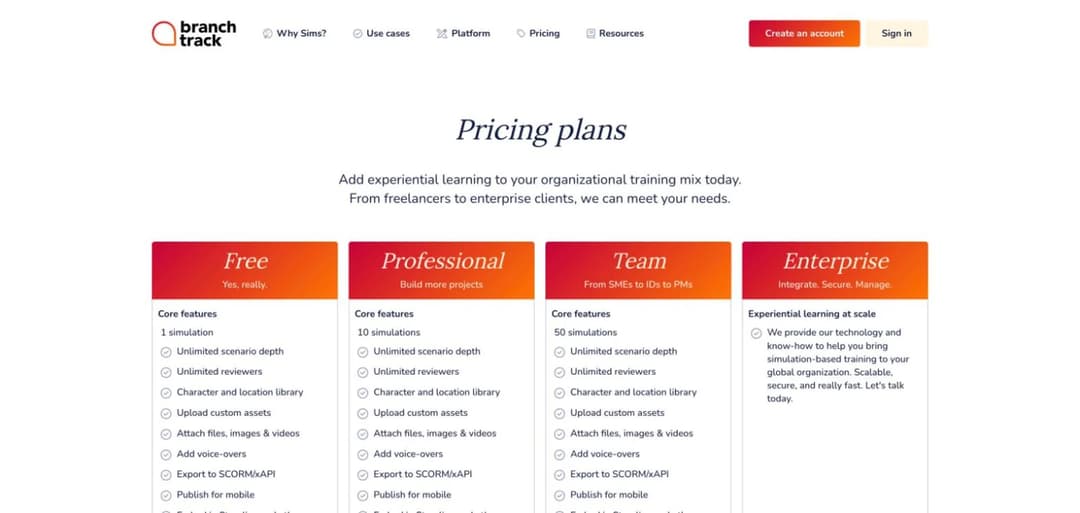
Top features
- Purpose-built scenario platform with no-code browser authoring
- Delivery across self-paced, mobile, classroom, blended and live Zoom or Teams sessions
- Real-time analytics on learner decisions
- Integrates with LMS platforms, Storyline and Captivate
- AI Co-pilot for visuals, automatic narration and translation
- SCORM and xAPI export on every tier, including the free one
- WCAG 2.0 accessibility compliance
The dedicated specialist. Unlike the authoring suites, branching is the product rather than a feature, and it shows in the analytics: decision-level data rather than a completion flag.
The live-session and classroom delivery, including a Live Scoreboard, is unusual and genuinely useful for facilitated training rather than self-paced only.
Pros
- Purpose-built for branching, so the structure and analytics are first-class rather than adapted
- SCORM and xAPI export on the free tier, which no other free option here offers – Twine has no SCORM at all
- A real free plan: one simulation with unlimited scenario depth, custom assets, voice-overs and export, forever
- Published WCAG 2.0 compliance, which almost nobody else in this roster states
- Embeds into Storyline and Captivate, so it can be a component rather than a replacement
Cons
- Priced by number of simulations (1 free, 10 at $83/mo, 50 at $299/mo), so a large library gets expensive in a way per-author pricing doesn’t
- Annual billing only on the paid tiers, with no monthly option to trial a team
- The AI Co-pilot is Type 1, accelerating assets rather than removing the structural work
7. Near-Life
Top features
- Interactive video at the centre of the product
- 360 and VR support for immersive scenarios
- Generative AI for creating characters and placing them into scenes
- Gamification features, plus AI scenario builder, image generator and chatbot on paid tiers
- SCORM-compatible zip export, plus LTI and embed, from the Starter tier
- Zero-coding authoring
The most ambitious media-wise, positioned as going “beyond decision trees”. If your scenarios need to be video-based – and for some safety, clinical and customer-facing training they genuinely do – this is built for that from the ground up.
Pros
- The strongest interactive video and VR capability in this roster by a wide margin
- Publishes full pricing across four tiers, with a free plan and a 14-day trial that needs no credit card
- SCORM, LTI and embed delivery from the Starter tier, so the output reaches an existing LMS
- Generative character creation reduces the production burden that normally makes video scenarios prohibitive
- Discounts published for K-12 education and not-for-profits
Cons
- Video and VR commit you to a production pipeline; every process change means reshooting
- The free tier is capped at 1 project and 100 plays, and Starter allows only 1 project a month, so the cheap tiers are for evaluation rather than production
- VR sits behind the most expensive tier at $249.50 a month
- Overkill for text-based judgement training, which is most corporate use
8, 9 and 10: ChatMapper, Yo Scenario and Google Forms
Three worth knowing about, in less detail.
ChatMapper is a dialogue-tree tool that presents itself as a training-and-simulation product. It comes from a game-dialogue heritage, which shows in the tree-editing model. Check its export options and pricing directly before shortlisting it.
Yo Scenario is a smaller, browser-based branching scenario builder. Same caveat: worth a look, and check export and pricing directly.
Google Forms deserves its place, and not as a joke. Christy Tucker’s comparison includes it as a legitimate option, and the mechanism is simple: section-based navigation with “go to section based on answer” produces a working branching scenario with automatic response collection, for free, in about an hour.
It’s ugly. It has no media, no styling and no SCORM. It’s also the fastest way to prototype a tree before committing to production, and it’s the right answer for a small team with no budget who need the scenario more than they need it to look good.
How to Design One That Actually Works
The part no tool solves, and the part that decides whether the scenario earns its cost. Six steps, in order.
Start from a real failure, not a topic
Not “customer service skills”. A specific moment where people demonstrably get it wrong: the refund request that isn’t quite in policy, the escalation somebody promises a timeline for before checking.
Ask the team what they’d have done differently last month. Their answers are your scenarios, and they arrive with the wrong options already attached.
Write the endings first
Counterintuitive and it saves days.
Decide the three or four places a learner can end up – the good outcome, the recoverable mistake, the expensive one – before writing a single node. Then work backwards to the decisions that separate them.
Working forwards produces trees that sprawl and then converge back to one ending, which is the structural version of the obvious-answer problem.
Make the wrong option tempting
Stated earlier and worth repeating, because it’s the rule most often broken.
Every option should be defensible by somebody. The shortcut that works most of the time. The answer that makes the customer happy now and creates a problem later. The technically-correct response that damages the relationship.
The test: show the options to an experienced person with the endings hidden. If they pick the right one instantly and can’t see why anyone would choose otherwise, rewrite the distractors.
Cap it at five decisions
Three to five decision points, with genuinely different endings. That’s a scenario somebody finishes, and it’s a scenario you’ll maintain.
If the subject genuinely needs more, build two scenarios rather than one large one. They’re independently useful, independently maintainable, and independently retirable.
Score against criteria, not path
A subtle but important distinction. Scoring “did they reach the good ending” rewards luck and punishes a reasonable recovery from an early mistake.
Scoring against criteria – did they establish the facts before proposing, did they acknowledge the impact, did they check the constraint – measures the behaviour you actually want and gives useful feedback to somebody who ended badly for one specific reason.
Test it on somebody who’ll break it
Give it to the person most likely to pick the perverse option at every node. They’ll find the path where the scenario stops making sense, and every branching scenario has one in its first draft.
Maintaining a Scenario After the Process Changes
The cost nobody budgets for, and the reason most branching scenarios are quietly out of date.
Why it’s harder than updating a lesson
A lesson is linear. Change the paragraph, done.
A scenario encodes a process across a graph, and a single policy change can touch nodes on three different paths, including ones most learners never see. The affected nodes aren’t visually grouped, and nothing flags them.
That’s why so many live branching scenarios describe a process that changed eighteen months ago on the paths nobody audits.
Three habits that make it survivable
Keep a source note. Record which policy or document the scenario encodes, in the scenario’s own description. When that document changes, you know what to check.
Prefer fewer, shorter scenarios. A five-decision scenario can be re-read end to end in ten minutes. A thirty-decision one cannot, which is why it never gets audited.
Diff rather than click through. If the tool exposes the scenario as text or structured data, searching for the changed term beats navigating every path. This is one of the underrated advantages of Twine’s HTML output and of agent-authored scenarios, where you can ask which nodes reference the old policy.
The agent-assisted version
Where the scenario was authored by an agent connected to your platform, the maintenance question becomes a question:
“The refund window changed from 14 days to 30. Which nodes in the escalation scenario reference the old window, and what would you change? Show me before publishing.”
Detection is the expensive half, and it’s the half an agent handles well. Keep the publish step human, particularly for anything with a compliance consequence – the same discipline set out in what an agent does after publish.
How to Choose Branching Scenario Software
Four questions, in the order that eliminates fastest.
Does it have to run in an LMS you don’t control?
The constraint that overrides preference.
If yes, you need SCORM or xAPI. Articulate publishes the broadest coverage (SCORM, xAPI, cmi5, AICC), BranchTrack exports SCORM and xAPI on every tier including the free one, and Near-Life adds SCORM and LTI from Starter. Twine, despite being the best editing experience, has none and needs a wrapper.
If the scenario runs on your own platform or inside Moodle or Canvas, H5P removes the packaging step entirely and the constraint disappears.
How many people will build these?
The question that decides the economics, and it’s usually answered too late.
Per-author pricing at $970 to $1,749 a year makes one designer building everything the rational structure – which is also the structure that creates a bottleneck and means scenarios stop being made when that person is busy.
If you want subject-matter experts contributing directly, either use a free tool or one without per-author licensing. This decision shapes your programme more than any feature does.
Text, or media?
Be honest before you choose, because it’s expensive to reverse.
Text-and-image scenarios are fast, cheap and easy to maintain, and they carry most of the learning value for judgement and compliance training. Video and VR are more engaging, considerably more expensive, and go stale the moment the process changes.
Start with text. Add media to the scenarios that demonstrably need it, after they’ve proven they get used.
Which kind of AI do you actually want?
Back to the three types, applied.
If you want faster asset production inside a tool you already own, Type 1 is what you’re buying, and Articulate, BranchTrack and Near-Life all offer it.
If you want the writing done and you’ll build it yourself, you don’t need to buy anything – Type 2 is a general assistant and a tool you already have.
If you want the finished scored activity without the assembly, that’s Type 3, and it’s a different product shape entirely – the agent reaches your platform through an MCP server rather than an editor. The trade is control, and the Skills versus MCP comparison covers where each route makes sense.
Now Over to You
Branching scenario software is a category where practitioners still point each other to a forum thread and the tooling spans free hypertext editors to $1,749-per-seat suites. That’s not a mature market, and it means the right choice depends more on your constraints than on any ranked list.
Three constraints decide it. Export, if the scenario has to run in an LMS you don’t control. Author count, because per-author pricing determines whether subject-matter experts can contribute. Media, because video commits you to a production pipeline that text doesn’t.
If you have none of those constraints, use Twine. It’s free, its structure view is the best available, and fifteen years of practitioners haven’t found a reason to leave it.
And whatever you choose, spend your attention on the design rather than the tool. A tree where one option is obviously right is a reading test in expensive clothing, and no software fixes that. Make the wrong option tempting, keep it to three to five decisions, and score it.
If the scenario should sit inside a course rather than as a standalone file, that’s what the AI interaction builder is for – and if you want the portable standalone version, it’s on our roadmap rather than in your hands today.
Frequently Asked Questions
What is the best branching scenario software?
It depends on three constraints. Twine is free with the best structure editing, and has no SCORM export. Articulate Storyline 360 at $1,749 per user per year has the broadest export coverage. H5P is free and runs natively inside Moodle and Canvas. BranchTrack is the dedicated specialist with decision-level analytics.
How much does branching scenario software cost?
The published figures: Articulate 360 AI is $1,749 per user per year for Teams and $1,449 for Personal; iSpring Suite runs $970 to $1,290 per author per year; H5P.com Premium starts at $1,560 a year. The dedicated scenario tools are far cheaper – BranchTrack from $83 a month and Near-Life from $54.50 a month, both with free tiers. Twine and Google Forms are free.
Can AI build a branching scenario?
Three different things are sold as this. AI inside an editor generates images and narration while you still build the tree. A general assistant can write the scenario text for you to assemble. An agent can produce the finished, scored activity directly. Only the third removes the assembly work.
What is a branching scenario in H5P?
A free, open-source content type with its own tree editor that runs inside Moodle, Canvas, Drupal or WordPress via the H5P plugin. Because it’s native to those platforms, there’s no SCORM packaging step – which is why it’s the common answer in academic settings.
How long does a branching scenario take to build?
With traditional tools, a five-decision scenario is typically a few days: design, writing, building and testing every path. Most of that is structural work rather than writing. Agent-authored scenarios compress it to an afternoon, trading pixel-level control for speed.
Why do branching scenarios fail?
Usually one of three design problems: one option is obviously correct, so it becomes a reading test; the scope is thirty decisions when five would do; or there’s no score, so it produces an experience rather than evidence. None of these are tool problems and none are fixed by better software.
Do I need SCORM for a branching scenario?
Only if it has to run in an LMS you don’t control. If it lives on your own platform, or inside Moodle or Canvas via H5P, SCORM is unnecessary overhead. If it has to cross into a corporate LMS, export support becomes the first question you ask any vendor.