How MCG’s New Badges & Rewards Help You Build Course Paths Learners Actually Finish
Most course creators ship a bundle of lessons and hope learners stick around. They don’t. The average online course completion rate sits at around 25 percent, which means three out of every four students drop off before they reach the end.
Mini Course Generator’s new Badges & Rewards feature is built to fix exactly that problem. It turns any mini course collection into a guided, gamified learning journey, where every course in the path earns a badge, every state of progress is visible to the learner, and a final reward unlocks once the path is complete. Creators, trainers, and L&D teams can now use it on any collection without writing a single line of code, without a separate gamification plugin, and without leaving the MCG editor.
This post explains what Badges & Rewards is, why standard LMS badge systems fail to drive completion, how MCG’s approach is different, and how you can set it up on your own collection in around five minutes.
Why Standard LMS Badge Systems Don’t Drive Completion
Most learning platforms ship some kind of badge feature. Moodle has Open Badges, Canvas has its Credentials integration, and LearnDash supports badges through plugins like BadgeOS. The problem is that almost none of them actually move the needle on completion. Why?
Because in those systems, the badge is the end, not the journey. A learner finishes a course, a badge gets quietly deposited on their profile page, and that’s it. There’s no public path. There’s no visual milestone. There’s no final payoff that makes the next step feel worth the effort. Recognition that is hidden behind a learner profile does not change behavior.
The data on what does work is unambiguous. Recognition mechanisms like badges, leaderboards, and milestone rewards are 100 to 150 percent more effective than traditional, hidden recognition methods at driving learner engagement. And online courses that include gamification elements, when they are actually visible and structured, see completion rates jump from around 25 percent to roughly 90 percent, according to research compiled by Learnybox citing Global Growth Insights data from 2025.
Sagar Goel, Managing Director at Boston Consulting Group, makes a related point in a TalentLMS interview: in the current climate, traditional training is no longer built for how employees actually learn. Learners need a structured roadmap with visible milestones, not an endless list of lessons.
“Recognition is what changes behavior. A badge that nobody sees changes nothing.”
A summary of the gamification research consensus, 2025 and 2026
What MCG’s Badges & Rewards Does Differently
The Badges & Rewards feature in Mini Course Generator was designed around one principle: the journey has to be visible from the moment a learner lands on the page, not after they finish. Instead of a hidden achievement on a profile, every badge in your collection sits in a public block called Path to Success, right on the collection’s landing page.
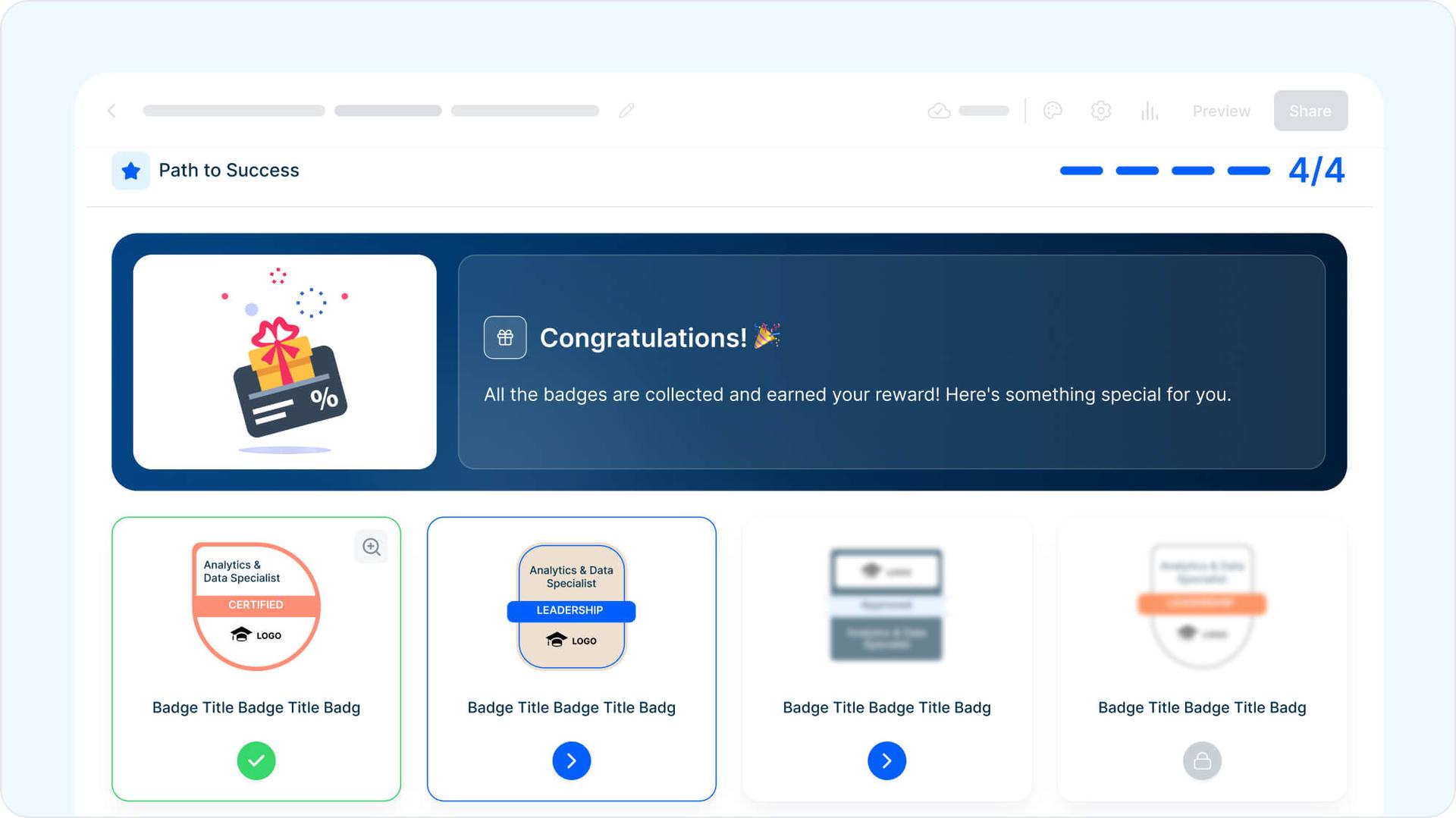
When a learner first opens that page, every badge in the path is blurred and locked. As they finish each mini course, the matching badge fills in with color and a state icon. When the last badge clicks into place, a reward block opens up at the top of the path with whatever you chose to give them: a discount code, a downloadable certificate, a private link, or a custom thank-you message.
So the path is not just a list of courses. It is a single visual journey with a clear starting point, visible progress at every step, and a tangible payoff at the end.
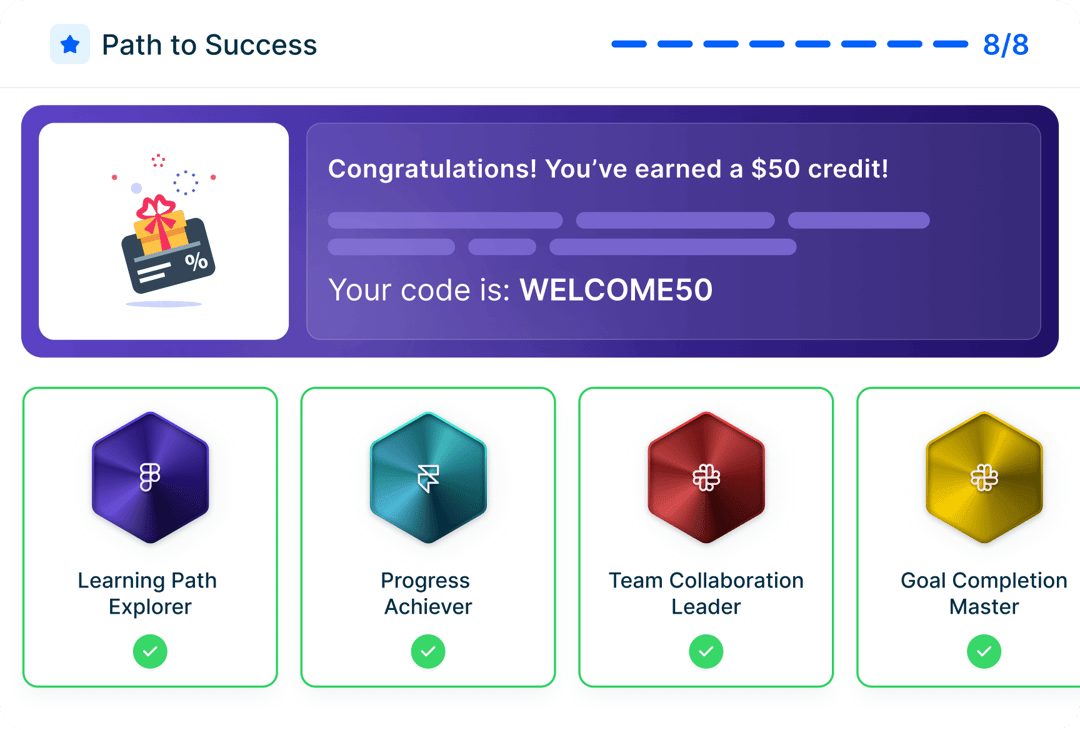
The Path to Success block on a live MCG collection page, where every badge is visible from the start.
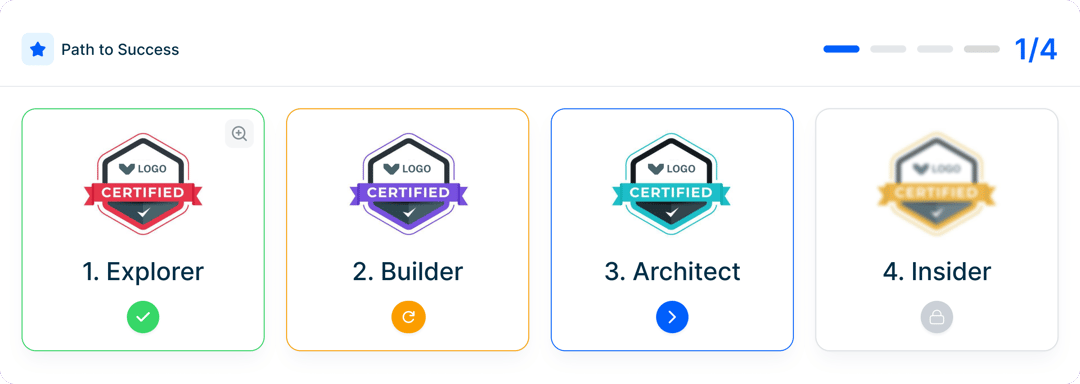
A closer look at the same row, where each badge clearly signals where the learner stands: earned, retake, in progress, or not started.
How Badges & Rewards Works in MCG
The system is built from three connected pieces. You configure each piece in a different place in MCG, and once they’re set up, they work together automatically every time a learner moves through the path.
01
Badge per Course
02
Path in Collection
03
Final Reward
1. A badge attached to each mini course
Inside any mini course editor, the Completion tab now has an “Issue Badge” option. You pick a built-in design (Initiate, Builder, Innovator, Master) or upload your own brand image. Optionally, you set a passing score so the badge only counts when a learner actually demonstrates they have learned the material, and anything below the threshold sends the badge into a Retake state instead of awarding it.
2. A path inside the collection
You group your badged mini courses into a collection in the order you want learners to take them. If sequence matters, you turn on “Proceed in order” and the rest of the path stays locked behind a padlock until the previous badge is earned. If it doesn’t matter, you leave it off and learners pick their own route through the badges.
3. A reward that unlocks at the end
In the collection editor, you switch on Completion Reward and add what you want to give once every badge is earned. A discount code, a download link, a certificate, or a custom message all work. You can also include a QR code if the actual reward lives somewhere else.
The Six Badge States Every Learner Sees
One of the reasons hidden badge systems fail is that learners can’t tell where they are. They open a course list, see a wall of titles, and have no idea which they’ve finished, which they’ve started, or what’s next. The Path to Success block solves this by giving every badge a clear visual state. Color, border, and icon all change at every step.
- Not started: the next available badge, with a blue arrow icon inviting the click
- Locked: waiting in line behind a padlock, only when “Proceed in order” is on
- In progress: blue border and arrow, the course has been opened but not finished
- Earned: green border and check, course complete and counted toward the reward
- Retake: orange border and refresh icon, score below the passing threshold
- Completed: every badge green, reward block opens at the top of the path
The result is that a learner can scan the row in two seconds and know exactly where they stand: how much they’ve done, what’s next, and what’s left between them and the final reward.
How MCG’s Approach Compares to Other LMS Platforms
Most platforms have some kind of badge feature. Far fewer ship the full path-and-reward unlock as one connected experience visible on a public landing page. The table below maps out the differences across four of the most common platforms used in the LMS and course-creator space in 2026.
| Tool | Native Badge System | Custom Badge Designs | Score-Based Auto-Award | Final Reward Unlock | Public Path Page | Best For |
|---|---|---|---|---|---|---|
| Mini Course Generator | Yes, built-in | Upload or pick presets | Yes, passing score per course | Yes, on collection completion | Yes, Path to Success block | Quick, gamified mini course paths with end rewards |
| Moodle | Open Badges support | Manual upload, limited editor | Yes, via course completion rules | No, plugin needed | No public path block | Open-source academic LMS deployments |
| Canvas | Via Canvas Credentials integration | Through integration | Yes, with assessment criteria | Not native | Not native | Higher-ed and large institutions |
| LearnDash | Via add-on (BadgeOS, GamiPress) | Via add-on | Via quiz scores in plugin | Achievable with multiple plugins | Custom WordPress build | WordPress-based course sites |
← Swipe to see all columns →
The pattern is consistent: most platforms hand you the raw materials (badges, completion rules, integrations) but leave the actual journey-design work to you, often through stacked plugins or third-party services. MCG ships the journey itself as a single feature.
Who Should Use Badges & Rewards
The reward at the end is what shifts the behavior. Different audiences respond to different rewards, but the structure works for any of these.
🎨 Course Creators
🚀 Onboarding Trainers
📚 L&D Teams
🏫 Educators
Course creators selling bundles
Use the reward as a discount code on your next product, an exclusive template pack, or early access to your next course. Learners feel like they earned the deal, which makes it convert better than a discount in a generic email.
Trainers running new-hire onboarding
Set a completion certificate as the reward and let new hires download it once every onboarding module is checked off. The certificate makes the path feel official, and the visible badges create natural touchpoints for managers to check in on progress.
L&D teams running certification tracks
Gate access to the next learning track behind the reward. Earning the path unlocks the next set of modules, a manager sign-off link, or membership in an internal “completers” group. This is especially powerful when paired with role-based learning paths, and there is hard data behind it: SAP’s AI-driven gamification module boosted course completion by 48 percent within 60 days of rollout, and L&D participation rose by 36 percent in the same window.
Educators building structured learning
Use level-style badges like Initiate, Builder, Innovator, and Master to mark difficulty. The reward can be a special resource, a featured spot on a public recognition page, or access to a private Q&A session.
Why This Matters for Course Completion
The data on visible, structured gamification is consistent across multiple sources. When recognition is built into the journey rather than hidden behind a profile, completion goes up, retention goes up, and the time learners spend actually engaged with the material goes up too.
90%
Completion rate for courses with gamification, vs. 25% for traditional formats
+45%
Knowledge retention boost in gamified training environments
+48%
Course completion lift reported by SAP within 60 days of rollout
Sources: Learnybox citing Global Growth Insights 2025; AmplifAI 2026 gamification statistics.
How to Set Up Badges & Rewards in 5 Minutes
Six steps, around five minutes. You can do it on a course you already have, or on a brand new one.
-
1
Open the course editor
Go to your MCG dashboard and open the mini course you want to add a badge to. The course can be brand new or already shared with learners, and every change goes live the moment you save it.
-
2
Click the Completion tab
In the course editor’s top tab menu, click Completion. Configure the badge using the Issue Badge option. Each course can have one badge.
-
3
Pick a badge design or upload your own
Choose from built-in styles like Initiate, Builder, Innovator, and Master, or upload your own image so the badge matches your brand.
-
4
Set a passing score (optional)
If you want learners to qualify by performance, set a minimum score. If they don’t hit it, the badge stays in Retake state and they need to redo the course before it counts.
-
5
Add the course to a collection
Open the collection, add the Rewards & Badges block from the Index menu, then add the courses in the order you want learners to take them. If sequence matters, turn on “Proceed in order”.
-
6
Turn on Completion Reward and share the link
In the collection editor, toggle Completion Reward on, add the reward content, then hit save. The collection landing page is already public and live, so you can copy the link and share it with your learners right away.
Common Questions About Badges & Rewards
If something is missing here, the in-app help center covers the rest.
How is Badges & Rewards different from other LMS badge systems?
Most LMS badges sit as isolated trophies on a learner profile after a course is finished. With MCG, every badge is part of a single Path to Success block on the public collection landing page, and a final reward unlocks only when every badge is earned. Learners see the journey, the milestones, and the payoff in one view from the moment they land on the page.
Can learners take the courses in any order?
That is up to the creator. In the collection settings, turn on “Proceed in order” for a strict sequence, or leave it off so learners can start with whichever badge they want. With “Proceed in order” on, the rest of the path stays locked behind a padlock until the current badge is earned.
What can the final reward be?
Anything you can deliver with a code, a link, or a downloadable file. Most creators use a discount code for their next product, a downloadable certificate, a private resource link, or a custom thank-you message. You can also include a QR code if the actual reward lives on another platform.
What happens if a learner does not pass the course?
If a passing score is set and the learner does not hit it, the badge stays in Retake state with an orange refresh icon. They keep access to the course but need to retake it and pass before the badge counts toward the final reward.
Do I have to use my own badge designs?
No. MCG ships with ready-made badge designs you can pick from, including level-style badges like Initiate, Builder, Innovator, and Master. If you want the badges to match your brand, you can also upload your own image at any time.
Does this work with the MCG free plan?
Badges & Rewards is available across MCG plans, including the free plan, with full access to the badge editor, Path to Success block, and Completion Reward. Plan-specific limits and any pro-only badge designs are listed on the pricing page.
Give Your Learners a Finish Line They Can Actually See
Most course creators don’t have a completion problem because the content is bad. They have a completion problem because the journey is invisible. Badges & Rewards fixes that by turning a flat list of mini courses into a gamified path with a clear payoff at the end.
The setup takes about five minutes, the path lives on the public landing page, and the reward unlock is built in. No plugins, no extra services, no instructional design experience required.
Add Badges & Rewards to any collection and turn a list of courses into a learning journey worth completing. Try it in MCG and start your first gamified path for free.